
- Posts: 575
- Thank you received: 11
Product listing in 2 colums on mobile/reponsive view
- ler@singmuiheng.com
-
 Topic Author
- Offline
Less
More
9 years 7 months ago #264503
by ler@singmuiheng.com
-- HikaShop version -- : 3.0.1
-- Joomla version -- : 3.6.1
-- PHP version -- : 5.6
Is there this function ready for hikashop 3 since all the mainstream shopping system are having 2 column product in mobile?
-- Joomla version -- : 3.6.1
-- PHP version -- : 5.6
Is there this function ready for hikashop 3 since all the mainstream shopping system are having 2 column product in mobile?
Please Log in or Create an account to join the conversation.

9 years 7 months ago #264509
by nicolas
Replied by nicolas on topic Product listing in 2 colums on mobile/reponsive view
Hi,
2 columns ? Not 1 ?
Usually you want the grid systems to switch to 1 column on mobile phones so that the products display properly on any smartphone.
So I'm not sure what you're talking about ?
2 columns ? Not 1 ?
Usually you want the grid systems to switch to 1 column on mobile phones so that the products display properly on any smartphone.
So I'm not sure what you're talking about ?
Please Log in or Create an account to join the conversation.
- ler@singmuiheng.com
-
Topic Author
- Offline
Less
More
- Posts: 575
- Thank you received: 11
9 years 7 months ago - 9 years 6 months ago #264613
by ler@singmuiheng.com
Replied by ler@singmuiheng.com on topic Product listing in 2 colums on mobile/reponsive view
Dear Nicolas
Yes, it should have 2 columns option as default and 1 columns as optional(some industry may need 1 columns to display more detail), i believe this display issue was bring up some times ago
While all the most popular shopping system such as
amazon, lazada, taobao are displaying 2 columns of products on their mobile view, end users had get used to have 2 columns of products and find that 1 columns is weird
refer to some old post :
www.hikashop.com/forum/install-update/87...ts-side-by-side.html
www.hikashop.com/forum/product-category-...ponsive-display.html
Yes, it should have 2 columns option as default and 1 columns as optional(some industry may need 1 columns to display more detail), i believe this display issue was bring up some times ago
While all the most popular shopping system such as
amazon, lazada, taobao are displaying 2 columns of products on their mobile view, end users had get used to have 2 columns of products and find that 1 columns is weird
refer to some old post :
www.hikashop.com/forum/install-update/87...ts-side-by-side.html
www.hikashop.com/forum/product-category-...ponsive-display.html
Last edit: 9 years 6 months ago by Jerome. Reason: removing useless quote
Please Log in or Create an account to join the conversation.
9 years 7 months ago #264645
by nicolas
Replied by nicolas on topic Product listing in 2 colums on mobile/reponsive view
Hi,
The first link is indeed talking about reducing to two columns instead of one and we provided a CSS modification for that.
The second link however is not talking about that. It's talking about swapping from X columns to 3 then, to 2 then to 1 based on the width available on the page.
We cannot have 2 columns by default in the CSS as on most websites/browsers, it wouldn't display properly. That's because HikaShop doesn't have the control of the template display like amazon has on its own website. So we do by default the next best thing. Also, most merchants do want to switch to 1 column display on smartphones. And if you want to have 2 columns instead of 1 it's easy with a bit of CSS.
And regarding changing dinamically the number of elements per row it also not possible by default as we don't know how the template will display and thus we don't know at which point the break points should happen. But again, that can also be done with some simple CSS.
The first link is indeed talking about reducing to two columns instead of one and we provided a CSS modification for that.
The second link however is not talking about that. It's talking about swapping from X columns to 3 then, to 2 then to 1 based on the width available on the page.
We cannot have 2 columns by default in the CSS as on most websites/browsers, it wouldn't display properly. That's because HikaShop doesn't have the control of the template display like amazon has on its own website. So we do by default the next best thing. Also, most merchants do want to switch to 1 column display on smartphones. And if you want to have 2 columns instead of 1 it's easy with a bit of CSS.
And regarding changing dinamically the number of elements per row it also not possible by default as we don't know how the template will display and thus we don't know at which point the break points should happen. But again, that can also be done with some simple CSS.
Please Log in or Create an account to join the conversation.
- ler@singmuiheng.com
-
Topic Author
- Offline
Less
More
- Posts: 575
- Thank you received: 11
7 years 7 months ago #304829
by ler@singmuiheng.com
Replied by ler@singmuiheng.com on topic Product listing in 2 colums on mobile/reponsive view
Dear Nicholas
A catch back for this issue
Is there any option for mobile 2 column display in the latest version?
A catch back for this issue
Is there any option for mobile 2 column display in the latest version?
Please Log in or Create an account to join the conversation.
7 years 7 months ago #304830
by nicolas
Replied by nicolas on topic Product listing in 2 colums on mobile/reponsive view
Hi,
There is no option, but as I said in my previous message, it's easy to do with just a bit of CSS and it would be hard to do by default as we don't know how your template is made and how your configured your joomla modules which means that when switching from X columns to 2 and then whenswitching from 2 to 1 (for really small resolutions) will change from one website to another.
There is no option, but as I said in my previous message, it's easy to do with just a bit of CSS and it would be hard to do by default as we don't know how your template is made and how your configured your joomla modules which means that when switching from X columns to 2 and then whenswitching from 2 to 1 (for really small resolutions) will change from one website to another.
Please Log in or Create an account to join the conversation.
6 years 4 months ago #321118
by fhmanas
Replied by fhmanas on topic Product listing in 2 colums on mobile/reponsive view
Hello, nicolas, I know this is an old thread and most probably nothing has changed since the last request. I also would like to have a column display on mobile, maybe you can point us at the right direction on which css class we have to adjust to achieve the 2-column display.
Please Log in or Create an account to join the conversation.

6 years 4 months ago - 6 years 4 months ago #321126
by Philip
Replied by Philip on topic Product listing in 2 colums on mobile/reponsive view
Hello,
Of course, we can guide you in order to adapt and custom your HikaShop.
First, have a look on this tutorial to see how to add custom css, and take a look at this W3school documentation about @media.
To summarize the principle of this @media command, it's a condition that define on which kind of media your css command will be apply, example :
=> Here, only on screen 600 pixel wide screen, the background color will be "lightblue".
From this, with your mouse point your html element, and right-click and select inspector tool (or inspect), the point here is to find class or id html elements.
With this define your selector like this :
The use of ".page_html_class" is to be sure that your custom css code will be applied only where you need it.
Hope this will help you to achieved what your need.
Regards
Of course, we can guide you in order to adapt and custom your HikaShop.
First, have a look on this tutorial to see how to add custom css, and take a look at this W3school documentation about @media.
To summarize the principle of this @media command, it's a condition that define on which kind of media your css command will be apply, example :
Code:
@media only screen and (max-width: 600px) {
body {
background-color: lightblue;
}
}
From this, with your mouse point your html element, and right-click and select inspector tool (or inspect), the point here is to find class or id html elements.
With this define your selector like this :
Code:
@media only screen and (max-width: 600px) {
.page_html_class .element_html_class {
width : 50%
}
}
The use of ".page_html_class" is to be sure that your custom css code will be applied only where you need it.
Hope this will help you to achieved what your need.
Regards
Last edit: 6 years 4 months ago by Philip.
Please Log in or Create an account to join the conversation.
Less
More
- Posts: 52
- Thank you received: 4
5 years 7 months ago #330992
by knuffiwuffi
Replied by knuffiwuffi on topic Product listing in 2 colums on mobile/reponsive view
Hello,
I have created a carousel module.
When I set 2 products to show (only mobile 375px and above), mobile will still show one product.
Hardcoded?
What I have also noticed with carousel:
I have 6 sample products.
My module has carousel enabled with 5 products.
module > hikashop options > DIV/Grid > Columns 5 / Rows 1
This will show only 5 products, not 6.
If I want to see more products, I have to adjust the Columns/Rows.
module > hikashop options > DIV/Grid > Columns 5 / Rows 2 or more
Is this intended in order to limit the amount of products loaded with carousel?
In this case, carousel would always have a limit with products (probably a good idea).
I have created a carousel module.
When I set 2 products to show (only mobile 375px and above), mobile will still show one product.
Hardcoded?
What I have also noticed with carousel:
I have 6 sample products.
My module has carousel enabled with 5 products.
module > hikashop options > DIV/Grid > Columns 5 / Rows 1
This will show only 5 products, not 6.
If I want to see more products, I have to adjust the Columns/Rows.
module > hikashop options > DIV/Grid > Columns 5 / Rows 2 or more
Is this intended in order to limit the amount of products loaded with carousel?
In this case, carousel would always have a limit with products (probably a good idea).
Please Log in or Create an account to join the conversation.
Less
More
- Posts: 52
- Thank you received: 4
5 years 7 months ago - 5 years 7 months ago #331000
by knuffiwuffi
Replied by knuffiwuffi on topic Product listing in 2 colums on mobile/reponsive view
product listing module > carousel enabled > viewport 375px mobile
Trying to show 2 products with each slide, since hikashop will default to 1 product (column) with mobile-porttrait.
Somehow the stage is not working correct with my css approach.
product image mobile
width: 150px
height: 210px
I believe I have to set the transition correct, too.
Trying to show 2 products with each slide, since hikashop will default to 1 product (column) with mobile-porttrait.
Somehow the stage is not working correct with my css approach.
product image mobile
width: 150px
height: 210px
Code:
/* hikashop - carousel product listing - mobile */
div.owl-item {
width: 150px !important;
}
div.owl-stage {
width: ?px !important;
}
I believe I have to set the transition correct, too.
Last edit: 5 years 7 months ago by knuffiwuffi.
Please Log in or Create an account to join the conversation.
5 years 7 months ago - 5 years 7 months ago #331023
by Philip
Replied by Philip on topic Product listing in 2 colums on mobile/reponsive view
Hello,
In order to guide can you provide an Url link to your carousel, this will allow us to see the context and be more specific in our advice.
I guess we can achieved what you need trough some css command with the "@media" command ( see documentation about the @media ).
For answer the other part of your question, yes use the second row in order to figure the next "group" is coded like this on purpose.
Awaiting your returns in order to progress on your subject.
Regards
In order to guide can you provide an Url link to your carousel, this will allow us to see the context and be more specific in our advice.
I guess we can achieved what you need trough some css command with the "@media" command ( see documentation about the @media ).
For answer the other part of your question, yes use the second row in order to figure the next "group" is coded like this on purpose.
Awaiting your returns in order to progress on your subject.
Regards
Last edit: 5 years 7 months ago by Philip.
Please Log in or Create an account to join the conversation.
Less
More
- Posts: 52
- Thank you received: 4
5 years 7 months ago #331091
by knuffiwuffi
Replied by knuffiwuffi on topic Product listing in 2 colums on mobile/reponsive view
Hello,
I have sent access to your support.
I have sent access to your support.
Please Log in or Create an account to join the conversation.
5 years 7 months ago #331110
by Philip
Replied by Philip on topic Product listing in 2 colums on mobile/reponsive view
Hello,
We have received your elements but unfortunately we will need the backend access, and your provided references don't work, can you double check it please, and provide valid backend access (via our Contact us form WITH in your message an url link to this topic please) in order to see your carousel configuration please ?
Awaiting your new elements to be able to help you.
Regards
We have received your elements but unfortunately we will need the backend access, and your provided references don't work, can you double check it please, and provide valid backend access (via our Contact us form WITH in your message an url link to this topic please) in order to see your carousel configuration please ?
Awaiting your new elements to be able to help you.
Regards
Please Log in or Create an account to join the conversation.
Less
More
- Posts: 52
- Thank you received: 4
5 years 7 months ago #331124
by knuffiwuffi
Replied by knuffiwuffi on topic Product listing in 2 colums on mobile/reponsive view
Sorry.
Just noticed that the admin account I have sent to you wasn't activated.
Please try again with the login details I have already sent to you.
Just noticed that the admin account I have sent to you wasn't activated.
Please try again with the login details I have already sent to you.
Please Log in or Create an account to join the conversation.
5 years 7 months ago #331134
by Philip
Replied by Philip on topic Product listing in 2 colums on mobile/reponsive view
Hello,
Really sorry for this return, but we still cannot access your website back end.
Can you process yourself a test of your provided references, please ?
Once again sorry for this return.
Regards
Really sorry for this return, but we still cannot access your website back end.
Can you process yourself a test of your provided references, please ?
Once again sorry for this return.
Regards
Please Log in or Create an account to join the conversation.
Less
More
- Posts: 52
- Thank you received: 4
5 years 7 months ago #331160
by knuffiwuffi
Replied by knuffiwuffi on topic Product listing in 2 colums on mobile/reponsive view
yep, i did not check the access level of user.
stupid me.
stupid me.
Please Log in or Create an account to join the conversation.
5 years 7 months ago - 5 years 7 months ago #331178
by Philip
Replied by Philip on topic Product listing in 2 colums on mobile/reponsive view
Hello,
Thanks for your elements, this allow us to see your configuration and better understand what is the best solution for you.
In your case the best solution is to hard coded directly the HikaShop core file to modify parameters specially for mobile view, follow me step by step :
1. Go to YourWebsite\components\com_hikashop\views\product\tmpl folder
2. Open the carousel.php file
3. Go around the line 70, and look for "$slideByFor2 = $this->params->get('one_by_one') ? 1 : 2;"
4. You will see this :
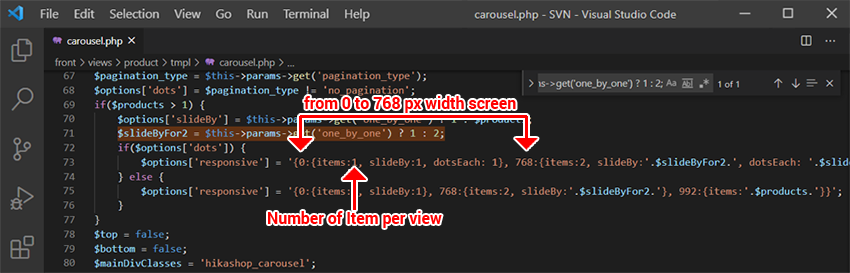
=> Modify item parameter from "items:1" to "items:2", to get 2 item per view on screen from 0 pixel width to 768 px.
AND in the same idea, if you want per move to slide more than 1 item "per move", modify "slideBy:1" to "slideBy:2".
Hope this will fit your needs.
Regards
Thanks for your elements, this allow us to see your configuration and better understand what is the best solution for you.
In your case the best solution is to hard coded directly the HikaShop core file to modify parameters specially for mobile view, follow me step by step :
1. Go to YourWebsite\components\com_hikashop\views\product\tmpl folder
2. Open the carousel.php file
3. Go around the line 70, and look for "$slideByFor2 = $this->params->get('one_by_one') ? 1 : 2;"
4. You will see this :
=> Modify item parameter from "items:1" to "items:2", to get 2 item per view on screen from 0 pixel width to 768 px.
AND in the same idea, if you want per move to slide more than 1 item "per move", modify "slideBy:1" to "slideBy:2".
Hope this will fit your needs.
Regards
Last edit: 5 years 7 months ago by Philip.
The following user(s) said Thank You: knuffiwuffi
Please Log in or Create an account to join the conversation.
Less
More
- Posts: 52
- Thank you received: 4
5 years 7 months ago #331191
by knuffiwuffi
Replied by knuffiwuffi on topic Product listing in 2 colums on mobile/reponsive view
Thank you indeed. I will try.
Is there a way to savely overwrite the core file or do I need to modify with each update?
Have you thought about enabling the column value with module in mobile view, so the product listing will actually respond to the number of columns set with module? Default could still be 1.
Nice to see, that there is always a way to do it with hikashop.
Flexibility is what I am most interested in.
Is there a way to savely overwrite the core file or do I need to modify with each update?
Have you thought about enabling the column value with module in mobile view, so the product listing will actually respond to the number of columns set with module? Default could still be 1.
Nice to see, that there is always a way to do it with hikashop.
Flexibility is what I am most interested in.
Please Log in or Create an account to join the conversation.
5 years 7 months ago - 5 years 7 months ago #331199
by Philip
Replied by Philip on topic Product listing in 2 colums on mobile/reponsive view
Hello,
Sorry I make a mistake, I realize with your question that you can use the override view ( documentation ), I make again my explanation :
1. From Main HikaShop Configuration => Display dropdown select Views
2. Use 3 dropdown filter with Product/YourTemplate/Front end
3. Find your view Product/Carrousel
4. Then repeat previously describe code modifications in this message .
From this, as you use the override system, even while update your modification will be kept in your custom view folder.
Once again sorry for my previous message.
And we aren't sure to understand your question when you said this :
"Have you thought about enabling the column value with module in mobile view, so the product listing will actually respond to the number of columns set with module? Default could still be 1."
=> Can you detail through a concrete case your idea in this sentence, please ?
Regards
Sorry I make a mistake, I realize with your question that you can use the override view ( documentation ), I make again my explanation :
1. From Main HikaShop Configuration => Display dropdown select Views
2. Use 3 dropdown filter with Product/YourTemplate/Front end
3. Find your view Product/Carrousel
4. Then repeat previously describe code modifications in this message .
From this, as you use the override system, even while update your modification will be kept in your custom view folder.
Once again sorry for my previous message.
And we aren't sure to understand your question when you said this :
"Have you thought about enabling the column value with module in mobile view, so the product listing will actually respond to the number of columns set with module? Default could still be 1."
=> Can you detail through a concrete case your idea in this sentence, please ?
Regards
Last edit: 5 years 7 months ago by Philip.
Please Log in or Create an account to join the conversation.
Less
More
- Posts: 52
- Thank you received: 4
5 years 7 months ago #331209
by knuffiwuffi
Replied by knuffiwuffi on topic Product listing in 2 colums on mobile/reponsive view
Perfect. Thank you very much.
Having 2 cards aside will show more products with mobile.
This will work for carousel enabled.
Is there another file I need to edit for a module with carousel disabled?
I guess changes will be gone with update?
Having 2 cards aside will show more products with mobile.
This will work for carousel enabled.
Is there another file I need to edit for a module with carousel disabled?
I guess changes will be gone with update?
Please Log in or Create an account to join the conversation.
Time to create page: 0.604 seconds