

- Posts: 317
- Thank you received: 20
Looking for update
3 years 3 months ago #353090
by jgribble
Looking for update was created by jgribble
Client is very anxious. What is your progress on a new working UPS shipping plugin?
Thank you,
-Jim Gribble
Thank you,
-Jim Gribble
Please Log in or Create an account to join the conversation.

3 years 2 months ago #353091
by nicolas
Replied by nicolas on topic Looking for update
Hi,
We've moved forward. We got valid credentials from UPS and we're talking with their tech support while debugging the issues in the new plugin. I think we're not too far from something we can release and thus I think it will be available in the next version of HikaShop.
We've moved forward. We got valid credentials from UPS and we're talking with their tech support while debugging the issues in the new plugin. I think we're not too far from something we can release and thus I think it will be available in the next version of HikaShop.
Please Log in or Create an account to join the conversation.
3 years 2 months ago #353108
by jgribble
Replied by jgribble on topic Looking for update
That's good news. My client would like to know when we can get our hands on this. It's the only thing preventing them from launching their brand-new website.
Thank you,
-Jim Gribble
Thank you,
-Jim Gribble
Please Log in or Create an account to join the conversation.
3 years 2 months ago #353112
by nicolas
Replied by nicolas on topic Looking for update
Well, talking to UPS takes 1 day for each answer. It's been 1 week that I have the same error message returned by the UPS API for no apparent reason. And we got back and forth for that whole week without finding the solution yet.
If you want the details, I'm sending this data to UPS:
and UPS returns
That returned error message is wrong. It says "Invalid weight" but the weight is provided by the plugin and it is valid as you can see above. So there is a problem but not sure what yet. And without knowing the real problem, I can't fix it.
I don't know how many problems like that I might have after this one. Maybe it will be smooth sailing for there, and I'll be able to provide a first working plugin in a few days. But it might take 2 months.
So I could say something random like "it will be in 2 weeks". But the reality is that I don't know.
If you want the details, I'm sending this data to UPS:
Code:
{"RateRequest":{"Request":{"TransactionReference":{"CustomerContext":"Verify Success response","TransactionIdentifier":"923156514878192726723253768547"}},"Shipment":{"Shipper":{"Name":"Nicolas Claverie","ShipperNumber":"C543B4","Address":{"AddressLine":["110 avenue barth\u00e9l\u00e9my buyer"],"City":"lyon","StateProvinceCode":"","PostalCode":"69009","CountryCode":"FR"}},"ShipTo":{"Name":"Ritsuko Fujii","Address":{"AddressLine":["145 avenue barth\u00e9l\u00e9my buyer"],"City":"LYON 05","StateProvinceCode":"69","PostalCode":"69005","CountryCode":"FR"}},"ShipFrom":{"Name":"Nicolas Claverie","Address":{"AddressLine":["110 avenue barth\u00e9l\u00e9my buyer"],"City":"lyon","StateProvinceCode":"","PostalCode":"69009","CountryCode":"FR"}},"PaymentDetails":{"ShipmentCharge":{"Type":"01","BillShipper":{"AccountNumber":"C543B4"}}},"DeliveryTimeInformation":{"PackageBillType":"03","Pickup":{"Date":"20230705"}},"Package":[{"PackagingType":{"Code":"02","Description":"Packaging"},"PackageWeight":{"UnitOfMeasurement":{"Code":"KGS","Description":"Kilograms"},"Weight":"2"},"Dimensions":{"UnitOfMeasurement":{"Code":"CM","Description":"Centimeters"},"Length":"10","Width":"20","Height":"10"}}]}}}
Code:
{"response":{"errors":[{"code":"111546","message":"Invalid Weight."}]}}
I don't know how many problems like that I might have after this one. Maybe it will be smooth sailing for there, and I'll be able to provide a first working plugin in a few days. But it might take 2 months.
So I could say something random like "it will be in 2 weeks". But the reality is that I don't know.
Please Log in or Create an account to join the conversation.
3 years 2 months ago #353121
by jgribble
Replied by jgribble on topic Looking for update
I'm sure you will solve it. Nothing is ever easy nowadays. Please keep us, and everybody else, posted.
-Jim Gribble
-Jim Gribble
Please Log in or Create an account to join the conversation.
3 years 2 months ago #353615
by nicolas
Replied by nicolas on topic Looking for update
Hi,
We've been working on it for the past 2 weeks and we have a working first version of the plugin which we've successfully tested.
We'll be releasing with the next version of HikaShop in September.
If you want to try it out before then, please go through our contact form to request a copy:
www.hikashop.com/support/contact-us.html
We've been working on it for the past 2 weeks and we have a working first version of the plugin which we've successfully tested.
We'll be releasing with the next version of HikaShop in September.
If you want to try it out before then, please go through our contact form to request a copy:
www.hikashop.com/support/contact-us.html
Please Log in or Create an account to join the conversation.
3 years 2 months ago #353621
by jgribble
Replied by jgribble on topic Looking for update
Thank you for this great news. I have requested a pre-release version of the plugin.
-Jim G.
-Jim G.
Please Log in or Create an account to join the conversation.
3 years 2 months ago - 3 years 2 months ago #353688
by jgribble
Replied by jgribble on topic Looking for update
So far so good with the new plugin.
At UPS, I am unable to find "shipper number." This is per the field label in the plugin.
I think you mean the UPS account number.
Is there a separate thing called "shipper number?"
Beyond that is any other validation value called for?
You were developing documentation for the new Checkout plugin. Is that available somewhere?
Thanks again!
-Jim Gribble
At UPS, I am unable to find "shipper number." This is per the field label in the plugin.
I think you mean the UPS account number.
Is there a separate thing called "shipper number?"
Beyond that is any other validation value called for?
You were developing documentation for the new Checkout plugin. Is that available somewhere?
Thanks again!
-Jim Gribble
Last edit: 3 years 2 months ago by jgribble.
Please Log in or Create an account to join the conversation.
3 years 2 months ago #353695
by nicolas
Replied by nicolas on topic Looking for update
Hi,
The name of the field in the UPS API is "shipperNumber" so we used that as the label of the option without thiking deeper into it.
Based on whar you're saying, I also think it would make sense to change it to "UPS account number", since that's what it is.
Thanks for the feedback.
The PayPal Checkout payment plugin documentation is available here:
www.hikashop.com/support/documentation/4...alcheckout-form.html
The name of the field in the UPS API is "shipperNumber" so we used that as the label of the option without thiking deeper into it.
Based on whar you're saying, I also think it would make sense to change it to "UPS account number", since that's what it is.
Thanks for the feedback.
The PayPal Checkout payment plugin documentation is available here:
www.hikashop.com/support/documentation/4...alcheckout-form.html
Please Log in or Create an account to join the conversation.
3 years 2 months ago #353715
by jgribble
Replied by jgribble on topic Looking for update
Thanks!
Please Log in or Create an account to join the conversation.
3 years 2 months ago #353717
by jgribble
Replied by jgribble on topic Looking for update
The plugin has two fields for state code and country code. Are those digits or abbreviations? This client is located in the state of Michigan in the United States.
Thank you,
-Jim Gribble

Thank you,
-Jim Gribble
Please Log in or Create an account to join the conversation.
3 years 2 months ago #353718
by nicolas
Replied by nicolas on topic Looking for update
Hi,
These must be 2 letter codes.
So the code for the USA is US
And the code for Michigan is MI
These must be 2 letter codes.
So the code for the USA is US
And the code for Michigan is MI
Please Log in or Create an account to join the conversation.
3 years 2 months ago #353729
by jgribble
Replied by jgribble on topic Looking for update
Thanx again.
Please Log in or Create an account to join the conversation.
3 years 2 months ago - 3 years 2 months ago #353800
by jgribble
Replied by jgribble on topic Looking for update
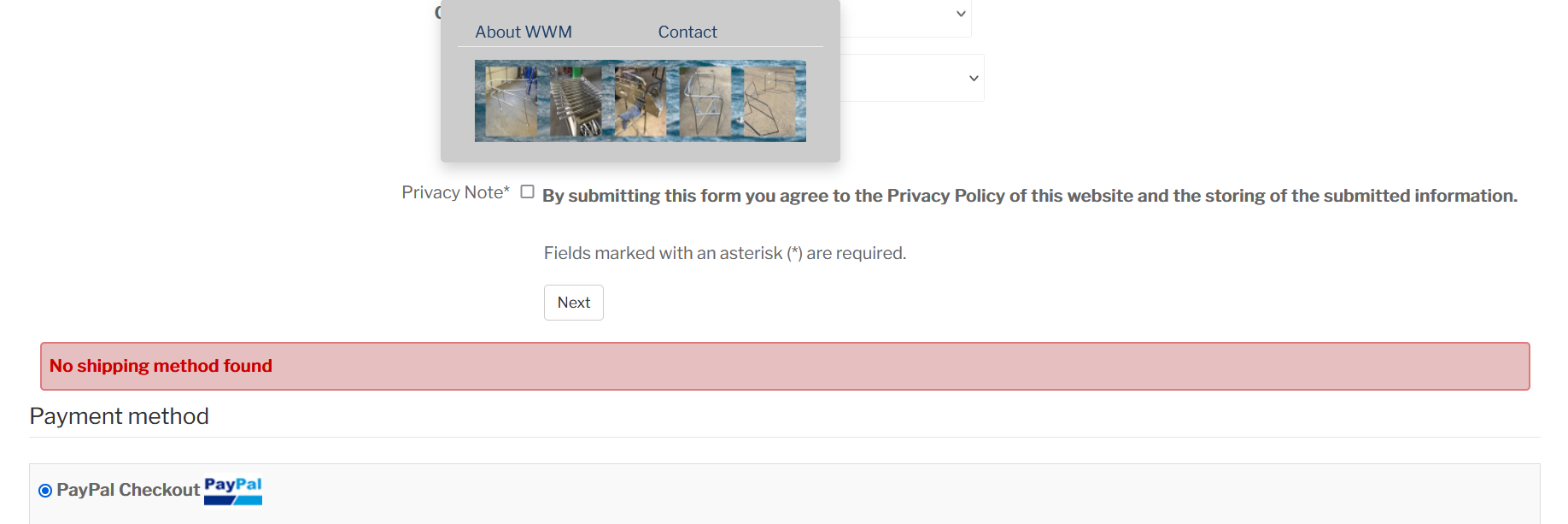
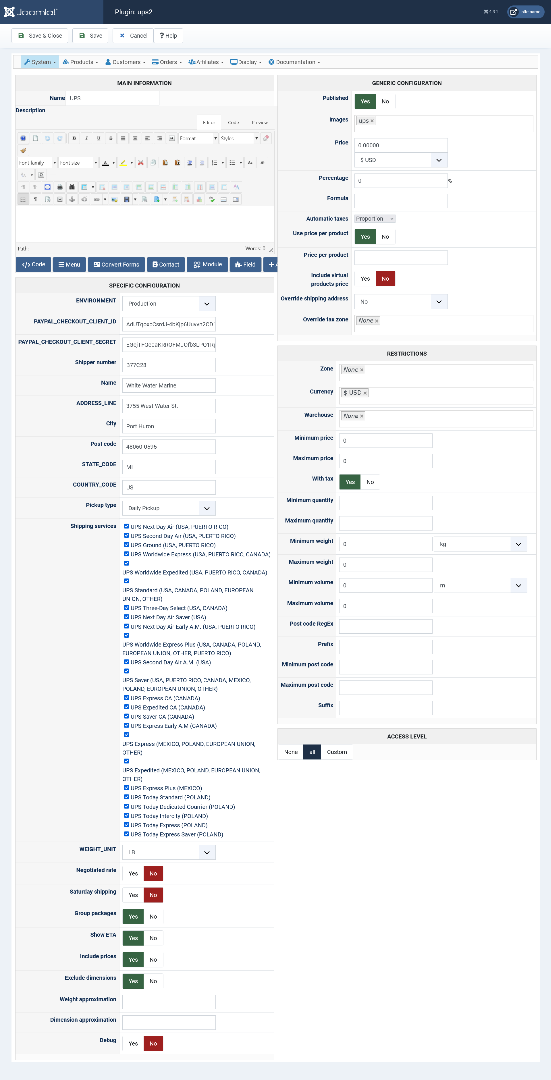
We may be a little bit closer but I am afraid it still doesn't work Or I am doing something wrong. Please see screenshot. I have the new plugin installed and configured and published. But it still doesn't show in front end. I have scoured settings and documentation to no avail. If you go here and attempt to check out you will see what I mean.
jimg57.sg-host.com/en/buy-boat-lifeline-...anchion-bases-online
There are other display issues but this is the big one - the one that is still making it impossible to launch. Would you be willing to log in and take a quick look? If there is a service fee, okay. It may well be a setting I just can't comprehend. I thought that if we published a shipping method, it would publish to checkout. Maybe not...
-Jim Gribble
There are other display issues but this is the big one - the one that is still making it impossible to launch. Would you be willing to log in and take a quick look? If there is a service fee, okay. It may well be a setting I just can't comprehend. I thought that if we published a shipping method, it would publish to checkout. Maybe not...
-Jim Gribble
Last edit: 3 years 2 months ago by jgribble.
Please Log in or Create an account to join the conversation.
3 years 2 months ago #353803
by nicolas
Replied by nicolas on topic Looking for update
Hi,
It's not that simple.
UPS requires the product to have a weight and potentially dimensions. So please check that it is the case.
Also, on your screenshot, it seems that you, as a customer, didn't enter your shipping address yet (you need to click on the "next" button above the red error message to validate the fields you filled in the address form above, so that the UPS shipping plugin sees your address and send it to UPS to be able to retrieve the rates).
It's not that simple.
UPS requires the product to have a weight and potentially dimensions. So please check that it is the case.
Also, on your screenshot, it seems that you, as a customer, didn't enter your shipping address yet (you need to click on the "next" button above the red error message to validate the fields you filled in the address form above, so that the UPS shipping plugin sees your address and send it to UPS to be able to retrieve the rates).
Please Log in or Create an account to join the conversation.
3 years 2 months ago - 3 years 2 months ago #353806
by jgribble
Replied by jgribble on topic Looking for update
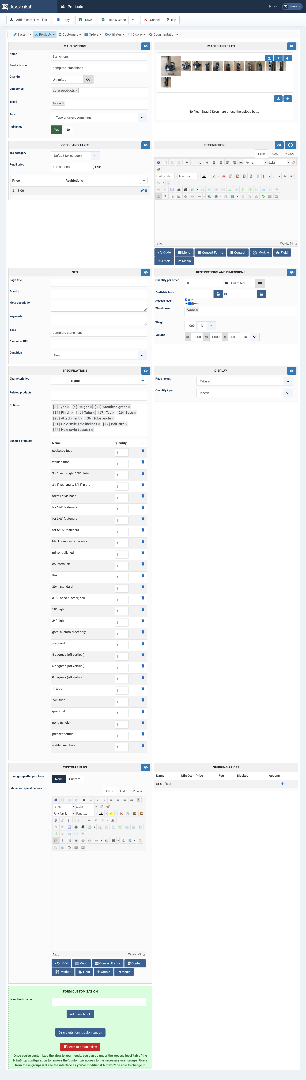
All products do have a weight. And volume. I can prove it. You can have a login to see it for yourself. I did as you suggested relative to filling in address/name. That is not the problem. I never thought so. Please see screenshot. We desperately need to get this working, and if there's a service charge okay. To my knowledge your plugin is properly configured and published. So far it doesn't work.
-Jim Gribble
-Jim Gribble
Last edit: 3 years 2 months ago by jgribble.
Please Log in or Create an account to join the conversation.
3 years 2 months ago - 3 years 2 months ago #353808
by jgribble
Replied by jgribble on topic Looking for update
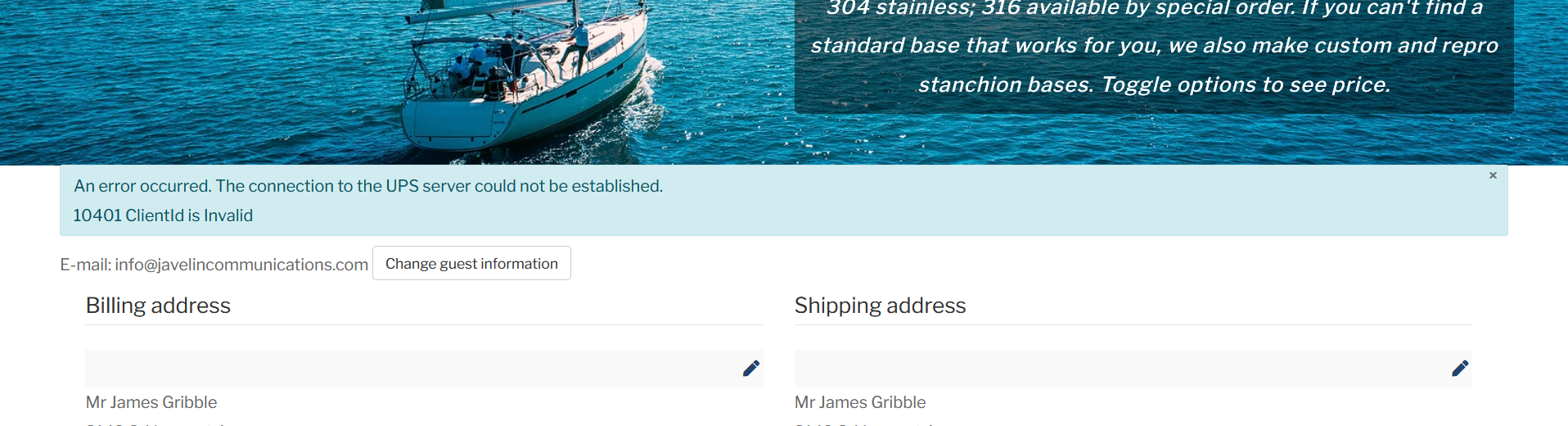
I tried to pay and a new error appeared. Seems to be a common thing, not something I did. How do I fix it?
An error occurred. The connection to the UPS server could not be established.
10401 ClientId is Invalid
I thought this might have something to do with sandbox mode. But no that's not it. Whether payment plugin is set to sandbox or production, error still occurs. The plugin is not connecting to UPS.
-Jim Gribble
An error occurred. The connection to the UPS server could not be established.
10401 ClientId is Invalid
I thought this might have something to do with sandbox mode. But no that's not it. Whether payment plugin is set to sandbox or production, error still occurs. The plugin is not connecting to UPS.
-Jim Gribble
Last edit: 3 years 2 months ago by jgribble.
Please Log in or Create an account to join the conversation.
3 years 2 months ago #353810
by jgribble
Replied by jgribble on topic Looking for update
In the UPS plugin, I have been wondering why am asked to I input Paypal client ID and Paypal secret key? Shouldn't these be coming from UPS? Is that our entire problem here? I have read that the new UPS API does have both client ID and secret key.
-Jim Gribble
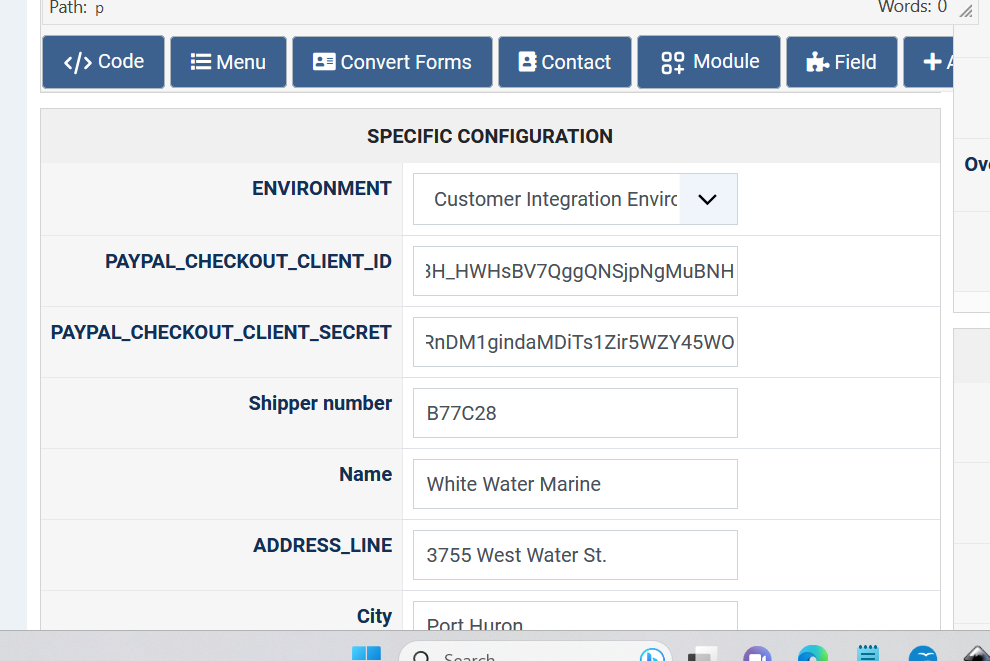
-Jim Gribble
Please Log in or Create an account to join the conversation.
3 years 2 months ago #353812
by nicolas
Replied by nicolas on topic Looking for update
Hi,
I'm not doubting you. So far you hadn't said you had set a weight and dimensions in your product, and since that's a common problem when people are configuring their products, I was just pointing at that possibility.
The error message indicates that the client ID provided in your shipping method settings page is wrong.
You indeed need to provide your UPS client id and client secret.
I used the paypal translation keys there, but because you didn't update your HikaShop you don't have the translations for these and thus, instead of seeing "client id" and "client secret", you see the translation keys.
Go in your HikaShop configuration page, and under the Languages tab, edit your language file. There, click on the "load latest version from our server" button and save. When you go back to the shipping method, you'll see just "client id" and "client secret" as everyone else using the plugin in the future will see.
I'm not doubting you. So far you hadn't said you had set a weight and dimensions in your product, and since that's a common problem when people are configuring their products, I was just pointing at that possibility.
The error message indicates that the client ID provided in your shipping method settings page is wrong.
You indeed need to provide your UPS client id and client secret.
I used the paypal translation keys there, but because you didn't update your HikaShop you don't have the translations for these and thus, instead of seeing "client id" and "client secret", you see the translation keys.
Go in your HikaShop configuration page, and under the Languages tab, edit your language file. There, click on the "load latest version from our server" button and save. When you go back to the shipping method, you'll see just "client id" and "client secret" as everyone else using the plugin in the future will see.
Please Log in or Create an account to join the conversation.
3 years 2 months ago - 3 years 2 months ago #353814
by jgribble
Replied by jgribble on topic Looking for update
So, yes, the plugin you gave me had the wrong field labels? I never suspected. The field labels which say "Paypal" are wrong. Right?
Then I will do as you suggest and we'll have another go. However, I have a lot of other language overrides in place. Please assure me they won't be overwritten?
I am going to look upon this process at a beta test and be patient and cheerful, expecting some teething issues. I know we will eventually get it all working. It's never easy going first.
Thank you,
-Jim G
Then I will do as you suggest and we'll have another go. However, I have a lot of other language overrides in place. Please assure me they won't be overwritten?
I am going to look upon this process at a beta test and be patient and cheerful, expecting some teething issues. I know we will eventually get it all working. It's never easy going first.
Thank you,
-Jim G
Last edit: 3 years 2 months ago by jgribble.
Please Log in or Create an account to join the conversation.
Time to create page: 0.324 seconds