

- Posts: 17
- Thank you received: 2
double-click on the rating star
7 years 7 months ago - 7 years 7 months ago #303991
by aron555
double-click on the rating star was created by aron555
-- url of the page with the problem -- :
fa4.ru
-- HikaShop version -- : 4.0.2
-- Joomla version -- : 3.9.3
-- PHP version -- : 7.2.10
-- Browser(s) name and version -- : mobile chrome and safari for iphone 6
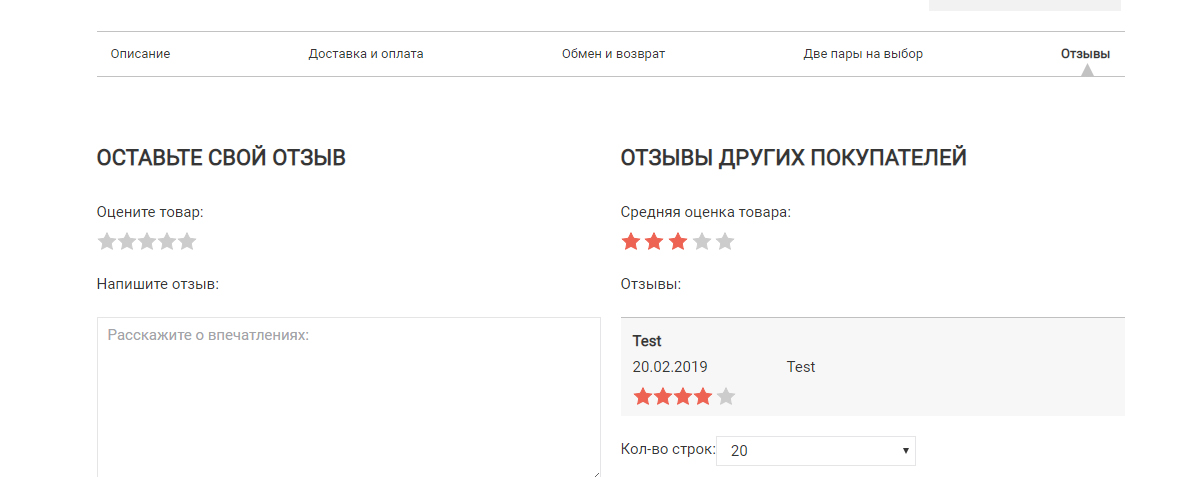
enabled setting - voting and comments together. on mobile browsers, to post a comment, you need to double-click on the rating star, otherwise the comment is not sent. how to change this behavior to just click on the star rating once
-- HikaShop version -- : 4.0.2
-- Joomla version -- : 3.9.3
-- PHP version -- : 7.2.10
-- Browser(s) name and version -- : mobile chrome and safari for iphone 6
enabled setting - voting and comments together. on mobile browsers, to post a comment, you need to double-click on the rating star, otherwise the comment is not sent. how to change this behavior to just click on the star rating once
Last edit: 7 years 7 months ago by aron555. Reason: replace browsers name
Please Log in or Create an account to join the conversation.

7 years 7 months ago #303993
by nicolas
Replied by nicolas on topic double-click on the rating star
Hi,
I just tried on your website but I'm not able to reproduce the problem.
I was able to post a "test" comment on a product page of your website with my android smartphone with the chrome browser by only clicking once on the star rating.
I just tried on your website but I'm not able to reproduce the problem.
I was able to post a "test" comment on a product page of your website with my android smartphone with the chrome browser by only clicking once on the star rating.
Please Log in or Create an account to join the conversation.
7 years 7 months ago #304021
by nicolas
Replied by nicolas on topic double-click on the rating star
Hi,
Please try to add the code:
after the line:
in the file media/com_hikashop/js/vote.js and then clear the cache of your browser.
That should help with that issue I think.
Please try to add the code:
Code:
if(hikaVote.options.both == '1' && hikashop_vote_comment == '' && val != 0)
return;
Code:
hikashop_vote_comment = d.getElementById("hikashop_vote_comment").value;
That should help with that issue I think.
Please Log in or Create an account to join the conversation.
7 years 6 months ago #305138
by aron555
Replied by aron555 on topic double-click on the rating star
saw that you added this code in hikashop, thank you, works! There were new troubles. No longer display the change of rating and information about the fact that the review is added to the tooltip.
Errors in dev chrome:
hikashop.js?v=403:217 POST krossovki1.ru/katalog/krossovki/krossovk.../save/tmpl-component 500
xRequest @ hikashop.js?v=403:217
hikaVote.vote @ vote.js:84
hikashop_send_vote @ nike-air-max-95-sneakerboot-grey:79
click @ vote.js:317
(anonymous) @ vote.js:212
vote.js:86 Uncaught TypeError: Cannot read property 'error' of null
at vote.js:86
at XMLHttpRequest.xhr.onreadystatechange (hikashop.js?v=403:206)
(anonymous) @ vote.js:86
xhr.onreadystatechange @ hikashop.js?v=403:206
XMLHttpRequest.send (async)
xRequest @ hikashop.js?v=403:217
hikaVote.vote @ vote.js:84
hikashop_send_vote @ nike-air-max-95-sneakerboot-grey:79
click @ vote.js:317
(anonymous) @ vote.js:212
hikashop.js?v=403:217 POST krossovki1.ru/katalog/krossovki/krossovk.../save/tmpl-component 500
xRequest @ hikashop.js?v=403:217
hikaVote.vote @ vote.js:84
hikashop_send_vote @ nike-air-max-95-sneakerboot-grey:79
click @ vote.js:317
(anonymous) @ vote.js:212
vote.js:86 Uncaught TypeError: Cannot read property 'error' of null
at vote.js:86
at XMLHttpRequest.xhr.onreadystatechange (hikashop.js?v=403:206)
Errors in dev chrome:
hikashop.js?v=403:217 POST krossovki1.ru/katalog/krossovki/krossovk.../save/tmpl-component 500
xRequest @ hikashop.js?v=403:217
hikaVote.vote @ vote.js:84
hikashop_send_vote @ nike-air-max-95-sneakerboot-grey:79
click @ vote.js:317
(anonymous) @ vote.js:212
vote.js:86 Uncaught TypeError: Cannot read property 'error' of null
at vote.js:86
at XMLHttpRequest.xhr.onreadystatechange (hikashop.js?v=403:206)
(anonymous) @ vote.js:86
xhr.onreadystatechange @ hikashop.js?v=403:206
XMLHttpRequest.send (async)
xRequest @ hikashop.js?v=403:217
hikaVote.vote @ vote.js:84
hikashop_send_vote @ nike-air-max-95-sneakerboot-grey:79
click @ vote.js:317
(anonymous) @ vote.js:212
hikashop.js?v=403:217 POST krossovki1.ru/katalog/krossovki/krossovk.../save/tmpl-component 500
xRequest @ hikashop.js?v=403:217
hikaVote.vote @ vote.js:84
hikashop_send_vote @ nike-air-max-95-sneakerboot-grey:79
click @ vote.js:317
(anonymous) @ vote.js:212
vote.js:86 Uncaught TypeError: Cannot read property 'error' of null
at vote.js:86
at XMLHttpRequest.xhr.onreadystatechange (hikashop.js?v=403:206)
Please Log in or Create an account to join the conversation.
7 years 6 months ago #305153
by nicolas
Replied by nicolas on topic double-click on the rating star
Hi,
I'm not able to get these errors on your website.
I did a test on the page fa4.ru/katalog/krossovki/krossovki-adida...limacool-1-dark-blue and I was able to add a vote with a comment.
Could you please provide precise instructions to reproduce the problem and get the error ?
Also, some screenshot might help understand what to do on the page ?
I'm not able to get these errors on your website.
I did a test on the page fa4.ru/katalog/krossovki/krossovki-adida...limacool-1-dark-blue and I was able to add a vote with a comment.
Could you please provide precise instructions to reproduce the problem and get the error ?
Also, some screenshot might help understand what to do on the page ?
Please Log in or Create an account to join the conversation.
7 years 6 months ago #305360
by aron555
Replied by aron555 on topic double-click on the rating star
sorry, new domain - krossovki1.ru .
krossovki1.ru/katalog/krossovki/krossovk...adidas-sobakov-black
Please Log in or Create an account to join the conversation.

7 years 6 months ago - 7 years 6 months ago #305376
by Philip
Replied by Philip on topic double-click on the rating star
Hello,
Sorry but when we use your 2 last url link we have a product page without rating or comment...
Can you provide like Nicolas asked a step by step process and all required to be able to reproduce your issue, or move forward on your subject will be difficult.
Awaiting more elements from you.
Regards
Sorry but when we use your 2 last url link we have a product page without rating or comment...
Can you provide like Nicolas asked a step by step process and all required to be able to reproduce your issue, or move forward on your subject will be difficult.
Awaiting more elements from you.
Regards
Last edit: 7 years 6 months ago by Philip.
Please Log in or Create an account to join the conversation.
7 years 6 months ago #305456
by aron555
Replied by aron555 on topic double-click on the rating star
1.jpg - go to comments.
2.jpg - after writing a comment and rating, there is no notification that the comment has been added (or not added)
2.jpg - after writing a comment and rating, there is no notification that the comment has been added (or not added)
Please Log in or Create an account to join the conversation.
7 years 6 months ago #305459
by nicolas
Replied by nicolas on topic double-click on the rating star
Hi,
When I reproduce the error on that page and look at the response from the server, I can see that there is a 500 error returned with a fatal error caused by an incorrect MySQL query:
monosnap.com/file/8AWwTXOfpAwBJ9I3iUWIGawfFg5pxN
Unfortuately, that's not the whole query so I'm not sure where that query comes from.
It seems to be related to SEF routing.
I would recommend first to do that modification to get the full MySQL query when you get that error:
www.hikashop.com/support/forum/product-c...eld-list.html#304882
That will help better understand the situation.
Also ideally, you should activate the "error reporting" and the "debug mode" settings of the Joomla configuration and reproduct the issue and look at the response from the server in the network area of your browser's developer tools. That way, instead of having the MySQL query and the limited error message in the response like I got, you would also get more information about which lines of which files are involved in that issue which would help understand the situation and provide a solution.
When I reproduce the error on that page and look at the response from the server, I can see that there is a 500 error returned with a fatal error caused by an incorrect MySQL query:
monosnap.com/file/8AWwTXOfpAwBJ9I3iUWIGawfFg5pxN
Unfortuately, that's not the whole query so I'm not sure where that query comes from.
It seems to be related to SEF routing.
I would recommend first to do that modification to get the full MySQL query when you get that error:
www.hikashop.com/support/forum/product-c...eld-list.html#304882
That will help better understand the situation.
Also ideally, you should activate the "error reporting" and the "debug mode" settings of the Joomla configuration and reproduct the issue and look at the response from the server in the network area of your browser's developer tools. That way, instead of having the MySQL query and the limited error message in the response like I got, you would also get more information about which lines of which files are involved in that issue which would help understand the situation and provide a solution.
Please Log in or Create an account to join the conversation.
7 years 6 months ago - 7 years 6 months ago #305638
by aron555
Replied by aron555 on topic double-click on the rating star
The problem was in my plugin where I used public function onAfterProductCreate(&$element)
www.hikashop.com/forum/vote/897194-error...nistrative-part.html - also the problem was due to use onAfterProductCreate(&$element)
www.hikashop.com/forum/vote/897194-error...nistrative-part.html - also the problem was due to use onAfterProductCreate(&$element)
Last edit: 7 years 6 months ago by aron555.
The following user(s) said Thank You: nicolas
Please Log in or Create an account to join the conversation.
Time to create page: 0.230 seconds