
- Posts: 145
- Thank you received: 0
A few questions for HikaMarket
- southga1974
-
 Topic Author
- Offline
Less
More
12 years 11 months ago #127329
by southga1974
Replied by southga1974 on topic A few questions for HikaMarket
I'm sorry, Jerome. You should have access now as a super user.
Please Log in or Create an account to join the conversation.

12 years 11 months ago #127334
by Jerome
Jerome - Obsidev.com
HikaMarket & HikaSerial developer / HikaShop core dev team.
Replied by Jerome on topic A few questions for HikaMarket
Hi,
I went in the HikaShop configuration
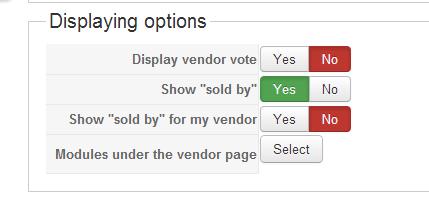
I click on the "select" button and activate your module.
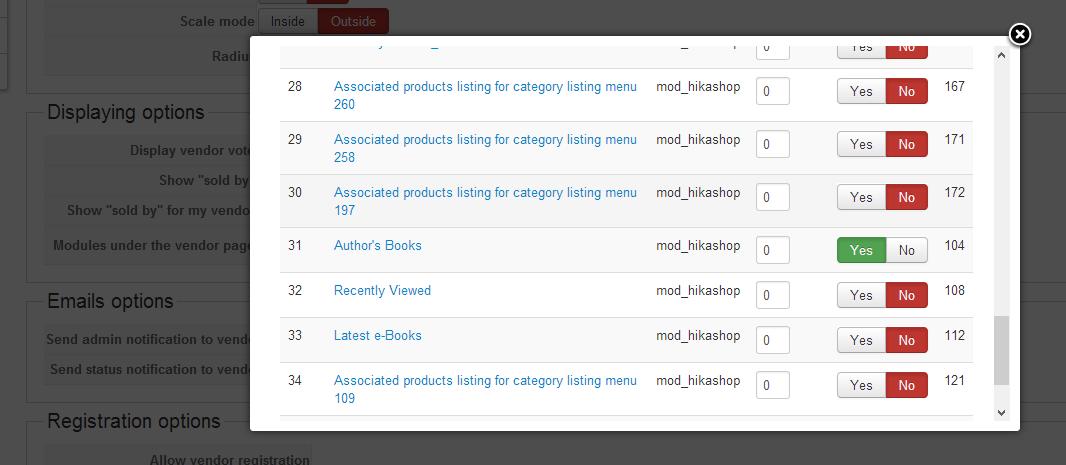
Then click on "ok" and "save". After the save, I see the list of associated modules which will be display under the vendor page.
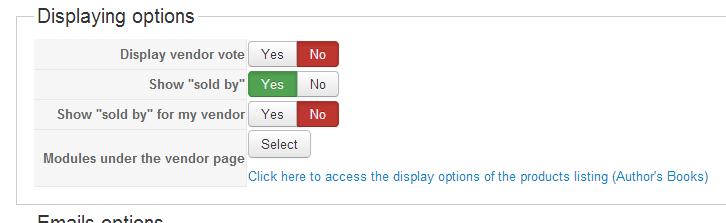
It should be better now.
Regards,
I went in the HikaShop configuration
I click on the "select" button and activate your module.
Then click on "ok" and "save". After the save, I see the list of associated modules which will be display under the vendor page.
It should be better now.
Regards,
Jerome - Obsidev.com
HikaMarket & HikaSerial developer / HikaShop core dev team.
Please Log in or Create an account to join the conversation.
- southga1974
-
Topic Author
- Offline
Less
More
- Posts: 145
- Thank you received: 0
12 years 11 months ago #127366
by southga1974
Replied by southga1974 on topic A few questions for HikaMarket
Thank you, but when I open a vendor's page, I still don't see his or her products. Each vendor has products that are books. I noticed that when I look at categories, none of my vendors have their books in their folder. Is that why the books aren't showing up for each vendor?
Go to Our Authors and click on a vendor to see what I'm talking about. The books module should be on the right.
Go to Our Authors and click on a vendor to see what I'm talking about. The books module should be on the right.
Please Log in or Create an account to join the conversation.
12 years 11 months ago #127373
by Jerome
Jerome - Obsidev.com
HikaMarket & HikaSerial developer / HikaShop core dev team.
Replied by Jerome on topic A few questions for HikaMarket
Hi,
You didn't have configured the "Sub elements filter" right.
I set "all sub elements" and now the products are displayed.
You can continue to configure the module parameters to improve the design (number of columns, etc).
Regards,
You didn't have configured the "Sub elements filter" right.
I set "all sub elements" and now the products are displayed.
You can continue to configure the module parameters to improve the design (number of columns, etc).
Regards,
Jerome - Obsidev.com
HikaMarket & HikaSerial developer / HikaShop core dev team.
Please Log in or Create an account to join the conversation.
- southga1974
-
Topic Author
- Offline
Less
More
- Posts: 145
- Thank you received: 0
12 years 11 months ago #127396
by southga1974
Replied by southga1974 on topic A few questions for HikaMarket
Thank you! You are great! Just one more small question. Why doesn't the module ttile show up? I have it set to "yes" for Show Title.
Please Log in or Create an account to join the conversation.
12 years 11 months ago #127408
by Jerome
Jerome - Obsidev.com
HikaMarket & HikaSerial developer / HikaShop core dev team.
Replied by Jerome on topic A few questions for HikaMarket
Hi,
I know that there is a bug in HikaShop 2.2.1 for the option "show title" in the HikaShop content module part.
Please open the Joomla module (you have a button in the HikaShop toolbar) and activate the option in Joomla itself.
It will be solve with HikaShop 2.2.2
Regards,
I know that there is a bug in HikaShop 2.2.1 for the option "show title" in the HikaShop content module part.
Please open the Joomla module (you have a button in the HikaShop toolbar) and activate the option in Joomla itself.
It will be solve with HikaShop 2.2.2
Regards,
Jerome - Obsidev.com
HikaMarket & HikaSerial developer / HikaShop core dev team.
Please Log in or Create an account to join the conversation.
- southga1974
-
Topic Author
- Offline
Less
More
- Posts: 145
- Thank you received: 0
12 years 11 months ago #127414
by southga1974
Replied by southga1974 on topic A few questions for HikaMarket
Both are set to yes for "Show Title"
Please Log in or Create an account to join the conversation.
12 years 11 months ago #127435
by Jerome
Jerome - Obsidev.com
HikaMarket & HikaSerial developer / HikaShop core dev team.
Replied by Jerome on topic A few questions for HikaMarket
Hi,
I get it.
The modules under the product/vendor page in hikashop/hikamarket call the joomla module renderer.
This renderModule function use the parameter "style" in order to know how the render has to be done.
You can see more about the module "chromes" here:
docs.joomla.org/Module_chrome
As you can see, the "none" chrome does not display the title.
You have to configure the module and set a specific module style (in Joomla 3, it's the second tab, under "Advanced options").
Regards,
I get it.
The modules under the product/vendor page in hikashop/hikamarket call the joomla module renderer.
This renderModule function use the parameter "style" in order to know how the render has to be done.
You can see more about the module "chromes" here:
docs.joomla.org/Module_chrome
As you can see, the "none" chrome does not display the title.
You have to configure the module and set a specific module style (in Joomla 3, it's the second tab, under "Advanced options").
Regards,
Jerome - Obsidev.com
HikaMarket & HikaSerial developer / HikaShop core dev team.
The following user(s) said Thank You: southga1974
Please Log in or Create an account to join the conversation.
Moderators: Obsidev
Time to create page: 0.214 seconds