
- Posts: 424
- Thank you received: 11
How can we ONLY get an email with the status confirmed??
- BluepointWebdesign
-
 Topic Author
- Offline
Less
More
4 years 9 months ago #338191
by BluepointWebdesign
-- url of the page with the problem -- : sal-mon.nl
Hi,
How can we ONLY get an email with the status confirmed??
regards,
Michiel
Hi,
How can we ONLY get an email with the status confirmed??
regards,
Michiel
Please Log in or Create an account to join the conversation.

4 years 9 months ago #338194
by nicolas
Replied by nicolas on topic How can we ONLY get an email with the status confirmed??
Hi,
I suppose that you're asking how to not send an email to the user when the order is created, before the payment is made.
Is that correct ?
In that case, you want to disable "order creation notification" email in the System>Emails menu.
Merry Christmas
I suppose that you're asking how to not send an email to the user when the order is created, before the payment is made.
Is that correct ?
In that case, you want to disable "order creation notification" email in the System>Emails menu.
Merry Christmas
Please Log in or Create an account to join the conversation.
- BluepointWebdesign
-
Topic Author
- Offline
Less
More
- Posts: 424
- Thank you received: 11
4 years 9 months ago #338209
by BluepointWebdesign
Replied by BluepointWebdesign on topic How can we ONLY get an email with the status confirmed??
Hi Nicolas,
Thanks for your answer, i think what we forgot to mention is that we don't want the admin get the order created notification, only the confirmed e-mails, this because when someone goes to ideal and does not do the payment he gets a created email.. but this isn't paid.. so that is confusing for our client..(admin)
How can we accomplish that??
Hope you can help..
Thanks
Mark
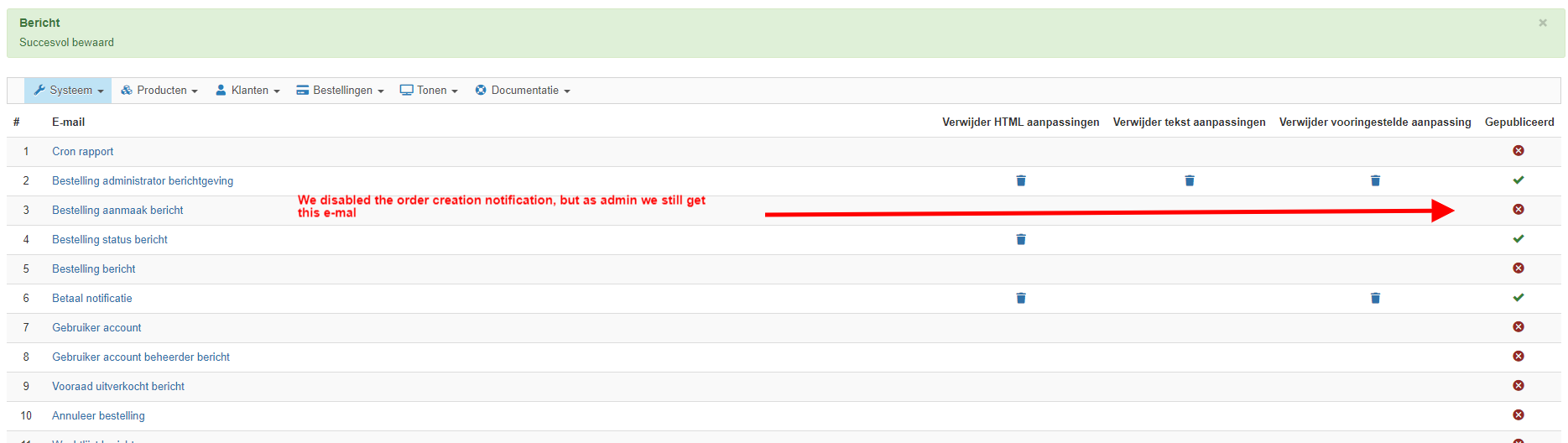
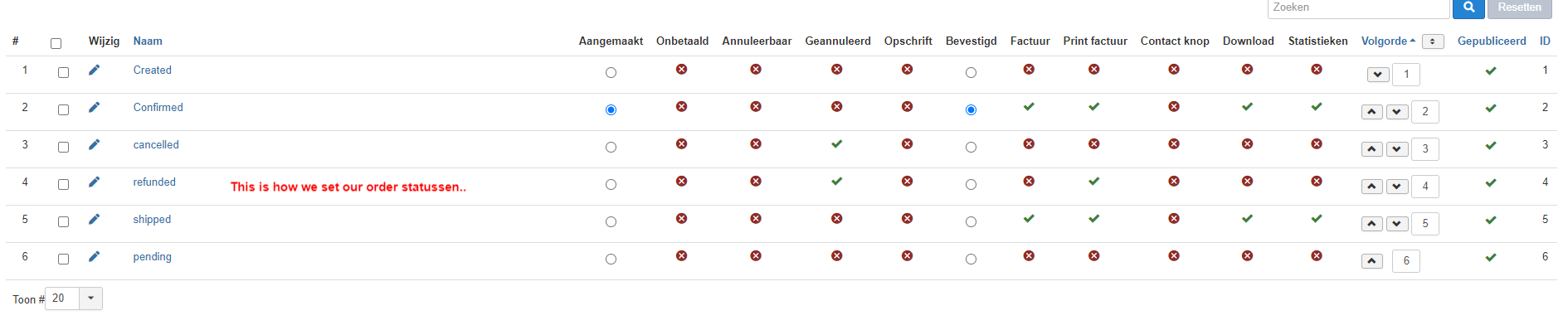
Thanks for your answer, i think what we forgot to mention is that we don't want the admin get the order created notification, only the confirmed e-mails, this because when someone goes to ideal and does not do the payment he gets a created email.. but this isn't paid.. so that is confusing for our client..(admin)
How can we accomplish that??
Hope you can help..
Thanks
Mark
Please Log in or Create an account to join the conversation.
4 years 9 months ago #338210
by nicolas
Replied by nicolas on topic How can we ONLY get an email with the status confirmed??
Hi,
For the admin, you want to disable the "order administrator notification" email there.
The admin will still get the "payment notification" email when the order is confirmed by the payment gateway, after the payment.
For the admin, you want to disable the "order administrator notification" email there.
The admin will still get the "payment notification" email when the order is confirmed by the payment gateway, after the payment.
Please Log in or Create an account to join the conversation.
- BluepointWebdesign
-
Topic Author
- Offline
Less
More
- Posts: 424
- Thank you received: 11
4 years 9 months ago #338220
by BluepointWebdesign
Replied by BluepointWebdesign on topic How can we ONLY get an email with the status confirmed??
Hi,
That i understand, but when someone orders on a cash / door payment, the admin will not be notified of this order...
I want him to get the "order administrator notification" email, but then only when the order is confirmed so he won't get the created email.
In short we have two options in checkout:
1. payment via ideal -> admin gets two emails by "order administrator notification" -> created and confirmed -> we only want it to sent when is confirmed.
2. payment on cash when deliverd or is picked up at the door.. -> admin now only gets one email -> confirmed.
Hope you can help ..
Thanks.
That i understand, but when someone orders on a cash / door payment, the admin will not be notified of this order...
I want him to get the "order administrator notification" email, but then only when the order is confirmed so he won't get the created email.
In short we have two options in checkout:
1. payment via ideal -> admin gets two emails by "order administrator notification" -> created and confirmed -> we only want it to sent when is confirmed.
2. payment on cash when deliverd or is picked up at the door.. -> admin now only gets one email -> confirmed.
Hope you can help ..
Thanks.
Please Log in or Create an account to join the conversation.

4 years 9 months ago - 4 years 9 months ago #338222
by Philip
Replied by Philip on topic How can we ONLY get an email with the status confirmed??
Hello,
Did you try to remove the administrator email address, in your Main HikaShop Configuration => Emails part :

Hope this can allow you to achieved your needs.
Regards
Did you try to remove the administrator email address, in your Main HikaShop Configuration => Emails part :
Hope this can allow you to achieved your needs.
Regards
Last edit: 4 years 9 months ago by Philip.
Please Log in or Create an account to join the conversation.
- BluepointWebdesign
-
Topic Author
- Offline
Less
More
- Posts: 424
- Thank you received: 11
4 years 9 months ago #338240
by BluepointWebdesign
Replied by BluepointWebdesign on topic How can we ONLY get an email with the status confirmed??
Hi Philip,
I tried this. But then no email will be sent.. not even the cash on delivery ..
So it does not achieve what we need..
As i explained we have to checkout options.
1. cash on delivery, -> this one goes well and sent only the confirm email.
2. iDeal-> here we get three emails when payment is successfull 1 created and 1 confirmed, and also the notifcation of the transaction is succesfull.
When nothing is done through iDeal so no payment what so ever the created email is sent. But we don't want that to happen, this is confusing for the admin..
Regards,
Mark
I tried this. But then no email will be sent.. not even the cash on delivery ..
So it does not achieve what we need..
As i explained we have to checkout options.
1. cash on delivery, -> this one goes well and sent only the confirm email.
2. iDeal-> here we get three emails when payment is successfull 1 created and 1 confirmed, and also the notifcation of the transaction is succesfull.
When nothing is done through iDeal so no payment what so ever the created email is sent. But we don't want that to happen, this is confusing for the admin..
Regards,
Mark
Please Log in or Create an account to join the conversation.
4 years 9 months ago #338252
by nicolas
Replied by nicolas on topic How can we ONLY get an email with the status confirmed??
Hi,
So what you can do is keep the "order admin notification" email activated.
And in its "preload" section (when you edit it via the System>Emails menu), at the end, you can add such code:
where XX is the id of the payment method for which you want to disable the email.
You can see the payment_id of the payment method in the URL of the browser's address bar when you're looking at the options of the payment method:
i.imgur.com/FQnapM2.png
So what you can do is keep the "order admin notification" email activated.
And in its "preload" section (when you edit it via the System>Emails menu), at the end, you can add such code:
Code:
if($data->cart->order_payment_id == XX) {
$mail->published = false;
}
You can see the payment_id of the payment method in the URL of the browser's address bar when you're looking at the options of the payment method:
i.imgur.com/FQnapM2.png
Please Log in or Create an account to join the conversation.
- BluepointWebdesign
-
Topic Author
- Offline
Less
More
- Posts: 424
- Thank you received: 11
4 years 9 months ago #338266
by BluepointWebdesign
Replied by BluepointWebdesign on topic How can we ONLY get an email with the status confirmed??
Hi Nicolas,
I will try this .. but will it keep sending the confirmed emails?
Regards,
Mark
I will try this .. but will it keep sending the confirmed emails?
Regards,
Mark
Please Log in or Create an account to join the conversation.

Less
More
- Posts: 12953
- Thank you received: 1778
4 years 9 months ago #338268
by Mohamed Thelji
Replied by Mohamed Thelji on topic How can we ONLY get an email with the status confirmed??
Hello Mark,
Emails sent to customers won't be affected by that modification.
Kind regards,
Mohamed.
About which confirmed emails are you talking about ? Emails sent to the admin or to customers ?but will it keep sending the confirmed emails?
Emails sent to customers won't be affected by that modification.
Kind regards,
Mohamed.
Please Log in or Create an account to join the conversation.
- BluepointWebdesign
-
Topic Author
- Offline
Less
More
- Posts: 424
- Thank you received: 11
4 years 9 months ago #338286
by BluepointWebdesign
Replied by BluepointWebdesign on topic How can we ONLY get an email with the status confirmed??
Hi,
I am talking about the emails sent to the admin.
They only need to get the confirmed email..
I am talking about the emails sent to the admin.
They only need to get the confirmed email..
Please Log in or Create an account to join the conversation.
4 years 9 months ago #338289
by nicolas
Replied by nicolas on topic How can we ONLY get an email with the status confirmed??
Hi,
The "payment notification" email which is sent when a payment plugin confirms an order automatically will be sent regardless of whether you do this modification or not as long as the "payment notification" email is published.
This modification is only for not sending the "order admin notification" to the admin when an order is created with a particular payment method.
The "payment notification" email which is sent when a payment plugin confirms an order automatically will be sent regardless of whether you do this modification or not as long as the "payment notification" email is published.
This modification is only for not sending the "order admin notification" to the admin when an order is created with a particular payment method.
Please Log in or Create an account to join the conversation.
- BluepointWebdesign
-
Topic Author
- Offline
Less
More
- Posts: 424
- Thank you received: 11
4 years 9 months ago #338307
by BluepointWebdesign
Replied by BluepointWebdesign on topic How can we ONLY get an email with the status confirmed??
Hi,
We want the order admin notifaction email to be sent only when the status of the order is confirmed. NOT when it is created,
We want the order admin notifaction email to be sent only when the status of the order is confirmed. NOT when it is created,
Please Log in or Create an account to join the conversation.
4 years 9 months ago #338314
by nicolas
Replied by nicolas on topic How can we ONLY get an email with the status confirmed??
Hi,
This should almost never happen as the status is normally not "confirmed" when an order is created.
But still, it's possible, you just need to adapt a bit the code I gave previously:
This should almost never happen as the status is normally not "confirmed" when an order is created.
But still, it's possible, you just need to adapt a bit the code I gave previously:
Code:
if($data->cart->order_status != 'confirmed') {
$mail->published = false;
}
Please Log in or Create an account to join the conversation.
- BluepointWebdesign
-
Topic Author
- Offline
Less
More
- Posts: 424
- Thank you received: 11
4 years 9 months ago #338350
by BluepointWebdesign
Replied by BluepointWebdesign on topic How can we ONLY get an email with the status confirmed??
Hi Nicolas,
I did some testing with your code.. but then we only get the payment notification email and not the admin notification email confirmed,
What we now get is for one order 3 emails:
1. one created (this one we do not want to be sent.
2. one confirmed
3. The payment notification
The first two are generated in the order administrator notification email..
Is there something i forget??
I did some testing with your code.. but then we only get the payment notification email and not the admin notification email confirmed,
What we now get is for one order 3 emails:
1. one created (this one we do not want to be sent.
2. one confirmed
3. The payment notification
The first two are generated in the order administrator notification email..
Is there something i forget??
Please Log in or Create an account to join the conversation.
Less
More
- Posts: 12953
- Thank you received: 1778
4 years 9 months ago #338489
by Mohamed Thelji
Replied by Mohamed Thelji on topic How can we ONLY get an email with the status confirmed??
Hello,
We'll need more information about how you used that code ? For example, in which function you used it and how.
Kind regards,
Mohamed
We'll need more information about how you used that code ? For example, in which function you used it and how.
Kind regards,
Mohamed
Please Log in or Create an account to join the conversation.
- BluepointWebdesign
-
Topic Author
- Offline
Less
More
- Posts: 424
- Thank you received: 11
4 years 9 months ago #338557
by BluepointWebdesign
Replied by BluepointWebdesign on topic How can we ONLY get an email with the status confirmed??
hi,
I used that peace of code in the pre load of the administrator notifaction email..
But this didn't help then i only get the created emails when a payment is done by iDeal.
I used that peace of code in the pre load of the administrator notifaction email..
But this didn't help then i only get the created emails when a payment is done by iDeal.
Please Log in or Create an account to join the conversation.
4 years 9 months ago #338561
by nicolas
Replied by nicolas on topic How can we ONLY get an email with the status confirmed??
Hi,
What that means is that the order status is not "confirmed" when the "order creation notification" email is sent.
If that is the case, then what you request
In that case, what I recommended before is better:
www.hikashop.com/forum/2-general-talk-ab...onfirmed.html#338252
This will not send the email when the order is created with the iDeal payment method, and thus it will send it for the "cash on delivery" payment method.
What that means is that the order status is not "confirmed" when the "order creation notification" email is sent.
If that is the case, then what you request
is not possible since the order admin notification email is sent beofre the status of the order is "confirmed".We want the order admin notifaction email to be sent only when the status of the order is confirmed. NOT when it is created,
In that case, what I recommended before is better:
www.hikashop.com/forum/2-general-talk-ab...onfirmed.html#338252
This will not send the email when the order is created with the iDeal payment method, and thus it will send it for the "cash on delivery" payment method.
Please Log in or Create an account to join the conversation.
1 year 1 month ago #368320
by nicolas
Replied by nicolas on topic How can we ONLY get an email with the status confirmed??
Hi,
For anyone reading this thread, note that since HikaShop 6.1.0, you can directly restrict order emails based on the payment method linked to the order with the interface available when editing an email in the System>Emails menu. No need for custom code anymore.
www.hikashop.com/home/blog/525-hikashop-6-1-0.html#email
For anyone reading this thread, note that since HikaShop 6.1.0, you can directly restrict order emails based on the payment method linked to the order with the interface available when editing an email in the System>Emails menu. No need for custom code anymore.
www.hikashop.com/home/blog/525-hikashop-6-1-0.html#email
Please Log in or Create an account to join the conversation.
Time to create page: 0.320 seconds