
- Posts: 115
- Thank you received: 0
add custom text field to check out page
- joycehoveling
-
 Topic Author
- Offline
Less
More
9 years 4 months ago #273210
by joycehoveling
add custom text field to check out page was created by joycehoveling
Hi,
i would like to add a custom field with "comments" to the check out page,
below or above the "please accept terms" line.
So I have added this code to the checkout / terms.php view, only the text box is not showing:
<?php echo $this->element->bericht_opmerking_bestelling; ?>
where in the file should I exactly add this code to be able to see it?
regards,
Joyce
i would like to add a custom field with "comments" to the check out page,
below or above the "please accept terms" line.
So I have added this code to the checkout / terms.php view, only the text box is not showing:
<?php echo $this->element->bericht_opmerking_bestelling; ?>
where in the file should I exactly add this code to be able to see it?
regards,
Joyce
Please Log in or Create an account to join the conversation.

9 years 4 months ago - 9 years 4 months ago #273214
by Philip
Replied by Philip on topic add custom text field to check out page
Hello,
Let's go back a little, you want add to your checkout a form to able your customer to fill extra data, like comments, right ?
For us, the best was and the most easy, is to use an order custom field.
To create it, follow these steps :
- Go to Components => HikaShop => Configuration
- On Display dropdown select Custom fields.
- Click on New to configure your custom field, for start I think you can reproduce this configuration :
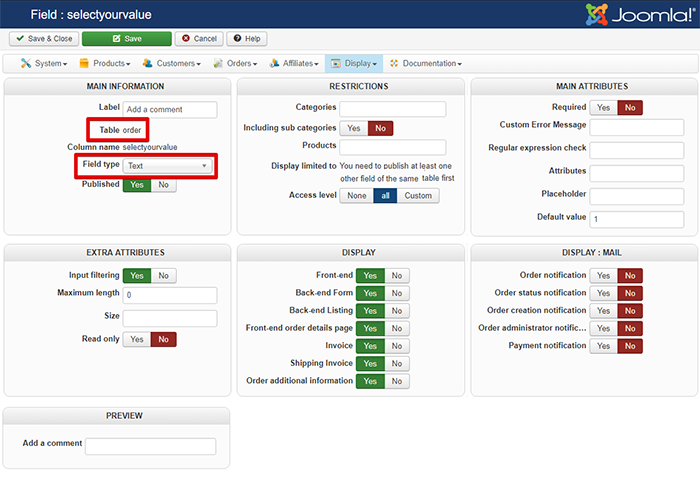
And don't forget, to go to your checkout configuration page (in Main Configuration, and Checlout tab) and add your Fields block in your Checkout Workflow.
Hope this will fit your needs.
Note : You can have more elements about Custom Fields, here .
Regards
Let's go back a little, you want add to your checkout a form to able your customer to fill extra data, like comments, right ?
For us, the best was and the most easy, is to use an order custom field.
To create it, follow these steps :
- Go to Components => HikaShop => Configuration
- On Display dropdown select Custom fields.
- Click on New to configure your custom field, for start I think you can reproduce this configuration :
And don't forget, to go to your checkout configuration page (in Main Configuration, and Checlout tab) and add your Fields block in your Checkout Workflow.
Hope this will fit your needs.
Note : You can have more elements about Custom Fields, here .
Regards
Last edit: 9 years 4 months ago by Philip.
Please Log in or Create an account to join the conversation.
- joycehoveling
-
Topic Author
- Offline
Less
More
- Posts: 115
- Thank you received: 0
9 years 4 months ago #273304
by joycehoveling
Replied by joycehoveling on topic add custom text field to check out page
Hello Philip,
This was easy thank you! Now, I would like to customize the layout a bit. (Please see attached how it looks now):
1) I would like the text "Bericht" to dissapear
2) Besides that i would like the other line of text "opmerking bij mijn bestelling" to be on top of the text field instead how on the left.
Can you tell me how to arrange this?
Kind regards,
Joyce
This was easy thank you! Now, I would like to customize the layout a bit. (Please see attached how it looks now):
1) I would like the text "Bericht" to dissapear
2) Besides that i would like the other line of text "opmerking bij mijn bestelling" to be on top of the text field instead how on the left.
Can you tell me how to arrange this?
Kind regards,
Joyce
Please Log in or Create an account to join the conversation.

9 years 4 months ago #273309
by nicolas
Replied by nicolas on topic add custom text field to check out page
Hi,
1. You can either use a translation override in order to change that text to nothing ( www.hikashop.com/download/languages.html#modify ), or you can add CSS to hide the title ( www.hikashop.com/support/documentation/1...ize-the-display.html ).
2. That's also possible with CSS.
I guess such CSS should do it:
;hikashop_checkout_fields label{
display: block;
width: 100%;
text-align: left;
}
1. You can either use a translation override in order to change that text to nothing ( www.hikashop.com/download/languages.html#modify ), or you can add CSS to hide the title ( www.hikashop.com/support/documentation/1...ize-the-display.html ).
2. That's also possible with CSS.
I guess such CSS should do it:
;hikashop_checkout_fields label{
display: block;
width: 100%;
text-align: left;
}
Please Log in or Create an account to join the conversation.
- joycehoveling
-
Topic Author
- Offline
Less
More
- Posts: 115
- Thank you received: 0
9 years 3 months ago #273357
by joycehoveling
Replied by joycehoveling on topic add custom text field to check out page
Super, thanks!
Please Log in or Create an account to join the conversation.

8 years 3 months ago #295637
by fils
Replied by fils on topic add custom text field to check out page
Hi, I got the same issue (inserting a custom field into the checkout screen) but no fields can be seen on the checkout page.
Joomla and Hikashop are the latest (3.8.10 and 3.5)
What could be the trick to make it work??
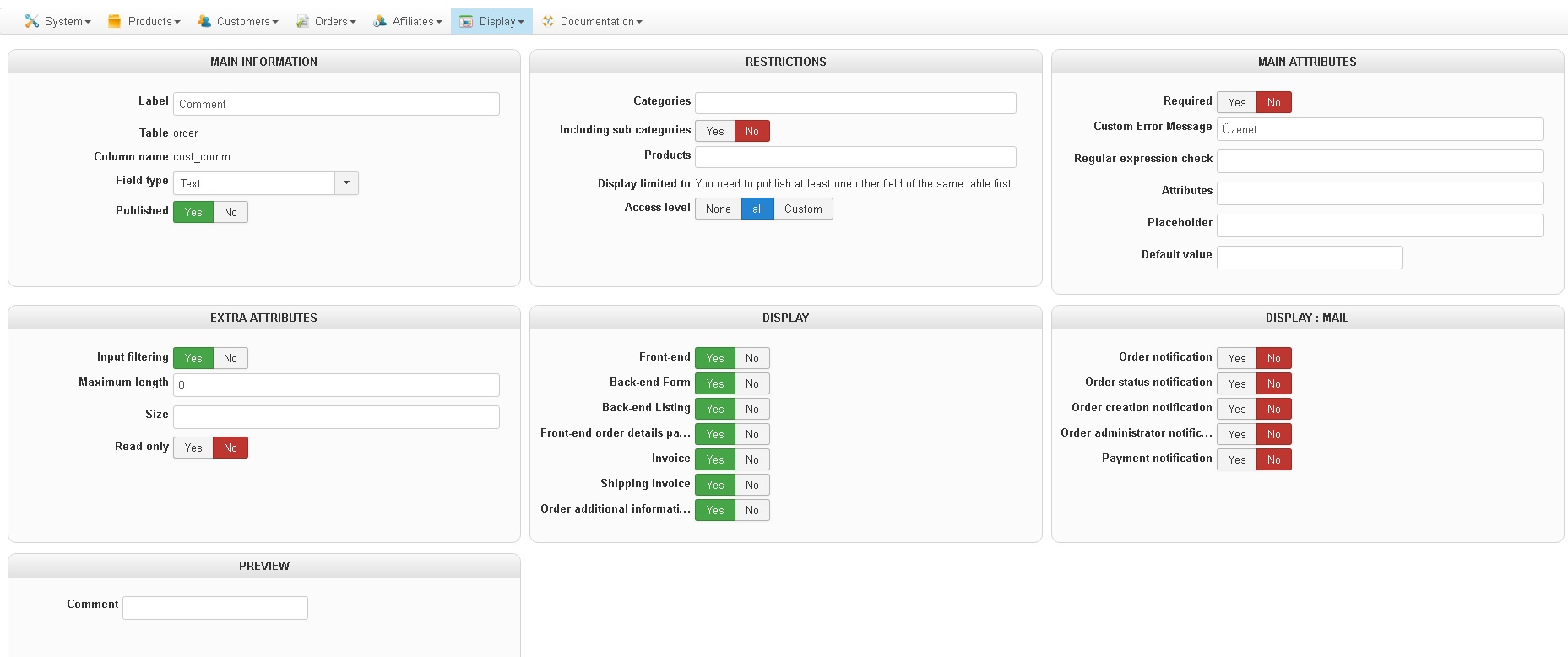
Joomla and Hikashop are the latest (3.8.10 and 3.5)
What could be the trick to make it work??
Please Log in or Create an account to join the conversation.
8 years 3 months ago #295642
by fils
Replied by fils on topic add custom text field to check out page
Actually I've been working on this for 2.5 days, so any hint would be appreciated, where to find the problem
Please Log in or Create an account to join the conversation.
8 years 3 months ago #295643
by nicolas
Replied by nicolas on topic add custom text field to check out page
Hi,
You probably removed the "fields" view from your "checkout workflow" in the HikaShop configuration.
So please check on that.
www.hikashop.com/support/documentation/4...eckout-workflow.html
You probably removed the "fields" view from your "checkout workflow" in the HikaShop configuration.
So please check on that.
www.hikashop.com/support/documentation/4...eckout-workflow.html
The following user(s) said Thank You: fils
Please Log in or Create an account to join the conversation.
8 years 3 months ago #295725
by fils
Replied by fils on topic add custom text field to check out page
That was the missing point, thank you!
Please Log in or Create an account to join the conversation.
Time to create page: 0.084 seconds