
- Posts: 575
- Thank you received: 11
Dashboard sales graph error
- ler@singmuiheng.com
-
 Topic Author
- Offline
Less
More
5 years 6 months ago #331689
by ler@singmuiheng.com
Dashboard sales graph error was created by ler@singmuiheng.com
-- HikaShop version -- : 4.3
-- Joomla version -- : 3.9.19
-- PHP version -- : 5.6
-- Error-message(debug-mod must be tuned on) -- : to split is not a function
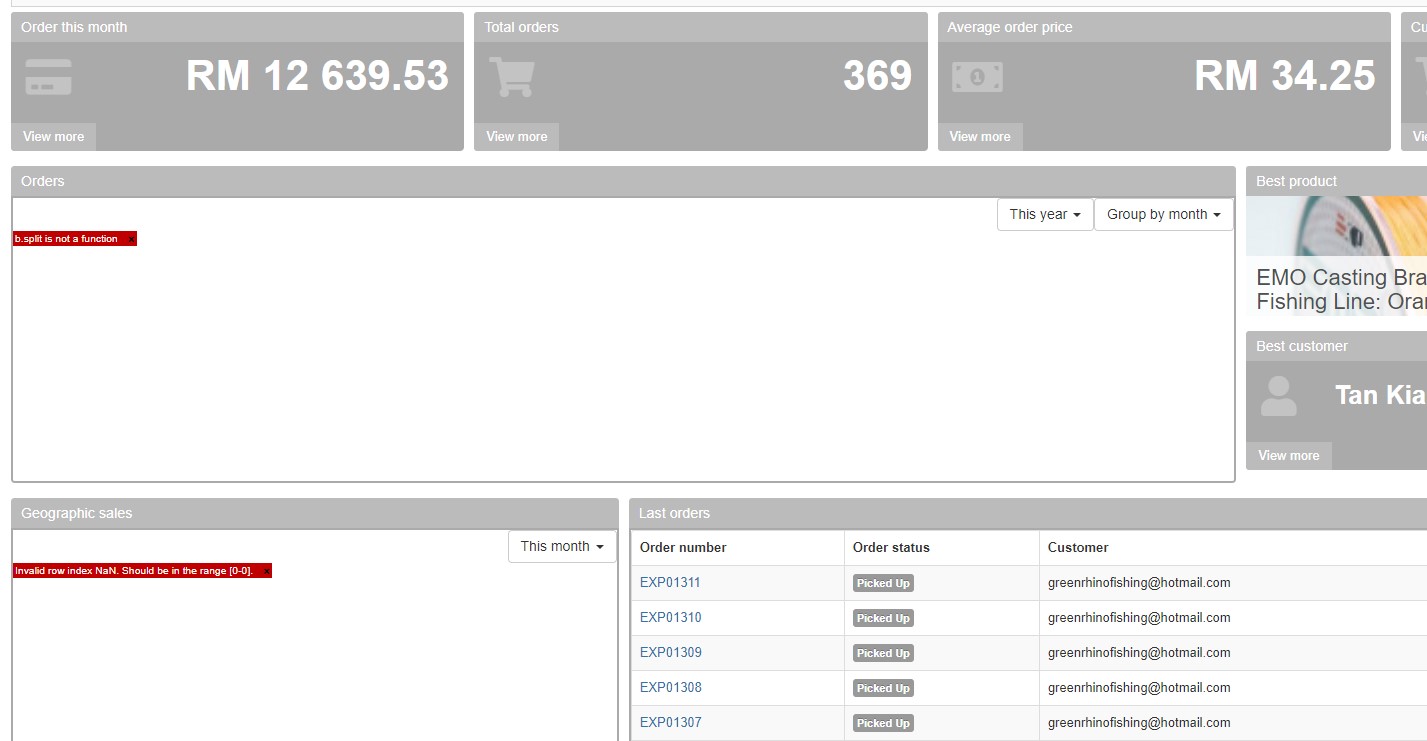
after switching the month and group, it will show
but the hover appearing sales figure is not working also
-- Joomla version -- : 3.9.19
-- PHP version -- : 5.6
-- Error-message(debug-mod must be tuned on) -- : to split is not a function
after switching the month and group, it will show
but the hover appearing sales figure is not working also
Please Log in or Create an account to join the conversation.

5 years 6 months ago #331700
by nicolas
Replied by nicolas on topic Dashboard sales graph error
Hi,
I was able to reproduce the issue on my end.
It seems to come from an update that was done to the Google Visualization chart API.
Version 50 has been rolled out on 1st of April and has been made current yesterday:
groups.google.com/g/google-visualization-api/c/G4Keck3KVwU
So the charts automatically switched to that new version yesterday.
Change the line:
to:
in the file administrator/components/com_hikashop/classes/statistics.php in order to roll back to the previous version and it should fix the problem.
I was able to reproduce the issue on my end.
It seems to come from an update that was done to the Google Visualization chart API.
Version 50 has been rolled out on 1st of April and has been made current yesterday:
groups.google.com/g/google-visualization-api/c/G4Keck3KVwU
So the charts automatically switched to that new version yesterday.
Change the line:
Code:
google.load("visualization", "1", {packages:["corechart","geochart"]});
Code:
google.load("visualization", "49", {packages:["corechart","geochart"]});
Please Log in or Create an account to join the conversation.
5 years 6 months ago #331708
by earmaster
Replied by earmaster on topic Dashboard sales graph error
Is there maybe another version of the Google chart API that will make the legacy dashboard work? We rely heavily on widgets in our order processing workflow, so we need the legacy dashboard to work. version 49 works with the new dashboard but not the legacy it seems.
We're on HikaShop Business 3.2.0
We're on HikaShop Business 3.2.0
Please Log in or Create an account to join the conversation.
5 years 6 months ago #331710
by nicolas
Replied by nicolas on topic Dashboard sales graph error
Hi,
We've had to add similar patches in the files of the folder administrator/components/com_hikashop/views/dashboard/tmpl for the legacy dashboard and reports.
We've made a new build of the 4.4.1 which includes all the patches:
www.hikashop.com/forum/reports-statistic...ndefined.html#331703
So if you update your HikaShop right now, all the charts will work without any code change.
We've had to add similar patches in the files of the folder administrator/components/com_hikashop/views/dashboard/tmpl for the legacy dashboard and reports.
We've made a new build of the 4.4.1 which includes all the patches:
www.hikashop.com/forum/reports-statistic...ndefined.html#331703
So if you update your HikaShop right now, all the charts will work without any code change.
Please Log in or Create an account to join the conversation.
5 years 6 months ago #331712
by earmaster
Replied by earmaster on topic Dashboard sales graph error
Updating the files in /tmpl/ and statisitcs.php did the trick. Thank you!
Please Log in or Create an account to join the conversation.
5 years 6 months ago #331799
by xatzopou
Replied by xatzopou on topic Dashboard sales graph error
Hi Nicolas,
I updated my sites with the latest Hikashop version 4.4.1. but when I select another option on "This year" or "Group by month" pull down menus, nothing changes. I did checked all my sites and got the same error.
Best regards.
Makis
P.S. This happens both to "Orders" and "Geographic sales" graphs.
I updated my sites with the latest Hikashop version 4.4.1. but when I select another option on "This year" or "Group by month" pull down menus, nothing changes. I did checked all my sites and got the same error.
Best regards.
Makis
P.S. This happens both to "Orders" and "Geographic sales" graphs.
Please Log in or Create an account to join the conversation.
5 years 6 months ago #331800
by nicolas
Replied by nicolas on topic Dashboard sales graph error
Hi,
This was reported to us yesterday and we've made a second patch for it.
Download again the install package of the 4.4.2 on our website and install it again on your website and it will add that second patch for the dropdowns.
This was reported to us yesterday and we've made a second patch for it.
Download again the install package of the 4.4.2 on our website and install it again on your website and it will add that second patch for the dropdowns.
Please Log in or Create an account to join the conversation.
Less
More
- Posts: 14
- Thank you received: 0
5 years 6 months ago #331884
by packerblood
Replied by packerblood on topic Dashboard sales graph error
We're on version 4.4.2 (Business) and are still seeing the same issue.
Please Log in or Create an account to join the conversation.
5 years 6 months ago #331900
by nicolas
Replied by nicolas on topic Dashboard sales graph error
Hi,
We are not able to reproduce the issues on our end now with all the patches and many don't have the issue anymore too.
So if you still have the issue with HikaShop 4.4.2, we would have to look into it on your website and thus we would need a backend + FTP access.
You can provide these along with a link to this thread for reference via our contact form:
www.hikashop.com/support/contact-us.html
We are not able to reproduce the issues on our end now with all the patches and many don't have the issue anymore too.
So if you still have the issue with HikaShop 4.4.2, we would have to look into it on your website and thus we would need a backend + FTP access.
You can provide these along with a link to this thread for reference via our contact form:
www.hikashop.com/support/contact-us.html
Please Log in or Create an account to join the conversation.
5 years 6 months ago #331918
by nicolas
Replied by nicolas on topic Dashboard sales graph error
>>> UPDATE <<<
We got the necessary accesses from someone else for that same issue and we were able to find the cause and add a patch for it.
So we've just made a new build of the 4.4.2 with that extra patch included.
To get it, download the install package of HikaShop on our website and install it on yours.
Hopefully, that's the same cause you have and the patch will also work for you.
We got the necessary accesses from someone else for that same issue and we were able to find the cause and add a patch for it.
So we've just made a new build of the 4.4.2 with that extra patch included.
To get it, download the install package of HikaShop on our website and install it on yours.
Hopefully, that's the same cause you have and the patch will also work for you.
Please Log in or Create an account to join the conversation.
Less
More
- Posts: 196
- Thank you received: 15
5 years 6 months ago #331936
by StudioPrzyLesie
Replied by StudioPrzyLesie on topic Dashboard sales graph error
Hello,
after updating the statistics work, but editing the price in the product when you click on "pencil" - the price disappears
Back to version 4.4.1 - works fine.
Something about this topic?
after updating the statistics work, but editing the price in the product when you click on "pencil" - the price disappears
Back to version 4.4.1 - works fine.
Something about this topic?
Please Log in or Create an account to join the conversation.
5 years 6 months ago #331938
by nicolas
Replied by nicolas on topic Dashboard sales graph error
Hi,
The issue might be linked to the order status selector issue I just found here:
www.hikashop.com/forum/reports-statistic...n-or-exp.html#331937
The issue might be linked to the order status selector issue I just found here:
www.hikashop.com/forum/reports-statistic...n-or-exp.html#331937
Please Log in or Create an account to join the conversation.
Less
More
- Posts: 196
- Thank you received: 15
5 years 6 months ago #331976
by StudioPrzyLesie
Replied by StudioPrzyLesie on topic Dashboard sales graph error
Is there anything in my topic - problem with price editing.
Please Log in or Create an account to join the conversation.
Less
More
- Posts: 196
- Thank you received: 15
5 years 6 months ago #331979
by StudioPrzyLesie
Replied by StudioPrzyLesie on topic Dashboard sales graph error
I think I've found a solution. Download the latest package with version 4.4.2 (I had such a version, but I think the version has changed in the meantime without changing the marking). Install, clean the browser cache - it works for me 
Please Log in or Create an account to join the conversation.
Time to create page: 0.093 seconds