

- Posts: 317
- Thank you received: 20
Further customize product pages
2 years 9 months ago - 2 years 9 months ago #358725
by jgribble
Further customize product pages was created by jgribble
-- HikaShop version -- : 5.0.3
-- Joomla version -- : 4.4.2
On a product page, is there a way to display content above the product/options select? In default layout we can put specifications directly underneath and that's very helpful.
But what about at the very top? I'd like an introductory message/label to go there. The default presentation is kind of drab/generic and I'd like to be able to jazz it up.
So I suppose I would create a WSIWYG custom field. Then I could assign to a column. And then assign it to categories or individual products? What is that column name? And how can I set my new field to appear at the top of the column if used? Will that be somewhere in Views?
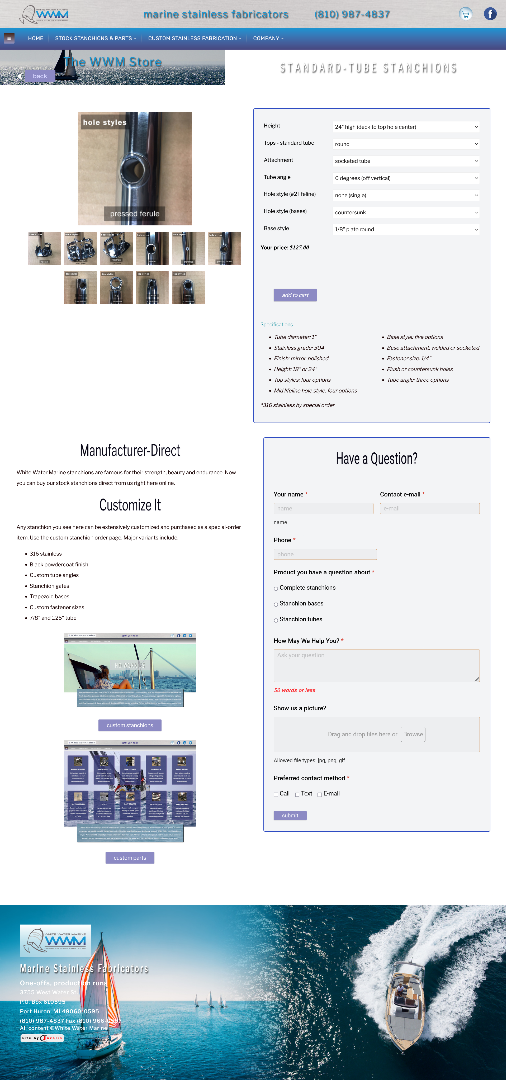
Here's an example of typical product page
Thank you,
-Jim G.
-- Joomla version -- : 4.4.2
On a product page, is there a way to display content above the product/options select? In default layout we can put specifications directly underneath and that's very helpful.
But what about at the very top? I'd like an introductory message/label to go there. The default presentation is kind of drab/generic and I'd like to be able to jazz it up.
So I suppose I would create a WSIWYG custom field. Then I could assign to a column. And then assign it to categories or individual products? What is that column name? And how can I set my new field to appear at the top of the column if used? Will that be somewhere in Views?
Here's an example of typical product page
-Jim G.
Last edit: 2 years 9 months ago by jgribble.
Please Log in or Create an account to join the conversation.

2 years 9 months ago #358734
by nicolas
Replied by nicolas on topic Further customize product pages
Hi,
That's a good idea, yes.
The column name is the name of the column where the data entered in that field will be stored in the database.
If you leave it empty, HikaShop will automatically use the field title as column name.
And yes, you can edit the view file product / show_default via the menu Display>Views to add custom code to display the content of the custom field.
The code is actually quite simple:
where xxx is to be replaced by the column name of the custom field.
That's a good idea, yes.
The column name is the name of the column where the data entered in that field will be stored in the database.
If you leave it empty, HikaShop will automatically use the field title as column name.
And yes, you can edit the view file product / show_default via the menu Display>Views to add custom code to display the content of the custom field.
The code is actually quite simple:
Code:
<?php echo $this->element->xxx; ?>
Please Log in or Create an account to join the conversation.
2 years 9 months ago - 2 years 9 months ago #358761
by jgribble
Replied by jgribble on topic Further customize product pages
Thanks for confirming, great news, but now walk us through it a little further?
Step one? Create the custom field. Let's call it "product-top."
Step two? Write a custom name for my column? Let's also use "product-top."
Step three? Assign the field to my select products. Can I also select by category?
Step four: I add <?php echo $this->element->product-top; ?> to the appropriate View.
But, which View exactly, and where in that View Php code? Could you be more specific with this last step?
Also, this is a good idea, and I hope you'll consider adding it to your list of built-in custom field options.
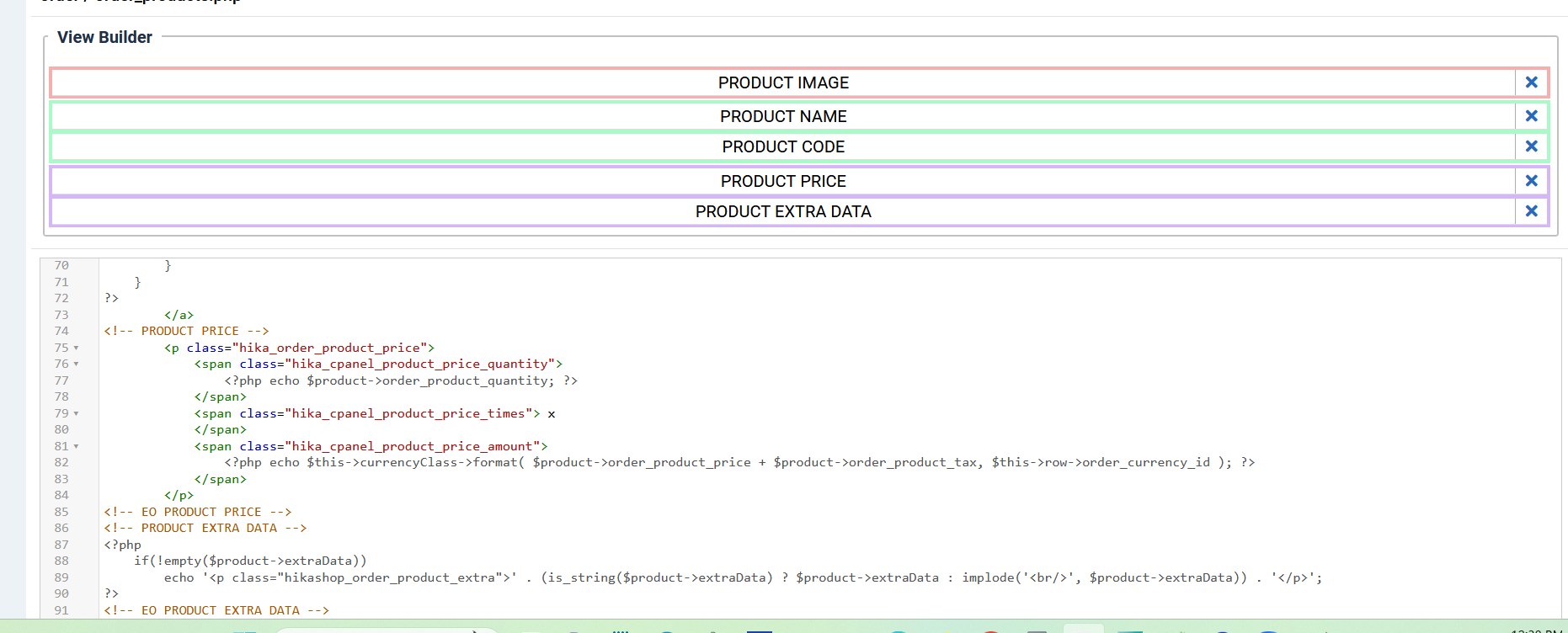
Is this where I would add the column in Php? Would appreciate some detailed guidance. I want the field to display in the same block as "price," directly above.
-Jim G.
Step one? Create the custom field. Let's call it "product-top."
Step two? Write a custom name for my column? Let's also use "product-top."
Step three? Assign the field to my select products. Can I also select by category?
Step four: I add <?php echo $this->element->product-top; ?> to the appropriate View.
But, which View exactly, and where in that View Php code? Could you be more specific with this last step?
Also, this is a good idea, and I hope you'll consider adding it to your list of built-in custom field options.
Is this where I would add the column in Php? Would appreciate some detailed guidance. I want the field to display in the same block as "price," directly above.
-Jim G.
Last edit: 2 years 9 months ago by jgribble.
Please Log in or Create an account to join the conversation.
2 years 9 months ago - 2 years 9 months ago #358766
by nicolas
Replied by nicolas on topic Further customize product pages
Hi,
And as I said, it should be the view product / show_default
Here is a documentation on view customization:
www.hikashop.com/support/documentation/1...-display.html#layout
Yes.Step one? Create the custom field. Let's call it "product-top."
don't use a "-" for the column name. That won't work. use producttop instead of exampleStep two? Write a custom name for my column? Let's call also use "product-top."
You don't need to do that. Leave it for all the products.Step three? Assign the field to my select products. Can I also select by category?
Yes. without the "-"Step four: I add <?php echo $this->element->product-top; ?> to the appropriate View.
That view, as well as all the other views of HikaShop, can be edited via the menu Display>Views, as I was saying.But, which View exactly, and where in that View Php code? Could you be more specific with this last step?
And as I said, it should be the view product / show_default
Here is a documentation on view customization:
www.hikashop.com/support/documentation/1...-display.html#layout
Yes, that's the place.Is this where I would add the column in Php? Would appreciate some detailed guidance. I want the field to display in the same block as "price," directly above.
Last edit: 2 years 9 months ago by nicolas.
Please Log in or Create an account to join the conversation.
2 years 9 months ago #358779
by jgribble
Replied by jgribble on topic Further customize product pages
Yes, all sounds great, I know not to use the quotes.
I will make a backup and give it a try tonite.
Appreciate the detailed response.
Please do consider adding this to the preselectable system defaults,
-JG
I will make a backup and give it a try tonite.
Appreciate the detailed response.
Please do consider adding this to the preselectable system defaults,
-JG
Please Log in or Create an account to join the conversation.
2 years 9 months ago - 2 years 9 months ago #358781
by jgribble
Replied by jgribble on topic Further customize product pages
This did work great, thank you. Here's an example.
jimg74.sg-host.com/buy-j35-lifeline-stanchions
Am I assured that layout edits such as this will not be overwritten by Hika updates? I believe so.
-JG
jimg74.sg-host.com/buy-j35-lifeline-stanchions
Am I assured that layout edits such as this will not be overwritten by Hika updates? I believe so.
-JG
Last edit: 2 years 9 months ago by jgribble.
The following user(s) said Thank You: nicolas
Please Log in or Create an account to join the conversation.
2 years 9 months ago #358808
by nicolas
Replied by nicolas on topic Further customize product pages
Indeed.
View overrides are stored in the folder templates/YOUR_TEMPLATE/html/com_hikashop/
They are not affected by updates so you won't lose them when you update your HikaShop in the future.
And if you change your Joomla template in the future, you can just copy the view overrides from the old template to the new one.
View overrides are stored in the folder templates/YOUR_TEMPLATE/html/com_hikashop/
They are not affected by updates so you won't lose them when you update your HikaShop in the future.
And if you change your Joomla template in the future, you can just copy the view overrides from the old template to the new one.
Please Log in or Create an account to join the conversation.
2 years 9 months ago #358809
by jgribble
Replied by jgribble on topic Further customize product pages
So, template updates will wipe these out? I guess it's not an issue if we know that and plan for it.
-Jim G.
-Jim G.
Please Log in or Create an account to join the conversation.
2 years 9 months ago #358811
by nicolas
Replied by nicolas on topic Further customize product pages
The short answer is most likely not.
The long answer is that it depends on the template.
If your template already had an override for product / show_default, then when you update the template, it will update the override file too. And thus if you modify the already existing view override, you would lose it when updating the template. And even in that case, Joomla introduced child templates a while ago which allows you to create overrides of view overrides (we talked about this here : www.hikashop.com/forum/5-support-en-fran...template/358556.html ).
But if your template doesn't has an override for that view file, then updating the template won't change anything for these overrides and you won't have anything to do.
The long answer is that it depends on the template.
If your template already had an override for product / show_default, then when you update the template, it will update the override file too. And thus if you modify the already existing view override, you would lose it when updating the template. And even in that case, Joomla introduced child templates a while ago which allows you to create overrides of view overrides (we talked about this here : www.hikashop.com/forum/5-support-en-fran...template/358556.html ).
But if your template doesn't has an override for that view file, then updating the template won't change anything for these overrides and you won't have anything to do.
Please Log in or Create an account to join the conversation.
2 years 9 months ago - 2 years 9 months ago #358823
by jgribble
Replied by jgribble on topic Further customize product pages
Thanks, I will have to study this further. I am aware of it but never had reason to use it until now.
The solution would be for you to add this field as a permanent default choice to the Hikashop core. I think it would be very welcome.
And now, I would like to go one better.
While it was a simple matter to add the field to the View PHP, I can only apply inline style.
I am not sure how Hikashop works but usually blocks have to be defined in a master file titled something like blocks.php. This gives a CSS class name to all our layout building blocks. Now we can add CSS style to the block via our custom.css file.
So that is what I want to do.
Then as the store grows, if I want to adjust style of all the product header blocks, I just do it one place, fast, easy. Just like already I can with all your default layout blocks.
Is this how? www.hikashop.com/home/blog/481-hikashop-4-5-1.html#prod
Might work, but would I have to do it for every product individually? Seems cumbersome.
Again, thanks.
-Jim G.
The solution would be for you to add this field as a permanent default choice to the Hikashop core. I think it would be very welcome.
And now, I would like to go one better.
While it was a simple matter to add the field to the View PHP, I can only apply inline style.
I am not sure how Hikashop works but usually blocks have to be defined in a master file titled something like blocks.php. This gives a CSS class name to all our layout building blocks. Now we can add CSS style to the block via our custom.css file.
So that is what I want to do.
Then as the store grows, if I want to adjust style of all the product header blocks, I just do it one place, fast, easy. Just like already I can with all your default layout blocks.
Is this how? www.hikashop.com/home/blog/481-hikashop-4-5-1.html#prod
Might work, but would I have to do it for every product individually? Seems cumbersome.
Again, thanks.
-Jim G.
Last edit: 2 years 9 months ago by jgribble.
Please Log in or Create an account to join the conversation.
2 years 9 months ago #358837
by nicolas
Replied by nicolas on topic Further customize product pages
Hi,
What you linked to is the drag & drop interface to customize the product edit form in the backend.
So if you want to customize the frontend, it won't help you.
What you're talking about is a drag and drop to customize the views of the frontend.
HikaShop actually comes with this.
If you go in the menu Display>Views and edit the product / show_default view file, you can see the view builder's drag & drop interface in order to swap the place of the different elements:
www.hikashop.com/home/blog/471-hikashop-4-4-3.html#drag
In there, you have a block "CUSTOM PRODUCT FIELDS" which displays all the custom product fields.
If you want to add an extra block for your new custom field, instead of
, you could use:
and the block "MY XXX FIELD" would be added to the drag & drop view builder interface of the product details page.
In the future, we would like to add a "new" button which would allow you to add new blocks there so that you would be able to do it without having to write any code.
What you linked to is the drag & drop interface to customize the product edit form in the backend.
So if you want to customize the frontend, it won't help you.
What you're talking about is a drag and drop to customize the views of the frontend.
HikaShop actually comes with this.
If you go in the menu Display>Views and edit the product / show_default view file, you can see the view builder's drag & drop interface in order to swap the place of the different elements:
www.hikashop.com/home/blog/471-hikashop-4-4-3.html#drag
In there, you have a block "CUSTOM PRODUCT FIELDS" which displays all the custom product fields.
If you want to add an extra block for your new custom field, instead of
Code:
<?php echo $this->element->xxx; ?>
Code:
<!-- MY XXX FIELD -->
<?php echo $this->element->xxx; ?>
<!-- EO MY XXX FIELD -->
In the future, we would like to add a "new" button which would allow you to add new blocks there so that you would be able to do it without having to write any code.
Please Log in or Create an account to join the conversation.
2 years 9 months ago - 2 years 9 months ago #358859
by jgribble
Replied by jgribble on topic Further customize product pages
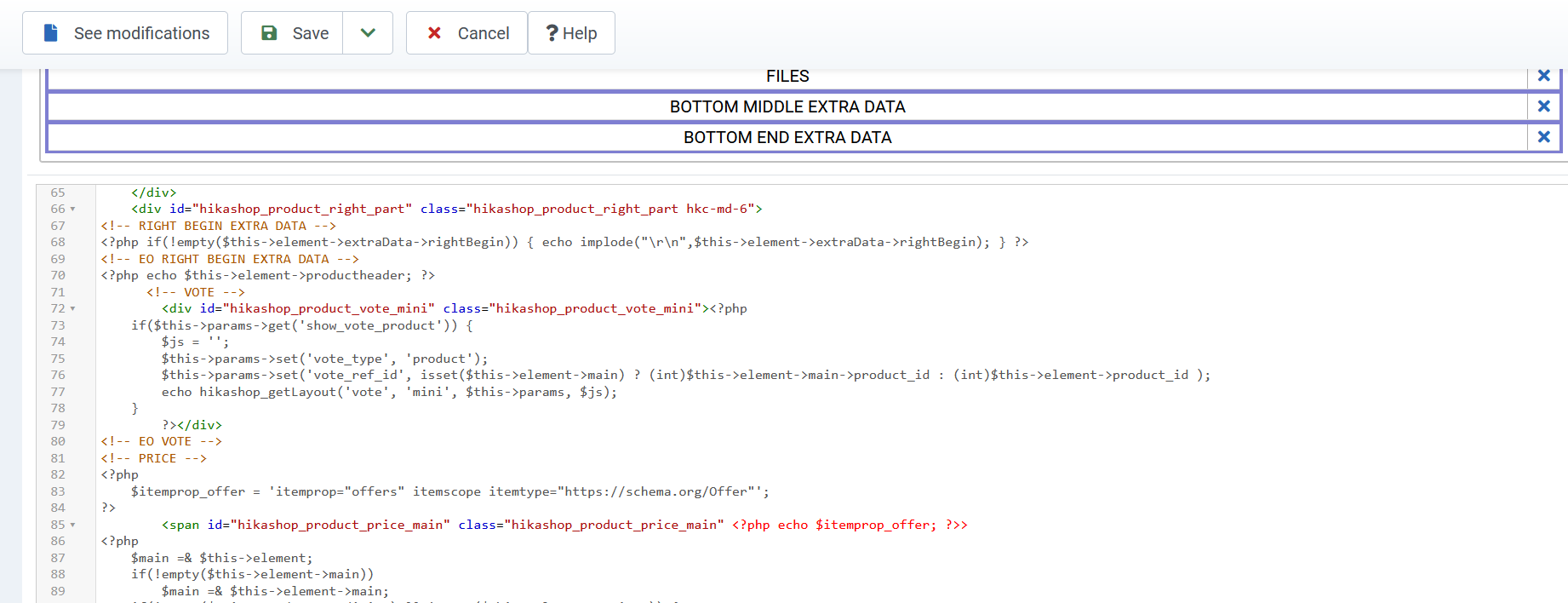
So, I got it working by adding this: <?php echo $this->element->productheader; ?> Screenshot attached.
Instead, I should add this?
<!-- MY productheader FIELD -->
<?php echo $this->element->productheader; ?>
<!-- EO MY productheader FIELD -->
In the same place in the PHP code?
At views/mytemplate/products show default?
And this adds an actual field instead of just an inline element?
And do I have it right that I am only customizing the default layout?
The field will not publish if I switch to tabular layout?
Thanks again, groping toward a full understanding.
The less coding you require, the more subscriptions you will sell.
-JG
Instead, I should add this?
<!-- MY productheader FIELD -->
<?php echo $this->element->productheader; ?>
<!-- EO MY productheader FIELD -->
In the same place in the PHP code?
At views/mytemplate/products show default?
And this adds an actual field instead of just an inline element?
And do I have it right that I am only customizing the default layout?
The field will not publish if I switch to tabular layout?
Thanks again, groping toward a full understanding.
The less coding you require, the more subscriptions you will sell.
-JG
Last edit: 2 years 9 months ago by jgribble.
Please Log in or Create an account to join the conversation.
2 years 8 months ago #358867
by nicolas
Replied by nicolas on topic Further customize product pages
Hi,
You need to use upper case characters only for the block limitation tags.
So it should be:
And yes, in the same place.
You need to use upper case characters only for the block limitation tags.
So it should be:
Code:
<!-- MY PRODUCTHEADER FIELD -->
<?php echo $this->element->productheader; ?>
<!-- EO MY PRODUCTHEADER FIELD -->
And yes, in the same place.
I'm not sure what you mean by this ?And this adds an actual field instead of just an inline element?
That's correct.And do I have it right that I am only customizing the default layout?
The field will not publish if I switch to tabular layout?
Please Log in or Create an account to join the conversation.
2 years 8 months ago #358891
by jgribble
Replied by jgribble on topic Further customize product pages
Thank you, I will give it a try. Excuse my PHP. I have only a basic working knowledge.
My question was, will this create a CSS classname "productheader," which I will be able to style in custom.css folder?
I think so.
-Jim Gribble
My question was, will this create a CSS classname "productheader," which I will be able to style in custom.css folder?
I think so.
-Jim Gribble
Please Log in or Create an account to join the conversation.
2 years 8 months ago #358893
by nicolas
Replied by nicolas on topic Further customize product pages
No, it won't. If you want to do this, you need to add a div around it.
For example:
For example:
Code:
<!-- MY PRODUCTHEADER FIELD -->
<div class="productheader">
<?php echo $this->element->productheader; ?>
</div>
<!-- EO MY PRODUCTHEADER FIELD -->
Please Log in or Create an account to join the conversation.
2 years 8 months ago #358903
by jgribble
Replied by jgribble on topic Further customize product pages
Looks perfect, thank you!
Please Log in or Create an account to join the conversation.
Time to create page: 0.153 seconds