
- Posts: 121
- Thank you received: 2
HikaShop search bar
- andrewwinkler
-
 Topic Author
- Offline
Less
More
5 years 7 months ago - 5 years 7 months ago #329850
by andrewwinkler
HikaShop search bar was created by andrewwinkler
-- Joomla version -- : 3.9.23
-- PHP version -- : 7.3.25
-- Browser(s) name and version -- : Firefox
Does HikaShop have a search similar to the one on eBay or Amazon? I've created a module position above the main content area where I place the standard Joomla SmartSearch module with the HikaShop search plugin enabled. However, the result of that search is no way near as fancy as what I get on Amazon, eBay or even some other online garden shops, e.g. www.hydroponicsguru.com.au/
When I search there, I get a grid of thumbnails of the products and their prices. Please tell me that I can and how to achieve the same thing with HikaShop.
-- PHP version -- : 7.3.25
-- Browser(s) name and version -- : Firefox
Does HikaShop have a search similar to the one on eBay or Amazon? I've created a module position above the main content area where I place the standard Joomla SmartSearch module with the HikaShop search plugin enabled. However, the result of that search is no way near as fancy as what I get on Amazon, eBay or even some other online garden shops, e.g. www.hydroponicsguru.com.au/
When I search there, I get a grid of thumbnails of the products and their prices. Please tell me that I can and how to achieve the same thing with HikaShop.
Last edit: 5 years 7 months ago by andrewwinkler.
Please Log in or Create an account to join the conversation.

5 years 7 months ago #329874
by nicolas
Replied by nicolas on topic HikaShop search bar
Hi,
There are three ways to search for products:
- using the Joomla search module which will use the standard search system of Joomla and the plugins of the group "search", including the Hikashop Products search plugin. When using that module, you won't have auto-complete and suggestions. You'll have to click on the search button after entering your text to see a list of matching results, which can be HikaShop products or Joomla articles or other elements supported by the search plugins you've activated.
- using the Joomla search search module. It will use the plugins of the group "finder". This requires first to index the products via the smart search component in your backend. This module can display suggestions and if you validate the search, you'll see a list of matching results, which can be HikaShop products or Joomla articles or other elements supported by the finder plugins you've activated.
- using HikaShop filter system ( www.hikashop.com/support/documentation/1...-filter-listing.html ) and the HikaShop filter module. There are three main advantages of that solution. The first is that it searches only on products and displays the results as a normal HikaShop products listing, so the search results will look good compared to the search results of the two previous methods. The second is that if you activate the auto submit setting of a text filter, it will automatically refresh the search results while you type in it. The third is that on top of a text input field, you can have dropdowns, radios, etc to propose multi criteria searches to your customers in order to find what they want.
What you have with the example you provided can be done with HikaShop filters but not with the smart search or search provided by Joomla.
There are three ways to search for products:
- using the Joomla search module which will use the standard search system of Joomla and the plugins of the group "search", including the Hikashop Products search plugin. When using that module, you won't have auto-complete and suggestions. You'll have to click on the search button after entering your text to see a list of matching results, which can be HikaShop products or Joomla articles or other elements supported by the search plugins you've activated.
- using the Joomla search search module. It will use the plugins of the group "finder". This requires first to index the products via the smart search component in your backend. This module can display suggestions and if you validate the search, you'll see a list of matching results, which can be HikaShop products or Joomla articles or other elements supported by the finder plugins you've activated.
- using HikaShop filter system ( www.hikashop.com/support/documentation/1...-filter-listing.html ) and the HikaShop filter module. There are three main advantages of that solution. The first is that it searches only on products and displays the results as a normal HikaShop products listing, so the search results will look good compared to the search results of the two previous methods. The second is that if you activate the auto submit setting of a text filter, it will automatically refresh the search results while you type in it. The third is that on top of a text input field, you can have dropdowns, radios, etc to propose multi criteria searches to your customers in order to find what they want.
What you have with the example you provided can be done with HikaShop filters but not with the smart search or search provided by Joomla.
Please Log in or Create an account to join the conversation.
5 years 7 months ago #330068
by Awards4u
Replied by Awards4u on topic HikaShop search bar
Hi Nicolas,
Would you have an example of this search option with filters from starting to end?
Both Search and smart search won't work for me.
Thanks
Would you have an example of this search option with filters from starting to end?
Both Search and smart search won't work for me.
Thanks
Please Log in or Create an account to join the conversation.
5 years 7 months ago #330076
by nicolas
Replied by nicolas on topic HikaShop search bar
Hi,
You can see an example on our demo website:
demo.hikashop.com/index.php/en/
There, you have a filter module on the left side and you can use it to search products.
For example, you can search "shoe" or "car"
You can see an example on our demo website:
demo.hikashop.com/index.php/en/
There, you have a filter module on the left side and you can use it to search products.
For example, you can search "shoe" or "car"
Please Log in or Create an account to join the conversation.
5 years 7 months ago #330098
by Awards4u
Replied by Awards4u on topic HikaShop search bar
Hi,
For some reason I can't get it to work. I don't have any documentation for Hikashop Filtering Module.
Please see the attachment and let me know if you see anything wrong.
Thank you for all the help.
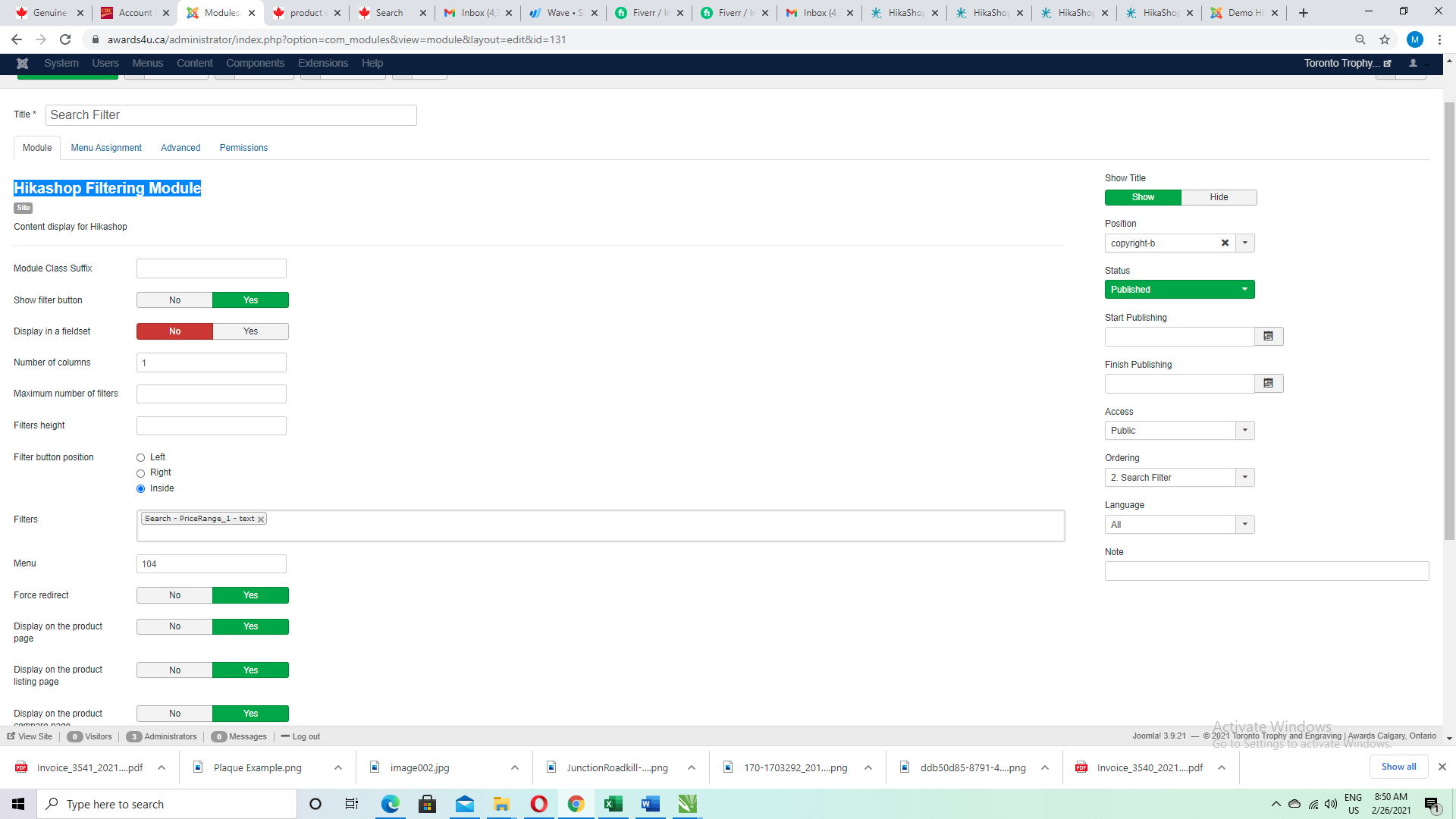
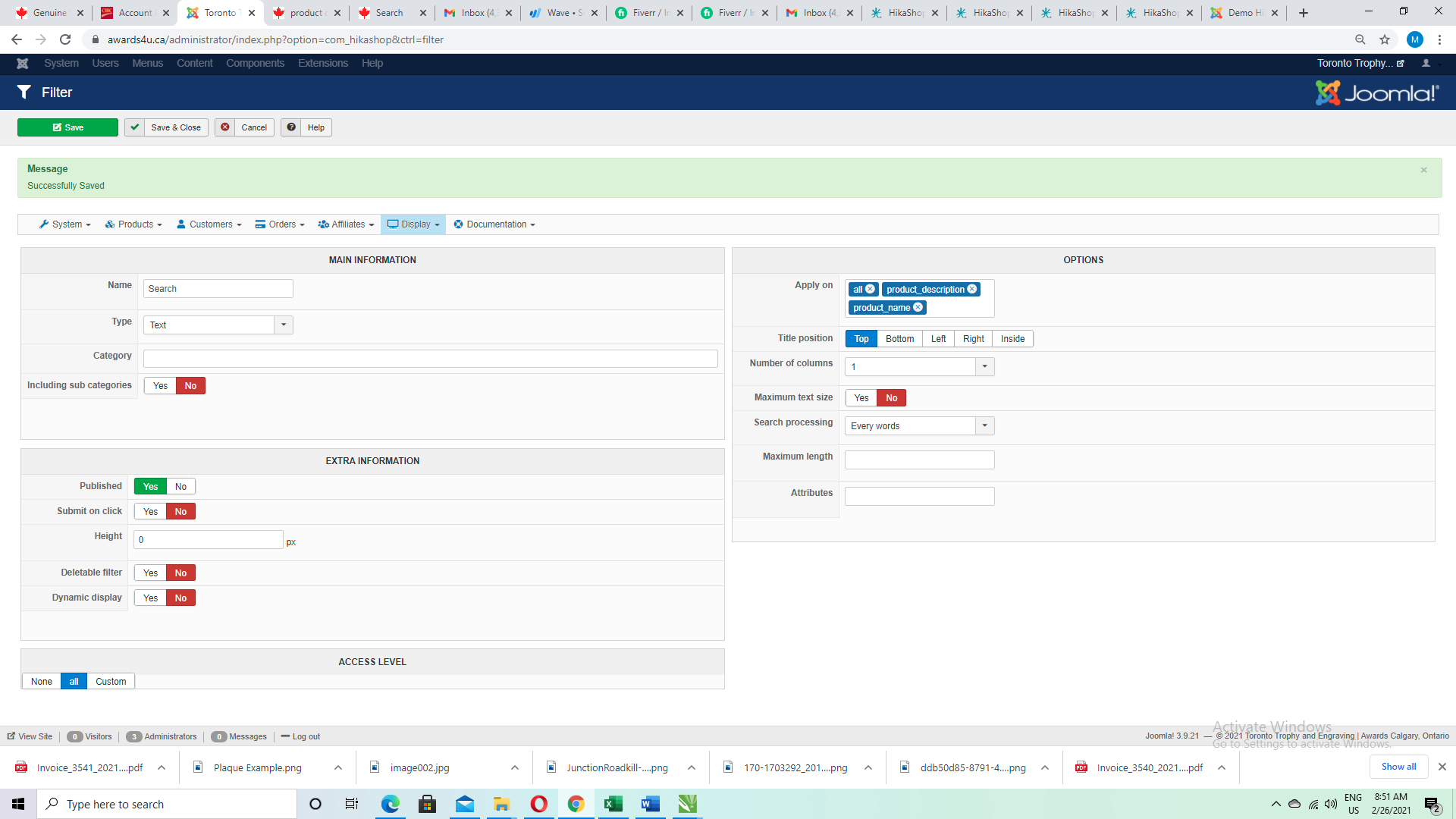
For some reason I can't get it to work. I don't have any documentation for Hikashop Filtering Module.
Please see the attachment and let me know if you see anything wrong.
Thank you for all the help.
Please Log in or Create an account to join the conversation.

5 years 7 months ago - 5 years 7 months ago #330101
by Philip
Replied by Philip on topic HikaShop search bar
Hello,
Can you be more specific about what don't work ? Does your search by product name find no results ? Don't display ? Leads to an error ?
From your elements, maybe we have a theory (but can't be sure of it) maybe you haven't select the correct Filter method, see your screenshot annotated by myself :
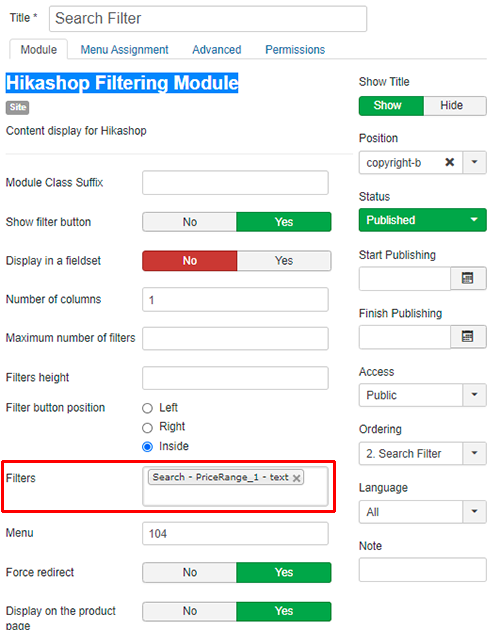
The red bordered part can be set with several different filter method, and from what I can see the current selected one is about price range, and at least isn't linked to the filter method in your other screenshot.
Hope this will help you to progress on your current issue.
Regards
Can you be more specific about what don't work ? Does your search by product name find no results ? Don't display ? Leads to an error ?
From your elements, maybe we have a theory (but can't be sure of it) maybe you haven't select the correct Filter method, see your screenshot annotated by myself :
The red bordered part can be set with several different filter method, and from what I can see the current selected one is about price range, and at least isn't linked to the filter method in your other screenshot.
Hope this will help you to progress on your current issue.
Regards
Last edit: 5 years 7 months ago by Philip.
Please Log in or Create an account to join the conversation.
5 years 7 months ago - 5 years 7 months ago #330113
by Awards4u
Replied by Awards4u on topic HikaShop search bar
Hi, Yes sorry I'm not getting an results. It says no products found.
Please see attached. I did change that to search. However, it still didn't work. Let me know if you have any other ideas.
I have searched for ideas but can't find the problem.
Let me know also if you have any documentation for the filter module.
Please see attached. I did change that to search. However, it still didn't work. Let me know if you have any other ideas.
I have searched for ideas but can't find the problem.
Let me know also if you have any documentation for the filter module.
Last edit: 5 years 7 months ago by Awards4u.
Please Log in or Create an account to join the conversation.
5 years 7 months ago #330150
by nicolas
Replied by nicolas on topic HikaShop search bar
Hi,
In the "menu" setting of your filter module, you've entered 104.
This needs to be the id of a menu item of the type "products listing" configured to display all the products of your shop.
Then, the filter will apply on the products from that listing.
The fact that you get "no products found" when you use the filter is probably because this menu item with the id 104 is not configured as such, so please check its settings via the Joomla menu manager.
In the "menu" setting of your filter module, you've entered 104.
This needs to be the id of a menu item of the type "products listing" configured to display all the products of your shop.
Then, the filter will apply on the products from that listing.
The fact that you get "no products found" when you use the filter is probably because this menu item with the id 104 is not configured as such, so please check its settings via the Joomla menu manager.
Please Log in or Create an account to join the conversation.
5 years 7 months ago #330198
by Awards4u
Replied by Awards4u on topic HikaShop search bar
Hi,
I used filter module 104 for product listing. I thought it would work. I have tried to use other filter module however, I'm still not getting the results.
Do I put in all the id's? Not sure how to fix the problem so products would show up.
Thanks
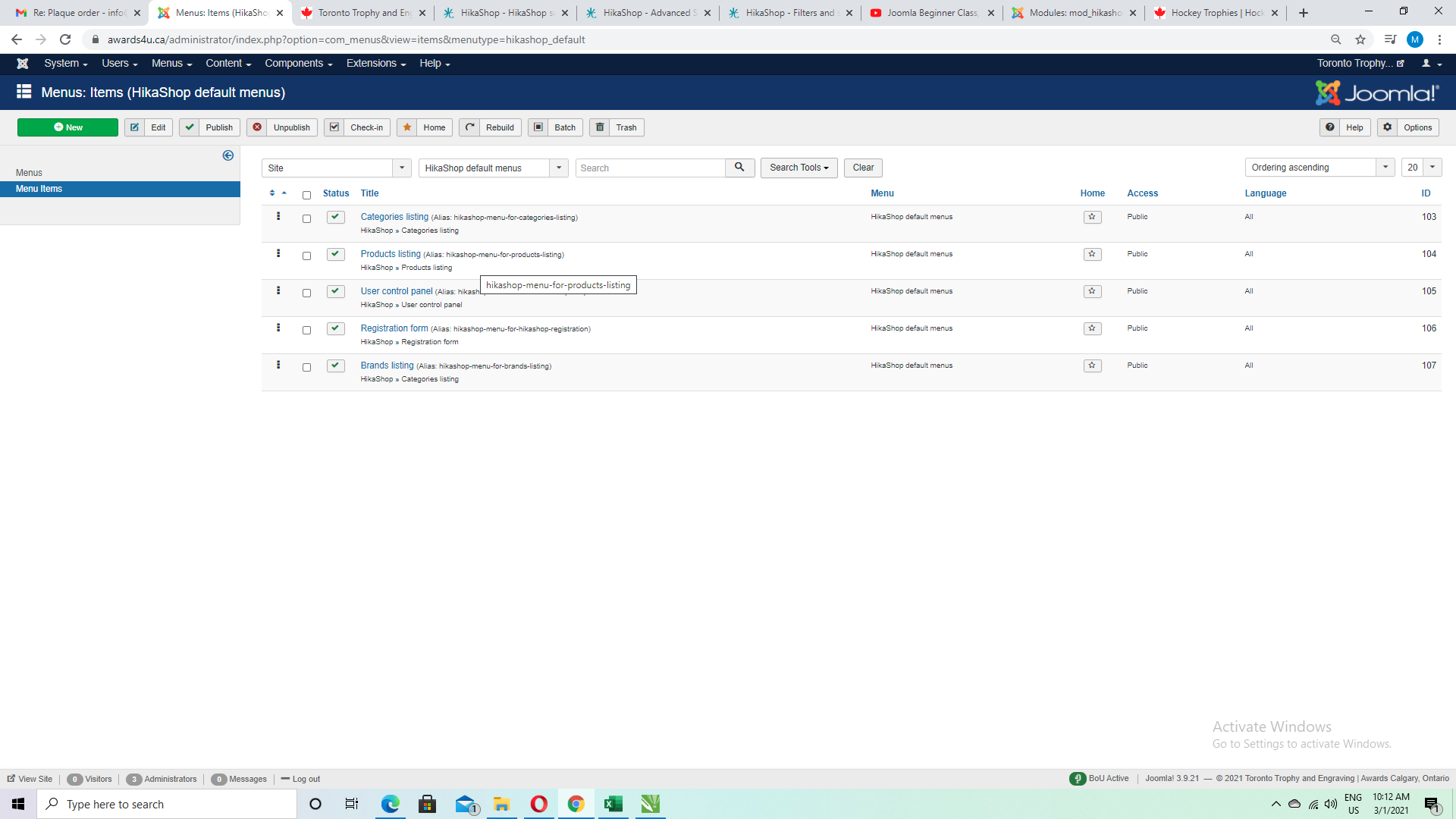
I used filter module 104 for product listing. I thought it would work. I have tried to use other filter module however, I'm still not getting the results.
Do I put in all the id's? Not sure how to fix the problem so products would show up.
Thanks
Please Log in or Create an account to join the conversation.
5 years 7 months ago #330200
by nicolas
Replied by nicolas on topic HikaShop search bar
Hi,
No only one id is good.
The problem is probably with the settings of the menu item.
Please provide a screenshot of the settings under the products options tab of that menu item and the URL to the page with the search filter and I should be able to tell you what's wrong.
No only one id is good.
The problem is probably with the settings of the menu item.
Please provide a screenshot of the settings under the products options tab of that menu item and the URL to the page with the search filter and I should be able to tell you what's wrong.
Please Log in or Create an account to join the conversation.
5 years 7 months ago #330218
by Awards4u
Replied by Awards4u on topic HikaShop search bar
Hi,
Please see the screen shots. I can't find setting. Not sure what I'm doing wrong.
website is www.awards4u.ca
Please see the screen shots. I can't find setting. Not sure what I'm doing wrong.
website is www.awards4u.ca
Please Log in or Create an account to join the conversation.
5 years 7 months ago #330229
by nicolas
Replied by nicolas on topic HikaShop search bar
Hi,
Please go in the Joomla menu manager and search for the menu item with the alias "hikashop-menu-for-products-listing". Edit it, and provide a screenshot of the settings under the "products options" tab. That's what I need to see as I think that's where the problem is.
Please go in the Joomla menu manager and search for the menu item with the alias "hikashop-menu-for-products-listing". Edit it, and provide a screenshot of the settings under the "products options" tab. That's what I need to see as I think that's where the problem is.
Please Log in or Create an account to join the conversation.
5 years 7 months ago - 5 years 7 months ago #330241
by Awards4u
Replied by Awards4u on topic HikaShop search bar
Last edit: 5 years 7 months ago by Awards4u.
Please Log in or Create an account to join the conversation.
5 years 7 months ago #330246
by nicolas
Replied by nicolas on topic HikaShop search bar
Hi,
Thanks. I see two issues with the settings of that menu item:
- set the "sub elements filter" setting to "all sub elements"
- deactivate the "recently viewed" setting
It should then display properly.
Thanks. I see two issues with the settings of that menu item:
- set the "sub elements filter" setting to "all sub elements"
- deactivate the "recently viewed" setting
It should then display properly.
Please Log in or Create an account to join the conversation.
5 years 7 months ago #330348
by Awards4u
Replied by Awards4u on topic HikaShop search bar
Thank you so much. That worked. Just two more things.
Please see the screen shot.
1. It shows Filter on the right side. Is there a way to remove it? I have marked it in red.
2. The search shows up in each category. Not sure what I did and it came. Any way to get ride of it. I have marked it in red.
Thanks you for all your help.
www.awards4u.ca
Please see the screen shot.
1. It shows Filter on the right side. Is there a way to remove it? I have marked it in red.
2. The search shows up in each category. Not sure what I did and it came. Any way to get ride of it. I have marked it in red.
Thanks you for all your help.
www.awards4u.ca
Please Log in or Create an account to join the conversation.
5 years 7 months ago #330350
by nicolas
Replied by nicolas on topic HikaShop search bar
Hi,
1. Edit your HikaShop filter module via the Joomla modules manager and turn off the "Show filter button" setting there.
2. Edit your category / product listing menu item via the Joomla menu manager and under the "products options" tab, turn off the "Filters" setting.
1. Edit your HikaShop filter module via the Joomla modules manager and turn off the "Show filter button" setting there.
2. Edit your category / product listing menu item via the Joomla menu manager and under the "products options" tab, turn off the "Filters" setting.
Please Log in or Create an account to join the conversation.
- andrewwinkler
-
Topic Author
- Offline
Less
More
- Posts: 121
- Thank you received: 2
5 years 7 months ago #330416
by andrewwinkler
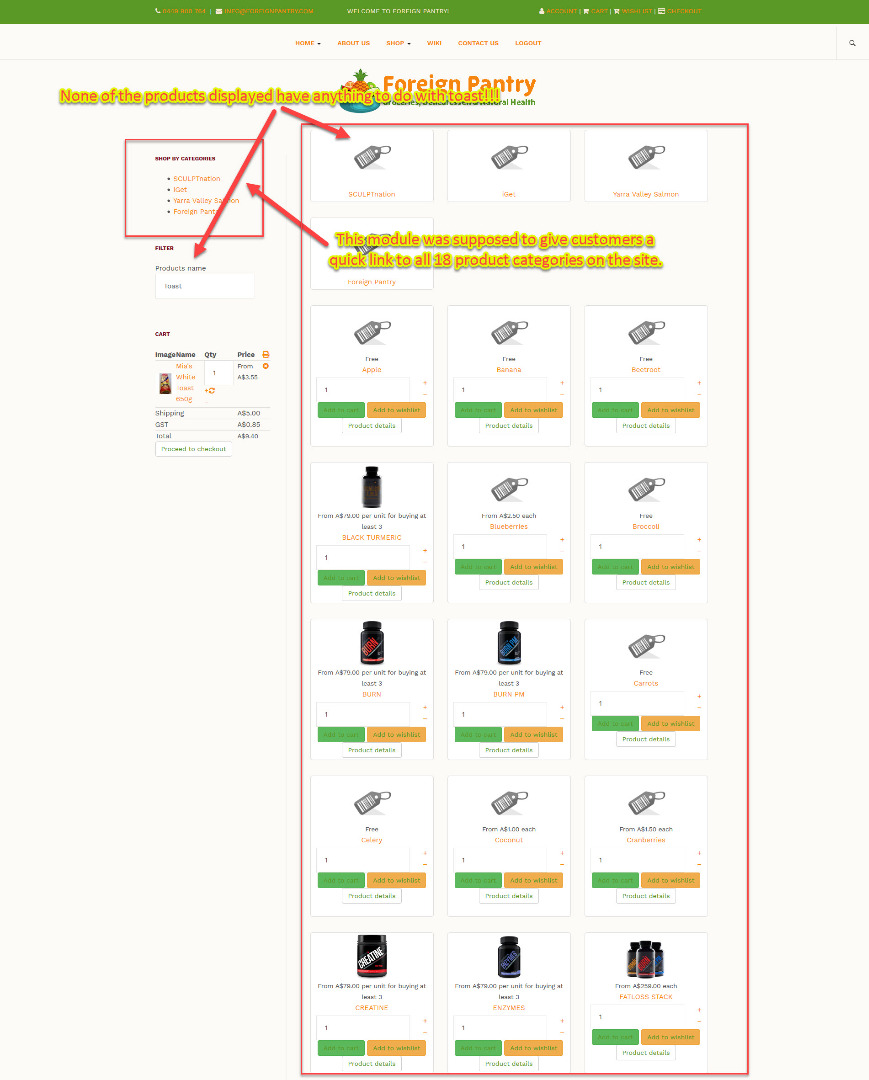
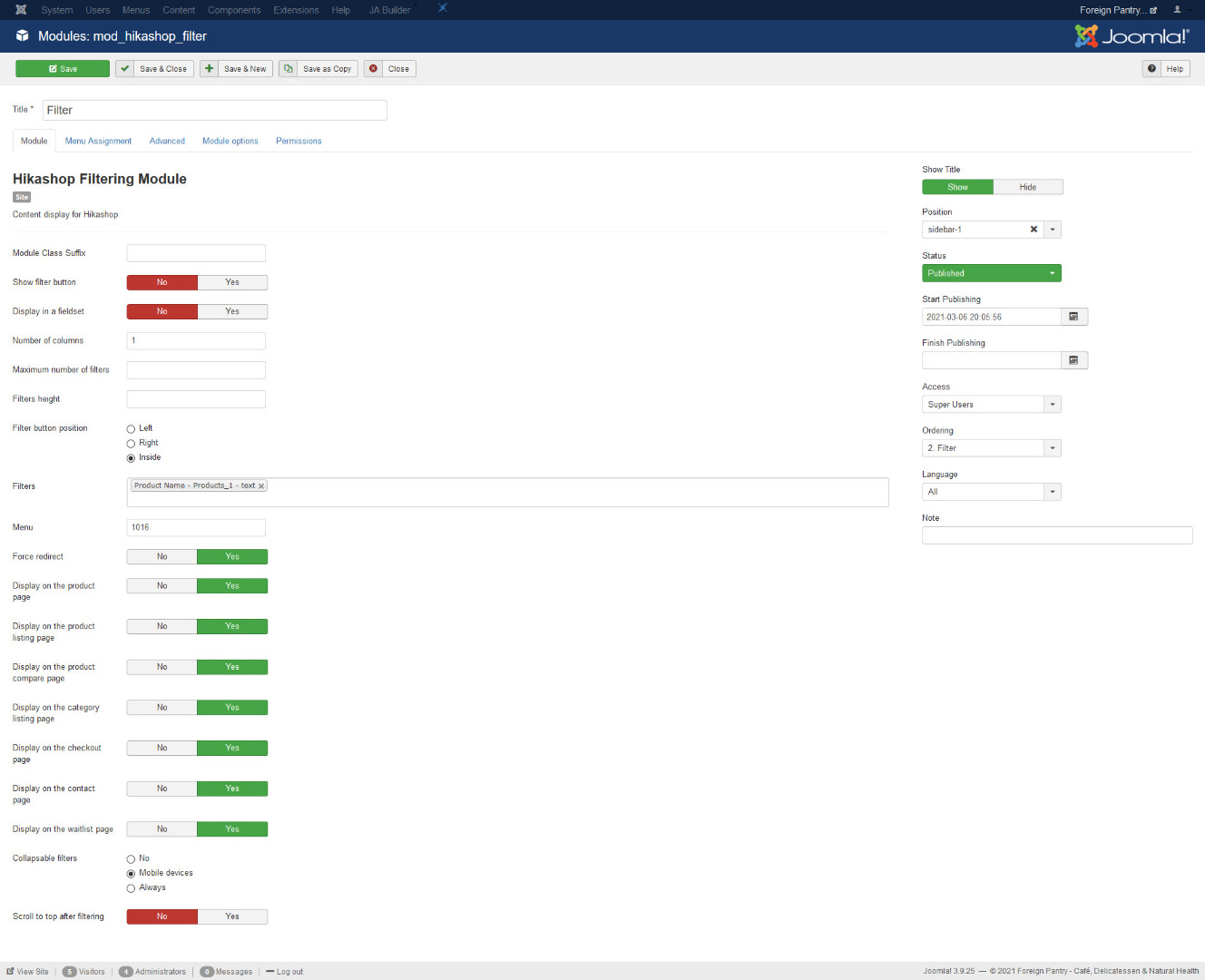
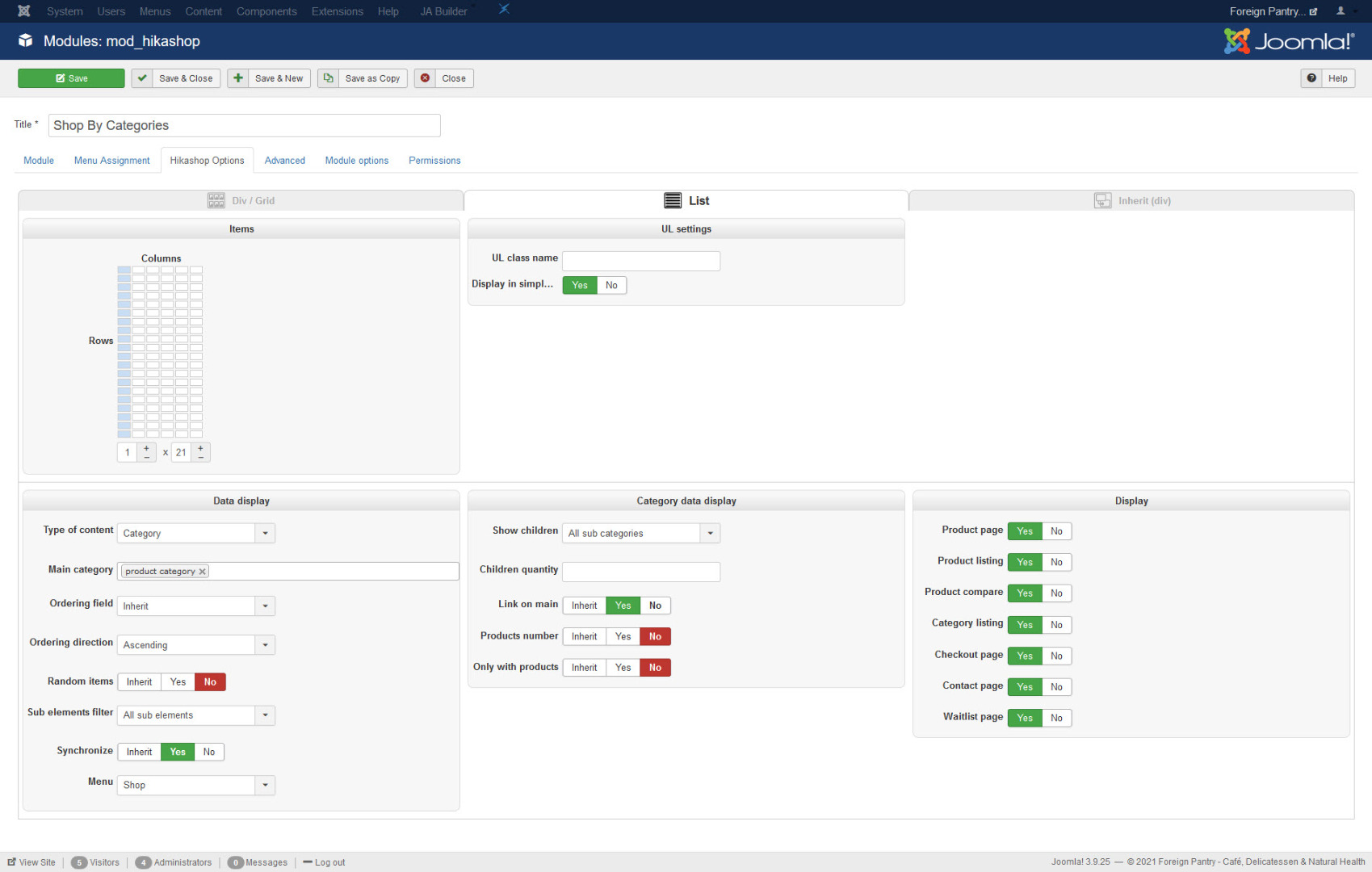
Replied by andrewwinkler on topic HikaShop search bar
Please Log in or Create an account to join the conversation.
5 years 7 months ago #330441
by nicolas
Replied by nicolas on topic HikaShop search bar
Hi,
1. For the filter, make sure that the menu item with the id 1016 (from the "menu" setting in the filter module) is of the type "HikaShop products listing" and configured to display all your products. Then, it will work. You might actually want to change that number in the "menu" setting of the module instead of changing the settings of the menu item so that you don't change a menu item that displays already like you want.
2. In the settings of your "shop by categories" module, you need to change the "sub elements filter" to "direct sub elements" as you only want the main categories in the module. Also, you need to turn off the "synchronize" setting so that it always uses the cateogry configured in the "main category" setting and not switch to the current category.
I would recommend to check this tutorial about displaying the products and categories on the frontend which talks about this and other things:
www.hikashop.com/support/documentation/3...splay-front-end.html
1. For the filter, make sure that the menu item with the id 1016 (from the "menu" setting in the filter module) is of the type "HikaShop products listing" and configured to display all your products. Then, it will work. You might actually want to change that number in the "menu" setting of the module instead of changing the settings of the menu item so that you don't change a menu item that displays already like you want.
2. In the settings of your "shop by categories" module, you need to change the "sub elements filter" to "direct sub elements" as you only want the main categories in the module. Also, you need to turn off the "synchronize" setting so that it always uses the cateogry configured in the "main category" setting and not switch to the current category.
I would recommend to check this tutorial about displaying the products and categories on the frontend which talks about this and other things:
www.hikashop.com/support/documentation/3...splay-front-end.html
The following user(s) said Thank You: andrewwinkler
Please Log in or Create an account to join the conversation.
- andrewwinkler
-
Topic Author
- Offline
Less
More
- Posts: 121
- Thank you received: 2
5 years 7 months ago #330457
by andrewwinkler
Replied by andrewwinkler on topic HikaShop search bar
The filter is fine now. I still would prefer it if there was an advanced product search for HikaShop similar to the search provided on eBay and Amazon and which is also available for Virtuemart. When the customer enters for example "toast" in the joomla search bar, it doesn't just provide a list of links to toast items in the catalogue, but formatted columns of thumbnails with "add to cart" icons and prices, similar to what you get when you enter "toast" in the filter while staying in the "bread" category.
Please Log in or Create an account to join the conversation.
5 years 7 months ago - 5 years 7 months ago #330473
by Philip
Replied by Philip on topic HikaShop search bar
Hello,
This isn't a solution provide by default in HikaShop but did you try the Smart Search module provided with Joomla ?

This isn't anymore our subject but I think that you can increase the smart search by using the Joomla Tag system.
Hope this will help you to progress and get what you need.
Regards
This isn't a solution provide by default in HikaShop but did you try the Smart Search module provided with Joomla ?
This isn't anymore our subject but I think that you can increase the smart search by using the Joomla Tag system.
Hope this will help you to progress and get what you need.
Regards
Last edit: 5 years 7 months ago by Philip.
Please Log in or Create an account to join the conversation.
Time to create page: 0.369 seconds