
- Posts: 86
- Thank you received: 2
Purchase notification email after pay
10 years 6 months ago #235872
by vilo
Purchase notification email after pay was created by vilo
-- HikaShop version -- : 2.6.2
-- Joomla version -- : 3.5.1
-- PHP version -- : 5.6.19
-- Browser(s) name and version -- : Firefox 45.0.1
Hi.
When a customer completes their purchase and get to the checkout, he is redirected to the payment platform you chose, but the notification emails are sent BEFORE the customer pays purchase on the payment gateway ...
If the customer were to repent and cancel purchase and want to return to my website, Hikashop already sent the email notification purchase, both the seller and the buyer.
Is there any way that the email is only sent once the customer has paid purchase on the payment gateway?
Thank you very much from now.
Sorry for my English.
-- Joomla version -- : 3.5.1
-- PHP version -- : 5.6.19
-- Browser(s) name and version -- : Firefox 45.0.1
Hi.
When a customer completes their purchase and get to the checkout, he is redirected to the payment platform you chose, but the notification emails are sent BEFORE the customer pays purchase on the payment gateway ...
If the customer were to repent and cancel purchase and want to return to my website, Hikashop already sent the email notification purchase, both the seller and the buyer.
Is there any way that the email is only sent once the customer has paid purchase on the payment gateway?
Thank you very much from now.
Sorry for my English.
Please Log in or Create an account to join the conversation.

10 years 6 months ago #235883
by nicolas
Replied by nicolas on topic Purchase notification email after pay
Hi,
HikaShop sends 4 emails:
- the "order admin notification" to the admin when the order is created, before the payment.
- the "order creation notification" to the customer when the order is created, before the payment.
- the "order status notification" to the customer when the order is confirmed, after the payment.
- the "payment notification" to the admin when the order is confirmed, after the payment.
So if you want to deactivate the two first, just disable them via the menu System>Emails of HikaShop.
HikaShop sends 4 emails:
- the "order admin notification" to the admin when the order is created, before the payment.
- the "order creation notification" to the customer when the order is created, before the payment.
- the "order status notification" to the customer when the order is confirmed, after the payment.
- the "payment notification" to the admin when the order is confirmed, after the payment.
So if you want to deactivate the two first, just disable them via the menu System>Emails of HikaShop.
Please Log in or Create an account to join the conversation.

10 years 2 months ago #248067
by Polleke
Replied by Polleke on topic Purchase notification email after pay
Hi Nicolas,
is this with all version of Hikashop or just the buseniss version.
I now have the essential version. .
regards Jan
i am truely struglling with this subject.
is this with all version of Hikashop or just the buseniss version.
I now have the essential version. .
regards Jan
i am truely struglling with this subject.
Please Log in or Create an account to join the conversation.
10 years 2 months ago - 10 years 2 months ago #248074
by Polleke
Replied by Polleke on topic Purchase notification email after pay
Hi
I now bought the business version.
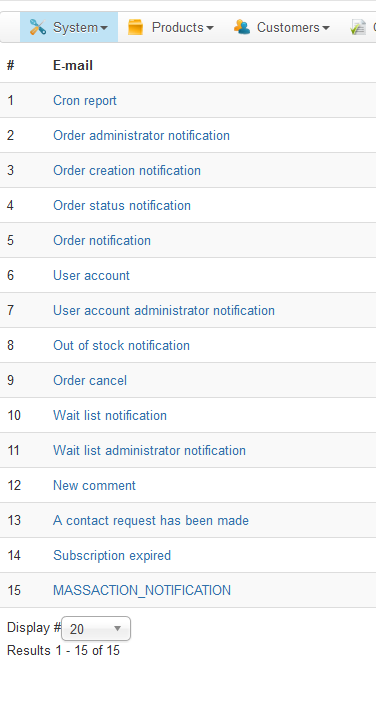
I go to System -> emails. But there is no mail called :"payment notification"
Is there an other place i should search for ?
regards
Jan
p.s. you can see at picture 1
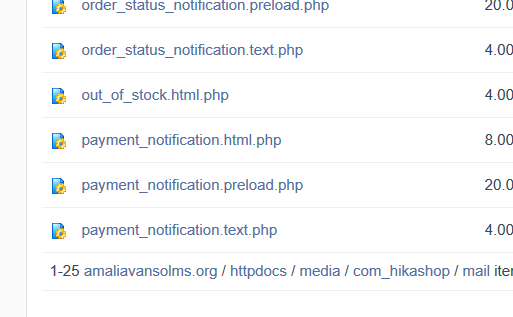
and this is the folder on the server. There the email seems to be :
I now bought the business version.
I go to System -> emails. But there is no mail called :"payment notification"
Is there an other place i should search for ?
regards
Jan
p.s. you can see at picture 1
and this is the folder on the server. There the email seems to be :
Last edit: 10 years 2 months ago by Polleke.
Please Log in or Create an account to join the conversation.

10 years 2 months ago #248076
by lousyfool
Need help with customisations of layouts, style or other site development? PM me!
(Don't forget to turn on "E-mail notification of new messages" )
Replied by lousyfool on topic Purchase notification email after pay
@Polleke:
Hi again,
The "payment notification" Nicolas is referring to is an email by the payment gateway/organisation, so it's not among the mails in the backend"Emails" page. And as per your other thread , you don't receive this anyway.
In System -> Emails you want to edit "Order status notification" -> tab "Sender Information", that's where the CC and BCC fields are for this mail.
Hi again,
The "payment notification" Nicolas is referring to is an email by the payment gateway/organisation, so it's not among the mails in the backend"Emails" page. And as per your other thread , you don't receive this anyway.
In System -> Emails you want to edit "Order status notification" -> tab "Sender Information", that's where the CC and BCC fields are for this mail.
Need help with customisations of layouts, style or other site development? PM me!
(Don't forget to turn on "E-mail notification of new messages" )
Please Log in or Create an account to join the conversation.
10 years 2 months ago #248079
by Polleke
Replied by Polleke on topic Purchase notification email after pay
Ok. i get it
So the customer should get an email after he paid.
Sorry but that is not happening.
Customer gets 1 email that the one telling that the order is created.
the administrator gets 1 email telling there is a new order created.
No more
I added my own email-adress in the BCC.
Jan
So the customer should get an email after he paid.
Sorry but that is not happening.
Customer gets 1 email that the one telling that the order is created.
the administrator gets 1 email telling there is a new order created.
No more
I added my own email-adress in the BCC.
Jan
Please Log in or Create an account to join the conversation.
10 years 2 months ago #248082
by lousyfool
Need help with customisations of layouts, style or other site development? PM me!
(Don't forget to turn on "E-mail notification of new messages" )
Replied by lousyfool on topic Purchase notification email after pay
Yes, the "created" emails you received are "Order creation notification" (to customer) and "Order administrator notification" (to admin, as the name implies).
"Order status notification" (the mail you're waiting for) will by default be sent once the order status changes e.g. to "confirmed". So, check the status of the order in the backend - what is it now?
If it's still "created", you're using an off-line payment method or one that doesn't change the status automatically, so you'll have to change the status manually in the backend. Do so: change it to "confirmed", and the emails should be sent. (Don't forget to select "Notify customer".)
"Order status notification" (the mail you're waiting for) will by default be sent once the order status changes e.g. to "confirmed". So, check the status of the order in the backend - what is it now?
If it's still "created", you're using an off-line payment method or one that doesn't change the status automatically, so you'll have to change the status manually in the backend. Do so: change it to "confirmed", and the emails should be sent. (Don't forget to select "Notify customer".)
Need help with customisations of layouts, style or other site development? PM me!
(Don't forget to turn on "E-mail notification of new messages" )
Please Log in or Create an account to join the conversation.
10 years 2 months ago #248084
by Polleke
Replied by Polleke on topic Purchase notification email after pay
Hi
the status is "confirmed" . I did not do that myself. So it happend auomaticly after paying.
But no email send.
Not to customer and not to administrator.
regards Jan
the status is "confirmed" . I did not do that myself. So it happend auomaticly after paying.
But no email send.
Not to customer and not to administrator.
regards Jan
Please Log in or Create an account to join the conversation.
10 years 2 months ago - 10 years 2 months ago #248089
by lousyfool
Need help with customisations of layouts, style or other site development? PM me!
(Don't forget to turn on "E-mail notification of new messages" )
Replied by lousyfool on topic Purchase notification email after pay
1. Which exact payment method/plugin are you using? (Previously you only mentioned "Ideal or Mistercash", but nothing more exact. And you can find elsewhere here on the forum that some 3rd-party plugins cause problems with this, like
in the last post here
.)
2. In the payment method/plugin configuration, is there a switch for notifications that is set to "no", perhaps?
3. Assuming the plugin "Hikashop Email History Plugin" was and is enabled in your site, do you have the "confirmed" mail listed in the email log under -> Customers -> Email history?
4. Are emails being sent if you change order status manually in the backend? (E.g. back to "created", and then to "confirmed" again with "Notify..." enabled.)
2. In the payment method/plugin configuration, is there a switch for notifications that is set to "no", perhaps?
3. Assuming the plugin "Hikashop Email History Plugin" was and is enabled in your site, do you have the "confirmed" mail listed in the email log under -> Customers -> Email history?
4. Are emails being sent if you change order status manually in the backend? (E.g. back to "created", and then to "confirmed" again with "Notify..." enabled.)
Need help with customisations of layouts, style or other site development? PM me!
(Don't forget to turn on "E-mail notification of new messages" )
Last edit: 10 years 2 months ago by lousyfool. Reason: link
Please Log in or Create an account to join the conversation.
10 years 2 months ago #248092
by Polleke
Replied by Polleke on topic Purchase notification email after pay
Hi here answers
1) i use ccideal there the problem occurs.
2) Yes there is a button but that does not trigger the payment notification email. You only get an email saying payment is received. But without any information of the customer or order.
3) No there is not
4) i changed it back to create and after that to confirmed. After that i receive the confirm email.
in the other post i read that i better change to JDIdeal instead of ccIdeal
regards Jan
1) i use ccideal there the problem occurs.
2) Yes there is a button but that does not trigger the payment notification email. You only get an email saying payment is received. But without any information of the customer or order.
3) No there is not
4) i changed it back to create and after that to confirmed. After that i receive the confirm email.
in the other post i read that i better change to JDIdeal instead of ccIdeal
regards Jan
Please Log in or Create an account to join the conversation.
10 years 2 months ago #248093
by lousyfool
Need help with customisations of layouts, style or other site development? PM me!
(Don't forget to turn on "E-mail notification of new messages" )
Replied by lousyfool on topic Purchase notification email after pay
Yes, all your answers are pointing to ccIdeal as the culprit.
Try a different plugin. I'll keep fingers crossed that all goes well then!
Try a different plugin. I'll keep fingers crossed that all goes well then!
Need help with customisations of layouts, style or other site development? PM me!
(Don't forget to turn on "E-mail notification of new messages" )
Please Log in or Create an account to join the conversation.
10 years 2 months ago #248101
by Polleke
Replied by Polleke on topic Purchase notification email after pay
hmmm...
well i have to look for an other ideal plugin
thanks so far
well i have to look for an other ideal plugin
thanks so far
Please Log in or Create an account to join the conversation.
3 years 2 months ago #354493
by gerryna09
Replied by gerryna09 on topic Purchase notification email after pay
If I use HikaMarket because I have multiple vendors
1) HikaMarket (Market mode FEE, Limit vendors in cart ONE VENDOR)
2) HikaMarket Paypal Adaptive Payment Plugin (PAYPAL_CLASSICAL YES)
The PAYMENT NOTIFICATION email.. is sent to the Admin or Vendor?
1) HikaMarket (Market mode FEE, Limit vendors in cart ONE VENDOR)
2) HikaMarket Paypal Adaptive Payment Plugin (PAYPAL_CLASSICAL YES)
The PAYMENT NOTIFICATION email.. is sent to the Admin or Vendor?
Please Log in or Create an account to join the conversation.
3 years 2 months ago #354494
by gerryna09
Replied by gerryna09 on topic Purchase notification email after pay
Hi Nicolas
If I use HikaMarket because I have multiple vendors
1) HikaMarket (Market mode FEE, Limit vendors in cart ONE VENDOR)
2) HikaMarket Paypal Adaptive Payment Plugin (PAYPAL_CLASSICAL YES)
The PAYMENT NOTIFICATION email.. is sent to the Admin or Vendor?
If I use HikaMarket because I have multiple vendors
1) HikaMarket (Market mode FEE, Limit vendors in cart ONE VENDOR)
2) HikaMarket Paypal Adaptive Payment Plugin (PAYPAL_CLASSICAL YES)
The PAYMENT NOTIFICATION email.. is sent to the Admin or Vendor?
Please Log in or Create an account to join the conversation.
3 years 2 months ago #354497
by nicolas
Replied by nicolas on topic Purchase notification email after pay
Hi,
The "payment notification" email is always sent to the admin.
However, with HikaMarket, there is an extra email for vendors. This extra email will be sent to each vendor with products linked to it in the order, and in that email, the vendor will only see his linked products, not the products of the other vendors.
If you limit the cart to one vendor, then the vendor will see all the products in the order in his email.
The "payment notification" email is always sent to the admin.
However, with HikaMarket, there is an extra email for vendors. This extra email will be sent to each vendor with products linked to it in the order, and in that email, the vendor will only see his linked products, not the products of the other vendors.
If you limit the cart to one vendor, then the vendor will see all the products in the order in his email.
The following user(s) said Thank You: gerryna09
Please Log in or Create an account to join the conversation.
Time to create page: 0.173 seconds