
- Posts: 164
- Thank you received: 0
Export to CSV, import to Google Shopping
- Rollerskate
-
 Topic Author
- Offline
Less
More
14 years 11 months ago #28233
by Rollerskate
Export to CSV, import to Google Shopping was created by Rollerskate
Attached is the error report from Google. I exported the .csv file from Hika Shop, and uploaded it to Google.
Pwease help
This attachment is hidden for guests.
Pwease help
This attachment is hidden for guests.
Please log in or register to see it.
Please Log in or Create an account to join the conversation.

14 years 11 months ago #28243
by nicolas
Replied by nicolas on topic Re: Export to CSV, import to Google Shopping
You can't export the CSV via the products listing and import it in Google shopping.
Google does not recognize that format.
For google shopping, you need to go in the options of the google products plugin via the joomla plugin manager and click on the download link there. It's explained in the documentation:
www.hikashop.com/en/support/documentatio...google-products.html
Google does not recognize that format.
For google shopping, you need to go in the options of the google products plugin via the joomla plugin manager and click on the download link there. It's explained in the documentation:
www.hikashop.com/en/support/documentatio...google-products.html
Please Log in or Create an account to join the conversation.
- Rollerskate
-
Topic Author
- Offline
Less
More
- Posts: 164
- Thank you received: 0
14 years 10 months ago #28334
by Rollerskate
Replied by Rollerskate on topic Re: Export to CSV, import to Google Shopping
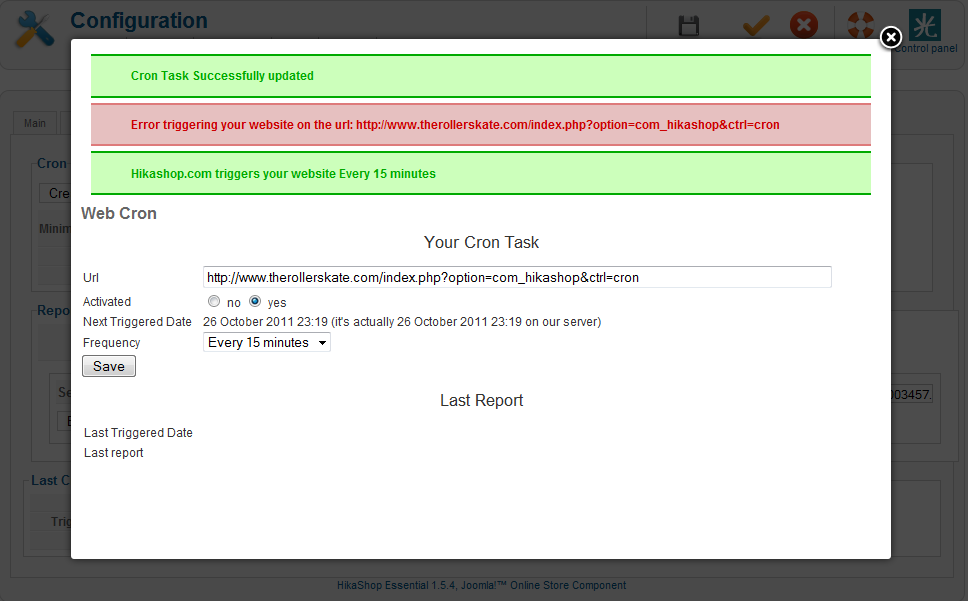
So, I setup a Cron thingy, and created it, and saved it. But I got this error.
Please Log in or Create an account to join the conversation.
14 years 10 months ago #28336
by nicolas
Replied by nicolas on topic Re: Export to CSV, import to Google Shopping
Going on
www.therollerskate.com/index.php?option=com_hikashop&ctrl=cron
I can see that your cron was triggered.
So it seems to be working.
You can check that in more details by following the documentation there:
www.hikashop.com/en/support/documentatio...cron-task.html#check
I can see that your cron was triggered.
So it seems to be working.
You can check that in more details by following the documentation there:
www.hikashop.com/en/support/documentatio...cron-task.html#check
Please Log in or Create an account to join the conversation.
- Rollerskate
-
Topic Author
- Offline
Less
More
- Posts: 164
- Thank you received: 0
14 years 10 months ago #28341
by Rollerskate
Replied by Rollerskate on topic Re: Export to CSV, import to Google Shopping
So... I got the cron and the Google Plugin working (I think).
Now all I wanna do is get it correctly integrated with Google.
It seems that Google Merchant is requiring a URL for the xml file. Where would I find that for mine?
Now all I wanna do is get it correctly integrated with Google.
It seems that Google Merchant is requiring a URL for the xml file. Where would I find that for mine?
Please Log in or Create an account to join the conversation.
14 years 10 months ago #28344
by nicolas
Replied by nicolas on topic Re: Export to CSV, import to Google Shopping
Google Merchant does not require a URL for the xml file. The xml file is uploaded automatically by your server to google's via FTP. So I'm not sure of what you're talking about.
Please Log in or Create an account to join the conversation.
- Rollerskate
-
Topic Author
- Offline
Less
More
- Posts: 164
- Thank you received: 0
14 years 10 months ago #28379
by Rollerskate
Replied by Rollerskate on topic Re: Export to CSV, import to Google Shopping
Ah... I was looking at "Data Feeds", which I assumed is what I needed. But apparently not, that may be just for bulk uploads.
I did find the FTP area in Google Merchant under Settings. I'm guessing this is where my FTP will have to be set. Will I need to create a new FTP account direct that to any specific folder? If so, which one?
I did find the FTP area in Google Merchant under Settings. I'm guessing this is where my FTP will have to be set. Will I need to create a new FTP account direct that to any specific folder? If so, which one?
Please Log in or Create an account to join the conversation.
14 years 10 months ago #28416
by nicolas
Replied by nicolas on topic Re: Export to CSV, import to Google Shopping
You indeed need to create a FTP account in Google Merchant. Then, you can enter the credentials of that account in the options of the plugin so that it can connect to the FTP server of Google to upload the xml file automatically.
I'm not sure why you're talking about folders. I don't remember about a folder setting for that.
I'm not sure why you're talking about folders. I don't remember about a folder setting for that.
Please Log in or Create an account to join the conversation.
- Rollerskate
-
Topic Author
- Offline
Less
More
- Posts: 164
- Thank you received: 0
14 years 10 months ago #28431
by Rollerskate
Replied by Rollerskate on topic Re: Export to CSV, import to Google Shopping
Ah...Ok. I was confusing things and making this a lot more complicated. I was under the impression that I was creating an FTP account at my web host (1and1) and then using that. But no, the ftp account is created with Google and then those entered into the Hikashop google plugin. I get it now! yay.
Please Log in or Create an account to join the conversation.
14 years 10 months ago #28557
by nicolas
Replied by nicolas on topic Re: Export to CSV, import to Google Shopping
Are you sure that you cron is working ?
Did you set the cron system to send you an email each time it is triggered and did you receive the emails ?
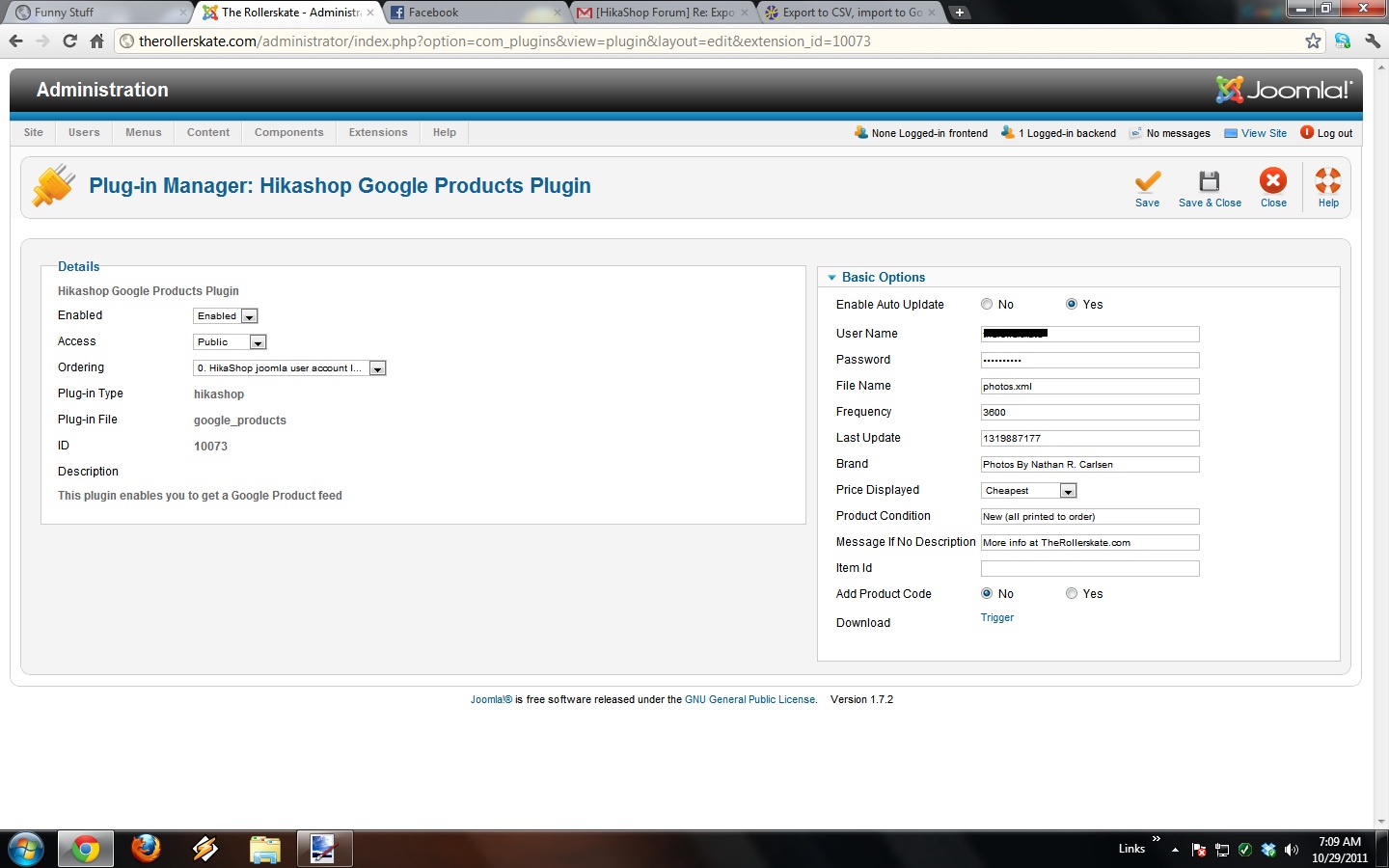
Could you do a screenshot of the plugin's options (you can grey out the password/username)
Did you set the cron system to send you an email each time it is triggered and did you receive the emails ?
Could you do a screenshot of the plugin's options (you can grey out the password/username)
Please Log in or Create an account to join the conversation.
- Rollerskate
-
Topic Author
- Offline
Less
More
- Posts: 164
- Thank you received: 0
14 years 10 months ago #28528
by Rollerskate
Replied by Rollerskate on topic Re: Export to CSV, import to Google Shopping
I think I got everything setup correctly now, but I still don't see any products in Google Merchant. I feel like I may have missed something.
Please Log in or Create an account to join the conversation.
- Rollerskate
-
Topic Author
- Offline
Less
More
- Posts: 164
- Thank you received: 0
14 years 10 months ago #28569
by Rollerskate
Replied by Rollerskate on topic Re: Export to CSV, import to Google Shopping
No, I am not receiving the cron emails, even though it is saying that it is working by giving a last run time. Attached is the plugin screen shot.
Please Log in or Create an account to join the conversation.
14 years 10 months ago #28582
by nicolas
Replied by nicolas on topic Re: Export to CSV, import to Google Shopping
What if you update your google products on your merchant account using the xml that you can download via the trigger link on that screen ? Does it displays any errors ?
Do you have any errors or messages regarding that photos.xml file on your google merchant account ?
Do you have any errors or messages regarding that photos.xml file on your google merchant account ?
Please Log in or Create an account to join the conversation.
- Rollerskate
-
Topic Author
- Offline
Less
More
- Posts: 164
- Thank you received: 0
14 years 10 months ago #28589
by Rollerskate
Replied by Rollerskate on topic Re: Export to CSV, import to Google Shopping
So, i DID have an error when I did the cron thing, which I did provide a screen shot. But, when I tried uploading it manually, it didn't give me any errors.
Please Log in or Create an account to join the conversation.
- Rollerskate
-
Topic Author
- Offline
Less
More
- Posts: 164
- Thank you received: 0
14 years 10 months ago #28593
by Rollerskate
Replied by Rollerskate on topic Re: Export to CSV, import to Google Shopping
And upon further inspection, it says this in Google "0 of 25 items inserted (View errors)"
And here are the "Item Warnings"
"Missing recommended attribute: brand (25 warnings)"
"Missing recommended attribute: mpn (25 warnings)"
"Missing recommended attribute: google product category (25 warnings)"
And here are the "Item Warnings"
"Missing recommended attribute: brand (25 warnings)"
"Missing recommended attribute: mpn (25 warnings)"
"Missing recommended attribute: google product category (25 warnings)"
Please Log in or Create an account to join the conversation.
14 years 10 months ago #28608
by nicolas
Replied by nicolas on topic Re: Export to CSV, import to Google Shopping
The mpn attribute is only added when the "add product code" option is turned on in the plugin so you should do that.
the brand attribute is only added when you have something in the "brand" input field of the plugin's options. I see that you had it filled in your screenshot. Did you empty it since then ?
The "google product category" option is not implemented at all in the plugin. That's because like for the other two parameters they are optional. It's strange that you get these errors.
For that last warning, the only way to remove it will be to add a line like this:
$xml.="\t".'<g:google_product_category>CATEGORY</g:google_product_category>'."\n";
where CATEGORY is the name of your category based on the explanations there (you need to choose between the list of possible categories on that page):
www.google.com/support/merchants/bin/ans...?answer=160081&hl=en
You can place that line of code just before the line:
$xml.="\t".'<g:shipping_weight>'.$product->product_weight.' '.$product->product_weight_unit.'</g:shipping_weight>'."\n";
in the file plugins/hikashop/google_product.php
Then, try to download again the xml and import it in google again. These error messages should not display anymore.
the brand attribute is only added when you have something in the "brand" input field of the plugin's options. I see that you had it filled in your screenshot. Did you empty it since then ?
The "google product category" option is not implemented at all in the plugin. That's because like for the other two parameters they are optional. It's strange that you get these errors.
For that last warning, the only way to remove it will be to add a line like this:
$xml.="\t".'<g:google_product_category>CATEGORY</g:google_product_category>'."\n";
where CATEGORY is the name of your category based on the explanations there (you need to choose between the list of possible categories on that page):
www.google.com/support/merchants/bin/ans...?answer=160081&hl=en
You can place that line of code just before the line:
$xml.="\t".'<g:shipping_weight>'.$product->product_weight.' '.$product->product_weight_unit.'</g:shipping_weight>'."\n";
in the file plugins/hikashop/google_product.php
Then, try to download again the xml and import it in google again. These error messages should not display anymore.
Please Log in or Create an account to join the conversation.
- Rollerskate
-
Topic Author
- Offline
Less
More
- Posts: 164
- Thank you received: 0
14 years 10 months ago #28710
by Rollerskate
Replied by Rollerskate on topic Re: Export to CSV, import to Google Shopping
And where do I edit the file "google_product.php", or is this an FTP process?
Please Log in or Create an account to join the conversation.
14 years 10 months ago #28741
by nicolas
Replied by nicolas on topic Re: Export to CSV, import to Google Shopping
Yes, you need to use FTP for that.
Please Log in or Create an account to join the conversation.
- Rollerskate
-
Topic Author
- Offline
Less
More
- Posts: 164
- Thank you received: 0
14 years 10 months ago #28749
by Rollerskate
Replied by Rollerskate on topic Re: Export to CSV, import to Google Shopping
Ok, now that I added that code, I get this error:
Parse error: syntax error, unexpected T_VARIABLE, expecting T_FUNCTION in /homepages/13/d369589260/htdocs/website3/plugins/hikashop/google_products/google_products.php on line 318
Perhaps I messed the code up, attached is the .php file I updated.
Parse error: syntax error, unexpected T_VARIABLE, expecting T_FUNCTION in /homepages/13/d369589260/htdocs/website3/plugins/hikashop/google_products/google_products.php on line 318
Perhaps I messed the code up, attached is the .php file I updated.
Please Log in or Create an account to join the conversation.
- Rollerskate
-
Topic Author
- Offline
Less
More
- Posts: 164
- Thank you received: 0
14 years 10 months ago #28750
by Rollerskate
Replied by Rollerskate on topic Re: Export to CSV, import to Google Shopping
er, no it's not. apparenlty it wouldn't let me attach a .php file
Please Log in or Create an account to join the conversation.
Time to create page: 0.263 seconds