

- Posts: 265
- Thank you received: 1
ShipStation
Less
More
8 years 9 months ago #284876
by Holmes-Pierce
Replied by Holmes-Pierce on topic ShipStation
I can't get this to work and it doesn't matter what username or password that I use.
Also, if I navigate to the URL, it's blank.
Also, if I navigate to the URL, it's blank.
Please Log in or Create an account to join the conversation.

8 years 9 months ago #284879
by nicolas
Replied by nicolas on topic ShipStation
Hi,
Hard to provide any help without more information and precisions.
What URL are you using ?
Can you provide a screenshot of the settings of the plugin ?
Did you follow the tutorial we have on shipstation ?
www.hikashop.com/support/documentation/3...n-plugin-method.html
Hard to provide any help without more information and precisions.
What URL are you using ?
Can you provide a screenshot of the settings of the plugin ?
Did you follow the tutorial we have on shipstation ?
www.hikashop.com/support/documentation/3...n-plugin-method.html
Please Log in or Create an account to join the conversation.
Less
More
- Posts: 265
- Thank you received: 1
8 years 9 months ago #284909
by Holmes-Pierce
Replied by Holmes-Pierce on topic ShipStation
Thanks,
I followed the tutorial. This is the URL: www.elevateyoursole.co.uk/index.php?opti...hop&ctrl=shipstation
I've also attached a screenshot of the plugin settings.
Many thanks,
Hal
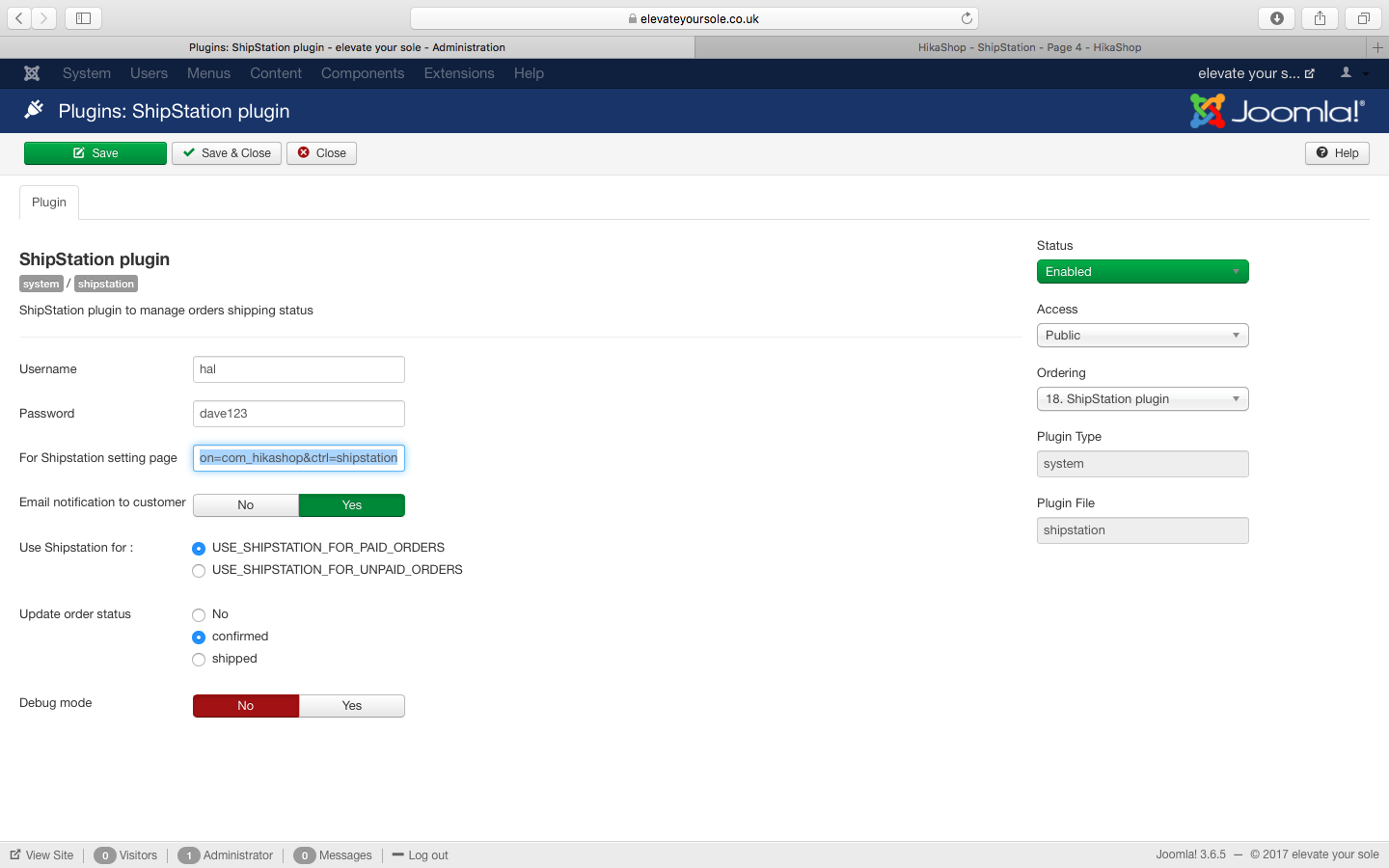
I followed the tutorial. This is the URL: www.elevateyoursole.co.uk/index.php?opti...hop&ctrl=shipstation
I've also attached a screenshot of the plugin settings.
Many thanks,
Hal
Please Log in or Create an account to join the conversation.
8 years 9 months ago #284933
by 41global
Replied by 41global on topic ShipStation
I'm having the same issue as well, I think the issue is with our xml page setting or login. Is this documentation/plugin still compatible for today's version of hikashop & shipstation. The documentation shows things that are no longer in hikashop such as the Order/Main section to update Invoice order statuses. And it also states that username and password cannot contain a "@" and I am only able to login to shipstation with my email address, no actual username. thnx
Please Log in or Create an account to join the conversation.
8 years 9 months ago #284936
by nicolas
Replied by nicolas on topic ShipStation
Hi,
@Holmes-Pierce How do you know it is not working ?
You don't see the orders on ShipStation ?
Based on how you configured your shipstation plugin, you should only see there the orders with their status changed from "created" to "confirmed" after the payment.
Do your orders have the correct status ?
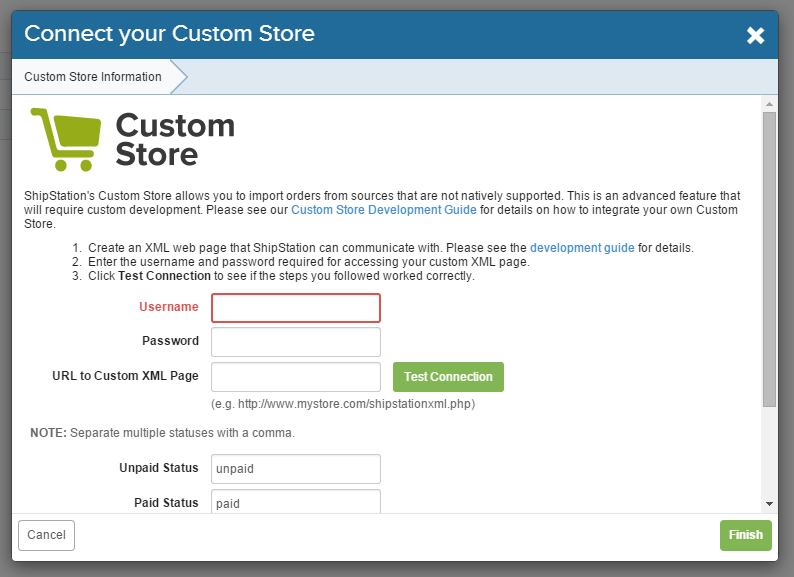
Did you enter the username/password and URL on that page of Shipstation www.hikashop.com/images/stories/shipstat...pstationSetting5.png ?
What happens when you click on the test connection button ?
@41global :
It's still working yes.
The order main section has been removed as you can now configure your order statuses in the menu System>Order statuses. There, you'll have the "invoice" column where you can configure that.
And no, you should not use your shipstation email/password.
You need to enter the same username/password in the shipstation plugin than what you enter in the "custom store" channel configuration of shipstation: www.hikashop.com/images/stories/shipstat...pstationSetting5.png
And in that custom store channel configuration, you also need to enter the URL that is given to you by the shipstation plugin. So make sure you do that and test the connection, as explained in the documentation link I provided in my previous message.
@Holmes-Pierce How do you know it is not working ?
You don't see the orders on ShipStation ?
Based on how you configured your shipstation plugin, you should only see there the orders with their status changed from "created" to "confirmed" after the payment.
Do your orders have the correct status ?
Did you enter the username/password and URL on that page of Shipstation www.hikashop.com/images/stories/shipstat...pstationSetting5.png ?
What happens when you click on the test connection button ?
@41global :
It's still working yes.
The order main section has been removed as you can now configure your order statuses in the menu System>Order statuses. There, you'll have the "invoice" column where you can configure that.
And no, you should not use your shipstation email/password.
You need to enter the same username/password in the shipstation plugin than what you enter in the "custom store" channel configuration of shipstation: www.hikashop.com/images/stories/shipstat...pstationSetting5.png
And in that custom store channel configuration, you also need to enter the URL that is given to you by the shipstation plugin. So make sure you do that and test the connection, as explained in the documentation link I provided in my previous message.
Please Log in or Create an account to join the conversation.
8 years 9 months ago #285023
by 41global
Replied by 41global on topic ShipStation
Hey Nicolas!
Thanks so much for response, still don't see in the plugin where it gives us the url to use for the xml path....I've tried following url but still get xml error message
www.domain.com/index.php?option=com_hikashop&ctrl=shipstation
Thanks so much for response, still don't see in the plugin where it gives us the url to use for the xml path....I've tried following url but still get xml error message
www.domain.com/index.php?option=com_hikashop&ctrl=shipstation
Please Log in or Create an account to join the conversation.
8 years 8 months ago #285025
by nicolas
Replied by nicolas on topic ShipStation
Hi,
The URL to use is provided in the "for shipstation setting page". So please use that URL.
If you have an error with the connection testing button, please provide the exact error message.
The URL to use is provided in the "for shipstation setting page". So please use that URL.
If you have an error with the connection testing button, please provide the exact error message.
Please Log in or Create an account to join the conversation.
8 years 8 months ago #285065
by 41global
Replied by 41global on topic ShipStation
where exactly is this "for shipstation setting page" I see a field in the shipstation plugin called "for shipstation setting pgae" but don't see a page anywhere called this.....
current error I see is:
We received an error testing the Custom store: Invalid XML. Error: 'Root element is missing.' We received: ''
thanks a bunch
current error I see is:
We received an error testing the Custom store: Invalid XML. Error: 'Root element is missing.' We received: ''
thanks a bunch
Please Log in or Create an account to join the conversation.
8 years 8 months ago #285069
by nicolas
Replied by nicolas on topic ShipStation
Yes, I'm talking about that field. You need to copy the URL in that field and use it in the "URL to custom XML page" setting of the shipstation popup to configure the channel.
If you don't put that URL there, it's normal that you get that error.
Also, the fact that this URL is blank when you call it on your browser is normal since it's missing the parameters that ShipStation adds to it when it calls it.
If you don't put that URL there, it's normal that you get that error.
Also, the fact that this URL is blank when you call it on your browser is normal since it's missing the parameters that ShipStation adds to it when it calls it.
Please Log in or Create an account to join the conversation.
7 years 3 months ago #307478
by Sebs78
Replied by Sebs78 on topic ShipStation
Hello
I'm just starting with Hikashop (v. Business 3.1.1) we installed the plugin and made the connection with ship station successfully but no orders are showing on ship station end. I checked all instructions and order status to see if there are any differences, but still no orders coming through.
I contacted shipstation and they say that everything looks good on their end, any clues of whats wrong?
I'm just starting with Hikashop (v. Business 3.1.1) we installed the plugin and made the connection with ship station successfully but no orders are showing on ship station end. I checked all instructions and order status to see if there are any differences, but still no orders coming through.
I contacted shipstation and they say that everything looks good on their end, any clues of whats wrong?
Please Log in or Create an account to join the conversation.

7 years 3 months ago - 7 years 3 months ago #307490
by Philip
Replied by Philip on topic ShipStation
Hello,
First can you provide your Shipstation plugin configuration screenshot and check that you have some orders that have to be import to Shipstation.
Use the debug option will help you to see Shipstation process, see this documentation for understand where you have to get the "debug" file.
Awaiting news from you to move forward to your issue.
Regards
First can you provide your Shipstation plugin configuration screenshot and check that you have some orders that have to be import to Shipstation.
Use the debug option will help you to see Shipstation process, see this documentation for understand where you have to get the "debug" file.
Awaiting news from you to move forward to your issue.
Regards
Last edit: 7 years 3 months ago by Philip.
Please Log in or Create an account to join the conversation.
Time to create page: 0.214 seconds