

- Posts: 75
- Thank you received: 1
Sales Tax by Shipping Location
Less
More
12 years 11 months ago #126258
by Scheinbacher
Replied by Scheinbacher on topic Sales Tax by Shipping Location
Hi,
I change the all tax category to default tax category, but the tax do not shown in the cart and it do not change the rate. Do I miss something else, perhaps the main tax zone?
I change the all tax category to default tax category, but the tax do not shown in the cart and it do not change the rate. Do I miss something else, perhaps the main tax zone?
Please Log in or Create an account to join the conversation.

12 years 11 months ago #126299
by Xavier
Replied by Xavier on topic Sales Tax by Shipping Location
Hi,
I can see that the price set to the products is "0", it seems to be calculated via an external plugin, not an HikaShop one.
So in this plugin you have probably forget the tax management.
I can see that the price set to the products is "0", it seems to be calculated via an external plugin, not an HikaShop one.
So in this plugin you have probably forget the tax management.
Please Log in or Create an account to join the conversation.
Less
More
- Posts: 75
- Thank you received: 1
12 years 11 months ago #126363
by Scheinbacher
Replied by Scheinbacher on topic Sales Tax by Shipping Location
Hi Xavier,
this external plugin was from Nicolas. Maybe you can help me to solve this.
Thanks.
this external plugin was from Nicolas. Maybe you can help me to solve this.
Thanks.
Please Log in or Create an account to join the conversation.

12 years 11 months ago #126546
by nicolas
Replied by nicolas on topic Sales Tax by Shipping Location
I don't remember what this plugin was about.
Can you provide a copy of the plugin ?
If there is indeed a custom price calculation plugin, it's normal that it doesn't handle taxes.
That would have to be coded into it.
Can you provide a copy of the plugin ?
If there is indeed a custom price calculation plugin, it's normal that it doesn't handle taxes.
That would have to be coded into it.
Please Log in or Create an account to join the conversation.
Less
More
- Posts: 75
- Thank you received: 1
12 years 11 months ago #126582
by Scheinbacher
Replied by Scheinbacher on topic Sales Tax by Shipping Location
Nicolas,
thank you, but I have updated and the old version is gone.
You did the modification two years ago, calculation the dimension of the customized acrylic sheets.
thank you, but I have updated and the old version is gone.
You did the modification two years ago, calculation the dimension of the customized acrylic sheets.
Please Log in or Create an account to join the conversation.
12 years 11 months ago #126727
by Xavier
Replied by Xavier on topic Sales Tax by Shipping Location
Hi,
You still should have the plugin, I think that you can find it via ftp.
You still should have the plugin, I think that you can find it via ftp.
Please Log in or Create an account to join the conversation.
Less
More
- Posts: 75
- Thank you received: 1
12 years 11 months ago #128052
by Scheinbacher
Replied by Scheinbacher on topic Sales Tax by Shipping Location
Hi,
I update hikashop, make the change following changes:
-change all states of USA to country
-change custom fields: address: country to state and state to county
to display the tax 0 =% for the other state then "outsid NY"
The default state is NY and county is chautauqua.
If I change the state, I got this error message (attachement):
� HTTP/1.1 303 See other Date: Tue, 15 Oct 2013 18:26:14 GMT Server: Apache Location: falkenacrylic.com/falkenacrylic/index.ph..._Dakota_4290&lang=en Vary: Accept-Encoding Content-Encoding: gzip Content-Length: 20 Keep-Alive: timeout=10, max=26 Connection: Keep-Alive Content-Type: text/html; charset=utf-8 ¬� *
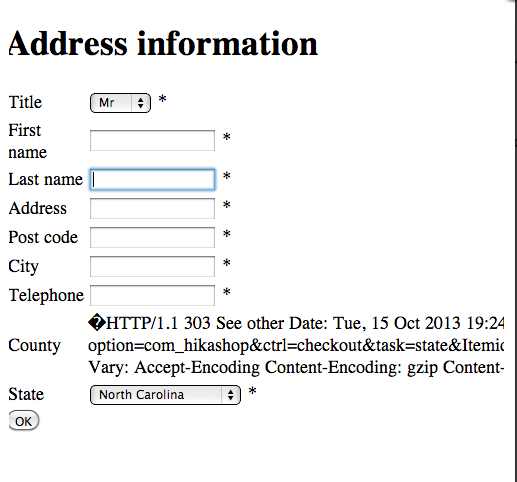
Maybe you can help.
Thanks.
I update hikashop, make the change following changes:
-change all states of USA to country
-change custom fields: address: country to state and state to county
to display the tax 0 =% for the other state then "outsid NY"
The default state is NY and county is chautauqua.
If I change the state, I got this error message (attachement):
� HTTP/1.1 303 See other Date: Tue, 15 Oct 2013 18:26:14 GMT Server: Apache Location: falkenacrylic.com/falkenacrylic/index.ph..._Dakota_4290&lang=en Vary: Accept-Encoding Content-Encoding: gzip Content-Length: 20 Keep-Alive: timeout=10, max=26 Connection: Keep-Alive Content-Type: text/html; charset=utf-8 ¬� *
Maybe you can help.
Thanks.
Please Log in or Create an account to join the conversation.
12 years 11 months ago #128402
by Xavier
Replied by Xavier on topic Sales Tax by Shipping Location
Hi,
You probably have an error on an edited state / country.
Thanks to check if there is no special characters in the list, and if you encode in UTF-8.
How have you made the modifications ?
You probably have an error on an edited state / country.
Thanks to check if there is no special characters in the list, and if you encode in UTF-8.
How have you made the modifications ?
Please Log in or Create an account to join the conversation.
Less
More
- Posts: 75
- Thank you received: 1
12 years 11 months ago #128409
by Scheinbacher
Replied by Scheinbacher on topic Sales Tax by Shipping Location
Hello Xavier
I do not have special characters in the list. Please tell me where to check that I encode in UTF-8.
I change in "zone" the states of USA in country and in "custom field" the name "country" in state and "state" in county.
The point is, if I change the state in address information the second or third time, it works.
Only at the first time, it does not works.
I do not have special characters in the list. Please tell me where to check that I encode in UTF-8.
I change in "zone" the states of USA in country and in "custom field" the name "country" in state and "state" in county.
The point is, if I change the state in address information the second or third time, it works.
Only at the first time, it does not works.
Please Log in or Create an account to join the conversation.

12 years 11 months ago #128615
by Jerome
Jerome - Obsidev.com
HikaMarket & HikaSerial developer / HikaShop core dev team.
Also helping the HikaShop support team when having some time or couldn't sleep.
By the way, do not send me private message, use the "contact us" form instead.
Replied by Jerome on topic Sales Tax by Shipping Location
Hi,
The message you got is a redirection which is made by a system plugin in order to add the language as parameter.
Please edit the file "administrator/components/com_hikashop/classes/field.php" and replace
By:
It will add the parameter "lang" to the url so your system plugin which made a redirection won't show up and break the feature.
Regards,
The message you got is a redirection which is made by a system plugin in order to add the language as parameter.
Please edit the file "administrator/components/com_hikashop/classes/field.php" and replace
Code:
if($allFields == null || $allValues == null) {
$doc = JFactory::getDocument();
$js = 'window.addEvent(\'domready\', function() {
var el = document.getElementById(\''.$this->prefix.$field->field_namekey.$this->suffix.'\');
window.hikashop.changeState(el,\''.$stateId.'\',\''.$field->field_url.'field_type='.$form_name.'&field_id='.$stateId.'&field_namekey='.$stateNamekey.'&namekey=\'+el.value);
});';
$doc->addScriptDeclaration($js);
}
Code:
if($allFields == null || $allValues == null) {
$doc = JFactory::getDocument();
$lang = JFactory::getLanguage();
$locale = strtolower(substr($lang->get('tag'),0,2));
$js = 'window.addEvent(\'domready\', function() {
var el = document.getElementById(\''.$this->prefix.$field->field_namekey.$this->suffix.'\');
window.hikashop.changeState(el,\''.$stateId.'\',\''.$field->field_url.'lang='.$locale.'&field_type='.$form_name.'&field_id='.$stateId.'&field_namekey='.$stateNamekey.'&namekey=\'+el.value);
});';
$doc->addScriptDeclaration($js);
}
Regards,
Jerome - Obsidev.com
HikaMarket & HikaSerial developer / HikaShop core dev team.
Also helping the HikaShop support team when having some time or couldn't sleep.
By the way, do not send me private message, use the "contact us" form instead.
Please Log in or Create an account to join the conversation.
Less
More
- Posts: 75
- Thank you received: 1
12 years 11 months ago #129135
by Scheinbacher
Replied by Scheinbacher on topic Sales Tax by Shipping Location
Thank you.
It works fine.
It works fine.
Please Log in or Create an account to join the conversation.
12 years 8 months ago #138341
by RobinS
Replied by RobinS on topic Sales Tax by Shipping Location
When will Hika Shop make it EASY to charge tax on only certain products (within the same category as others) in NY State, correctly charging the correct tax rate based on the most recent NY State tax publications????
Is Hika Shop working on fixing this????
Is Hika Shop working on fixing this????
Please Log in or Create an account to join the conversation.
12 years 8 months ago #138427
by nicolas
Replied by nicolas on topic Sales Tax by Shipping Location
Next version of HikaShop will include a taxcloud plugin to automatically calculate the taxes for US users.
Please Log in or Create an account to join the conversation.
12 years 8 months ago #139401
by Cyngen
That will indeed be great news. When do you anticipate this coming to be? I can hold off doing a complex setup on a few sites.
Great news!!
Kurt
Replied by Cyngen on topic Sales Tax by Shipping Location
nicolas wrote: Next version of HikaShop will include a taxcloud plugin to automatically calculate the taxes for US users.
That will indeed be great news. When do you anticipate this coming to be? I can hold off doing a complex setup on a few sites.
Great news!!
Kurt
Please Log in or Create an account to join the conversation.
12 years 8 months ago #139443
by Xavier
Replied by Xavier on topic Sales Tax by Shipping Location
Hi,
That should come during this month, or at least in February.
That should come during this month, or at least in February.
The following user(s) said Thank You: Cyngen
Please Log in or Create an account to join the conversation.
9 years 6 months ago #265940
by nicolas
Replied by nicolas on topic Sales Tax by Shipping Location
For people seeing this old thread: There is now a TaxCloud plugin to automatically calculate sales tax in the US:
www.hikashop.com/support/documentation/260-taxcloud.html
www.hikashop.com/support/documentation/260-taxcloud.html
Please Log in or Create an account to join the conversation.
Time to create page: 0.257 seconds