

- Posts: 3
- Thank you received: 0
Category listing pane sliders always open problem
14 years 1 month ago #64301
by greggaaa
Category listing pane sliders always open problem was created by greggaaa
Hi,
I use at_cesmino template for J2.5 with hikashop, and on frontpage my category listing accordion menu (for hikashop categories) is always open and doesn't respond to opening/closing a category.
What could be the problem?
This template doesn't have jquery on/off option in template options (I read somewhere it can be mootools/jquery conflict but I don't know how and where to fix it).
thx.
I use at_cesmino template for J2.5 with hikashop, and on frontpage my category listing accordion menu (for hikashop categories) is always open and doesn't respond to opening/closing a category.
What could be the problem?
This template doesn't have jquery on/off option in template options (I read somewhere it can be mootools/jquery conflict but I don't know how and where to fix it).
thx.
Please Log in or Create an account to join the conversation.

14 years 1 month ago #64343
by Eliot
Replied by Eliot on topic Re: Category listing pane sliders always open problem
Hi there,
Yes it's probably a bug comming from a Jquery/mootools conflict.
Could you give us a link to the page so we can check it?
Yes it's probably a bug comming from a Jquery/mootools conflict.
Could you give us a link to the page so we can check it?
Please Log in or Create an account to join the conversation.
14 years 1 month ago #64356
by greggaaa
Replied by greggaaa on topic Re: Category listing pane sliders always open problem
I sent it now to support@hikashop.com..please check.
Please Log in or Create an account to join the conversation.
14 years 1 month ago #64362
by Eliot
Replied by Eliot on topic Re: Category listing pane sliders always open problem
Please Log in or Create an account to join the conversation.

Less
More
- Posts: 15
- Thank you received: 1
13 years 5 months ago - 13 years 5 months ago #102740
by kostia_lev
Replied by kostia_lev on topic Re: Category listing pane sliders always open problem
Hello!
I have the same issue.
Before I used 2.x Joomla categories slider worked. After Joomla upgrade to 3 v., the code of menu has changed(added accordion classes) and slider does not work anymore. No JS errors at all.
Can you please give me some tips, maybe template misses some js code. JQuery easy does not help.
At least, where I can see 3.0 Joomla&hikashop sites with accordion working?
Thank you!
I have the same issue.
Before I used 2.x Joomla categories slider worked. After Joomla upgrade to 3 v., the code of menu has changed(added accordion classes) and slider does not work anymore. No JS errors at all.
Can you please give me some tips, maybe template misses some js code. JQuery easy does not help.
At least, where I can see 3.0 Joomla&hikashop sites with accordion working?
Thank you!
Last edit: 13 years 5 months ago by kostia_lev.
Please Log in or Create an account to join the conversation.

13 years 5 months ago #102758
by Jerome
Jerome - Obsidev.com
HikaMarket & HikaSerial developer / HikaShop core dev team.
Replied by Jerome on topic Re: Category listing pane sliders always open problem
Hi,
Do you have some view overrides ?
We don't have a Joomla 3 demo website. I tried special effects (carousel, sliders) on a local J3 website and they are working.
I had a little CSS problem with the horizontal slider but the animations works good.
So, would it be possible to have a link to your store in order to see it directly ?
Thanks,
Do you have some view overrides ?
We don't have a Joomla 3 demo website. I tried special effects (carousel, sliders) on a local J3 website and they are working.
I had a little CSS problem with the horizontal slider but the animations works good.
So, would it be possible to have a link to your store in order to see it directly ?
Thanks,
Jerome - Obsidev.com
HikaMarket & HikaSerial developer / HikaShop core dev team.
Please Log in or Create an account to join the conversation.
Less
More
- Posts: 15
- Thank you received: 1
13 years 5 months ago #102971
by kostia_lev
Replied by kostia_lev on topic Re: Category listing pane sliders always open problem
2 Jerome
I have sent link as private message.
I have sent link as private message.
Please Log in or Create an account to join the conversation.
13 years 5 months ago #102987
by Jerome
Jerome - Obsidev.com
HikaMarket & HikaSerial developer / HikaShop core dev team.
Replied by Jerome on topic Re: Category listing pane sliders always open problem
Hi kostia_lev,
Your website uses Joomla 3 but your template does not include bootstrap (css/js).
Please deactivate the option "use bootstrap design mode" in order to not use the Bootstrap Accordion (which use bootstrap CSS and JS) but use the Joomla accordion system.
twitter.github.io/bootstrap/javascript.html#collapse
Regards,
Your website uses Joomla 3 but your template does not include bootstrap (css/js).
Please deactivate the option "use bootstrap design mode" in order to not use the Bootstrap Accordion (which use bootstrap CSS and JS) but use the Joomla accordion system.
twitter.github.io/bootstrap/javascript.html#collapse
Regards,
Jerome - Obsidev.com
HikaMarket & HikaSerial developer / HikaShop core dev team.
The following user(s) said Thank You: kostia_lev
Please Log in or Create an account to join the conversation.
Less
More
- Posts: 15
- Thank you received: 1
13 years 5 months ago - 13 years 5 months ago #104754
by kostia_lev
Replied by kostia_lev on topic Re: Category listing pane sliders always open problem
The option did not help. So I just added bootstrap.css and collapse.js from the link you gave me. Now it works, thanks!
Last edit: 13 years 5 months ago by kostia_lev.
Please Log in or Create an account to join the conversation.
13 years 3 months ago #112692
by androva
Replied by androva on topic Category listing pane sliders always open problem
Hey Hikashop,
Firstly, thanks for the great Joomla Ecommerce solution!
I have desperately been trying to get my category listing accordion menu to work like your Demo site.
I have read this Forum repeatedly and scoured Google several times... to no avail.
Please help or advise.
Problem is;
On your demo site; when the page loads ALL the sub-listings are collapsed.
On my site (localhost, not yet public) every time the page loads the first sub-listing is always visible.
Even I have select a different sub-listing and navigated to that page, the first sub-listing is always visible together with the sub-listing I navigated to.
Example of problem - please view attached image.
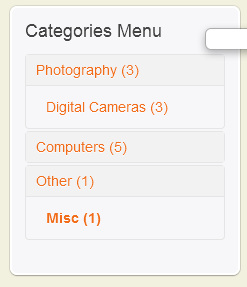
Site specs:
Joomla 3.1
Yootheme Master template (Warp 6 framework)
Thanks in advance!!!
Firstly, thanks for the great Joomla Ecommerce solution!
I have desperately been trying to get my category listing accordion menu to work like your Demo site.
I have read this Forum repeatedly and scoured Google several times... to no avail.
Please help or advise.
Problem is;
On your demo site; when the page loads ALL the sub-listings are collapsed.
On my site (localhost, not yet public) every time the page loads the first sub-listing is always visible.
Even I have select a different sub-listing and navigated to that page, the first sub-listing is always visible together with the sub-listing I navigated to.
Example of problem - please view attached image.
Site specs:
Joomla 3.1
Yootheme Master template (Warp 6 framework)
Thanks in advance!!!
Please Log in or Create an account to join the conversation.
13 years 3 months ago #112693
by androva
Replied by androva on topic Category listing pane sliders always open problem
Ps.
The accordion effect itself works.
Problem is Digital Cameras is always visible, unless I manually close it.
The accordion effect itself works.
Problem is Digital Cameras is always visible, unless I manually close it.
Please Log in or Create an account to join the conversation.

13 years 3 months ago #113051
by nicolas
Replied by nicolas on topic Category listing pane sliders always open problem
Hi,
I remember such issue with old versions of HikaShop. Can you make sure that you have the latest version (2.2) ?
If no, could you try to update ?
If yes, could you provide a link to that page so that we can see that ?
I remember such issue with old versions of HikaShop. Can you make sure that you have the latest version (2.2) ?
If no, could you try to update ?
If yes, could you provide a link to that page so that we can see that ?
Please Log in or Create an account to join the conversation.
13 years 3 months ago #113141
by androva
Replied by androva on topic Category listing pane sliders always open problem
Hi Nicolas,
Thanks for your reply and suggestion.
I have updated Hikashop to 2.2 like you suggested.
Unfortunately the problem persists.
I am unable to give you a link to the page as it is not publicly available yet (it's on my dev PC [localhost]).
I can send screen shots if that will help?
Also, when I completely disable all bootstrap and JS files controlling the accordion, the first level still stays open.
This means the listing helper or template file is building the list with first level open.
I prefer not to hack the core files, but I need to get his working.
Which file/s are responsible for building the category list?
Thanks!
Thanks for your reply and suggestion.
I have updated Hikashop to 2.2 like you suggested.
Unfortunately the problem persists.
I am unable to give you a link to the page as it is not publicly available yet (it's on my dev PC [localhost]).
I can send screen shots if that will help?
Also, when I completely disable all bootstrap and JS files controlling the accordion, the first level still stays open.
This means the listing helper or template file is building the list with first level open.
I prefer not to hack the core files, but I need to get his working.
Which file/s are responsible for building the category list?
Thanks!
Please Log in or Create an account to join the conversation.
13 years 3 months ago #113152
by nicolas
Replied by nicolas on topic Category listing pane sliders always open problem
Hi,
Screenshots won't help.
We'll really need to analyze the HTML/Js on a live website.
But if you want to look at it yourself, you can look at the file listing_list of the view "category" via the menu Display>Views.
The accordion system is generated using the joomla library in the second half part of the file.
Screenshots won't help.
We'll really need to analyze the HTML/Js on a live website.
But if you want to look at it yourself, you can look at the file listing_list of the view "category" via the menu Display>Views.
The accordion system is generated using the joomla library in the second half part of the file.
Please Log in or Create an account to join the conversation.
13 years 3 months ago #113173
by androva
Replied by androva on topic Category listing pane sliders always open problem
Hi Nicolas,
Went through the entire listing_list view (listing_list.php) and hacked whatever seemed to build the list (accordion).
Some things do change, but the first level is always open (this being the original problem).
Something else must be building/controlling the list.
I have also switched to Joomla's default template with the idea maybe it is the Yootheme template causing the issue, but it's not.
All out of ideas and time...
Went through the entire listing_list view (listing_list.php) and hacked whatever seemed to build the list (accordion).
Some things do change, but the first level is always open (this being the original problem).
Something else must be building/controlling the list.
I have also switched to Joomla's default template with the idea maybe it is the Yootheme template causing the issue, but it's not.
All out of ideas and time...
Please Log in or Create an account to join the conversation.
13 years 3 months ago #113174
by androva
Replied by androva on topic Category listing pane sliders always open problem
What is weird though; is the HTML and CSS is built by something else, and not entirely the listing_list parameters.
Maybe this can shed some light.
Firebug view of accordion (HTML):
<div class="hikashop_subcategories_listing">
<div class="hikashop_subcategories">
<div id="category_panel_179" class="accordion">
<div class="accordion-group">
<div class="accordion-heading">
<div id="category_pane_0" class="accordion-body collapse in">
</div>
<div class="accordion-group">
<div class="accordion-group">
</div>
</div>
</div>
Maybe this can shed some light.
Firebug view of accordion (HTML):
<div class="hikashop_subcategories_listing">
<div class="hikashop_subcategories">
<div id="category_panel_179" class="accordion">
<div class="accordion-group">
<div class="accordion-heading">
<div id="category_pane_0" class="accordion-body collapse in">
</div>
<div class="accordion-group">
<div class="accordion-group">
</div>
</div>
</div>
Please Log in or Create an account to join the conversation.
13 years 3 months ago #113284
by nicolas
Replied by nicolas on topic Category listing pane sliders always open problem
I remember that someone had accordion opening issues because he had several modules using the accordion on his website and that the joomla library doesn't support that. Maybe it could be the issue here ?
The following user(s) said Thank You: androva
Please Log in or Create an account to join the conversation.
12 years 10 months ago - 12 years 10 months ago #136221
by jdoe
Replied by jdoe on topic Category listing pane sliders always open problem
I have the same problem - first category stays opened on page refresh or browsing thru other catogories in the menu. Did you ever find out what caused the problem?
Using hikashop 2.2.2 +joomla 3.15 + gantry template
best regards.
Using hikashop 2.2.2 +joomla 3.15 + gantry template
best regards.
Last edit: 12 years 10 months ago by jdoe.
Please Log in or Create an account to join the conversation.

12 years 10 months ago #136255
by Xavier
Replied by Xavier on topic Category listing pane sliders always open problem
Hi,
A modification has been made recently about that to let the first category closed by default.
Thanks to download the latest version of HikaShop from our website and install it over your current version. (v 2.2.3)
A modification has been made recently about that to let the first category closed by default.
Thanks to download the latest version of HikaShop from our website and install it over your current version. (v 2.2.3)
Please Log in or Create an account to join the conversation.
12 years 10 months ago - 12 years 10 months ago #136282
by jdoe
Replied by jdoe on topic Category listing pane sliders always open problem
After the update all menu items stay closed no matter what subcategory user presses in the menu. Is this normal behavior with the latest update?
Last edit: 12 years 10 months ago by jdoe.
Please Log in or Create an account to join the conversation.
Time to create page: 0.236 seconds