

- Posts: 12953
- Thank you received: 1778
Category listing pane sliders always open problem
Less
More
12 years 9 months ago #136391
by Mohamed Thelji
Replied by Mohamed Thelji on topic Category listing pane sliders always open problem
Hi,
1. Do you have some view overrides ?
2. Can you give me a link to your store so that I can directly check it ?
Thanks.
1. Do you have some view overrides ?
2. Can you give me a link to your store so that I can directly check it ?
Thanks.
Please Log in or Create an account to join the conversation.

12 years 9 months ago - 12 years 9 months ago #136418
by jdoe
Replied by jdoe on topic Category listing pane sliders always open problem
Hi!
Overrides? Just to be sure I uninstalled most plugins I do not necessary need. Also disabled my custom CSS, but it did not help. I reinstalled hikashop as well, and this time I got an error in category menu in right sidebar in Slovenian language. If you view the site in Slovenian language, all menu items get 'component/hikashop' in links, instead of 'prodaja'.
If you browse through categories on page it self, it's fine, and also menu links on English site work just fine.
URL: /removed
But the main problem remains. Even if you try english site, you will notice menu getting always collapsed.
So, now I have two problems to solve.
Thanks for any help.
Overrides? Just to be sure I uninstalled most plugins I do not necessary need. Also disabled my custom CSS, but it did not help. I reinstalled hikashop as well, and this time I got an error in category menu in right sidebar in Slovenian language. If you view the site in Slovenian language, all menu items get 'component/hikashop' in links, instead of 'prodaja'.
If you browse through categories on page it self, it's fine, and also menu links on English site work just fine.
URL: /removed
But the main problem remains. Even if you try english site, you will notice menu getting always collapsed.
So, now I have two problems to solve.
Thanks for any help.
Last edit: 12 years 9 months ago by jdoe.
Please Log in or Create an account to join the conversation.
12 years 9 months ago #136584
by jdoe
Replied by jdoe on topic Category listing pane sliders always open problem
Anyone, please help.
Please Log in or Create an account to join the conversation.
12 years 9 months ago #136592
by jdoe
Replied by jdoe on topic Category listing pane sliders always open problem
I had to reconstruct the whole menu (category listing in right sidebar), so links work fine.
Still have problems with menu getting collapsed.
Still have problems with menu getting collapsed.
Please Log in or Create an account to join the conversation.

12 years 9 months ago #136641
by Xavier
Replied by Xavier on topic Category listing pane sliders always open problem
Hi,
The category listing seems to be working fine, if you want to display all the sub elements, you have to change the option "Show sub categories" to "All sub categories".
The category listing seems to be working fine, if you want to display all the sub elements, you have to change the option "Show sub categories" to "All sub categories".
The following user(s) said Thank You: mariussport
Please Log in or Create an account to join the conversation.
12 years 9 months ago - 12 years 9 months ago #136649
by jdoe
Replied by jdoe on topic Category listing pane sliders always open problem
I'm sorry, maybe I wasn't clear. Category listing menu works fine as far as listing of main categories and first level of subcategories goes. As to my understanding hikashop does not support more than 1 level of subcategories out of the box. Or am I mistaken?
Problem is that the menu does not stay expanded to the subcategory you are in. With hikashop 2.2.3 it is always collapsed (I even tried with new installation of joomla 3.2 + hikashop 2.2.3). Before I upgraded from 2.2.2, first category was always expanded including the one you were actually browsing. .
Here is a picture.
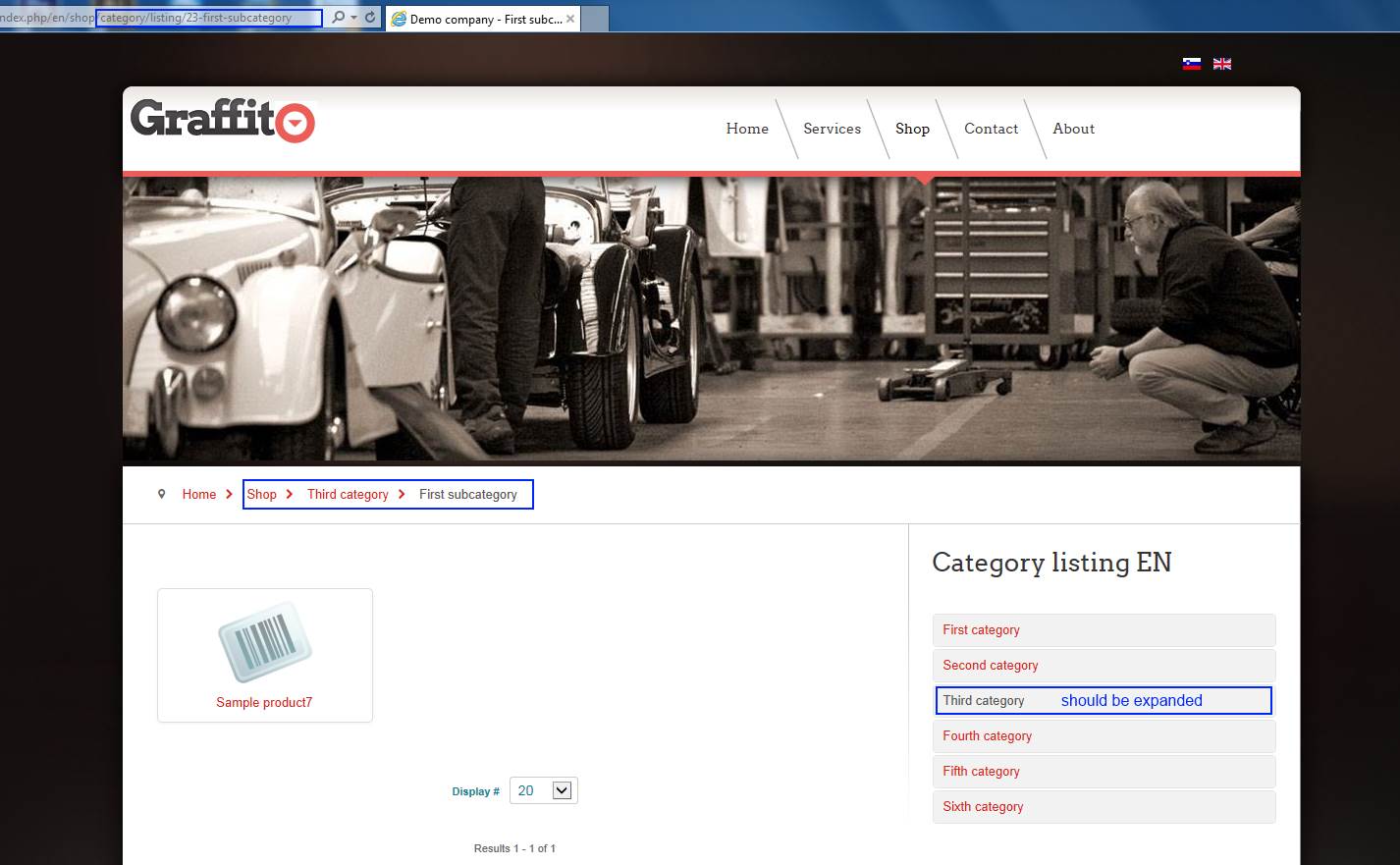
Problem is that the menu does not stay expanded to the subcategory you are in. With hikashop 2.2.3 it is always collapsed (I even tried with new installation of joomla 3.2 + hikashop 2.2.3). Before I upgraded from 2.2.2, first category was always expanded including the one you were actually browsing. .
Here is a picture.
Last edit: 12 years 9 months ago by jdoe.
Please Log in or Create an account to join the conversation.
12 years 9 months ago #136813
by jdoe
Replied by jdoe on topic Category listing pane sliders always open problem
Anyone has any idea?
Is there problem with hikashop or am I just not seeing something?
Is there problem with hikashop or am I just not seeing something?
Please Log in or Create an account to join the conversation.
12 years 9 months ago #137076
by jdoe
Replied by jdoe on topic Category listing pane sliders always open problem
I couldn't get it to work in 2.2.3. Menu is just always collapsed. So I reinstalled previous version, and that one has first category always opened. I think, menus are broken in hikashop.
Please Log in or Create an account to join the conversation.
12 years 9 months ago #138426
by Xavier
Replied by Xavier on topic Category listing pane sliders always open problem
Hi,
This is not available with the current version of the category listing module.
I just commit some changes on our end to allow that, that should be available in the next release of HikaShop.
This is not available with the current version of the category listing module.
I just commit some changes on our end to allow that, that should be available in the next release of HikaShop.
Please Log in or Create an account to join the conversation.
12 years 5 months ago #154525
by Nihilus
Replied by Nihilus on topic Category listing pane sliders always open problem
Hi. I have a similar problem. I have the categories listing with direct subcategories only.
The problem is that the subcategories does not show and when you click on the main category it goes to some anchor in the page (e.g. academy247.co.za/index.php/courses#category_pane_4 )
I don't know if that is just a setting somewhere but I can't seem to correct it.
I tried jQuery easy with no success.
The problem is that the subcategories does not show and when you click on the main category it goes to some anchor in the page (e.g. academy247.co.za/index.php/courses#category_pane_4 )
I don't know if that is just a setting somewhere but I can't seem to correct it.
I tried jQuery easy with no success.
Please Log in or Create an account to join the conversation.
12 years 5 months ago #154538
by Xavier
Replied by Xavier on topic Category listing pane sliders always open problem
Hi,
Could you give us a screeshot of your module configuration ?
Could you give us a screeshot of your module configuration ?
Please Log in or Create an account to join the conversation.
12 years 5 months ago #154606
by Nihilus
Replied by Nihilus on topic Category listing pane sliders always open problem
There you go. I probably just got the settings wrong. Thanks for the help
Please Log in or Create an account to join the conversation.
12 years 5 months ago #154689
by Nihilus
Replied by Nihilus on topic Category listing pane sliders always open problem
This could have been misleading. The problem is not resolved  I just provided the settings
I just provided the settings Please Log in or Create an account to join the conversation.
12 years 5 months ago #154725
by Xavier
Replied by Xavier on topic Category listing pane sliders always open problem
Hi,
Yes we saw that
You problem seems to be a javascript issue. But there is no errors displayed.
So maybe another component alter the way it's working.
Can you try to disable other extensions one by one to see if one of them is causing this conflict ?
If we click on a category in the category listing in div (left part) then we can see in that categories listing that the category is well expanded.
Yes we saw that
You problem seems to be a javascript issue. But there is no errors displayed.
So maybe another component alter the way it's working.
Can you try to disable other extensions one by one to see if one of them is causing this conflict ?
If we click on a category in the category listing in div (left part) then we can see in that categories listing that the category is well expanded.
Please Log in or Create an account to join the conversation.
12 years 4 months ago #155337
by Nihilus
Replied by Nihilus on topic Category listing pane sliders always open problem
I tried disabling extensions one by one and testing it again with no luck 
Any other suggestion?
Any other suggestion?
Please Log in or Create an account to join the conversation.
12 years 4 months ago #155762
by Xavier
Replied by Xavier on topic Category listing pane sliders always open problem
Hi,
Could you simply try to re-install hikashop over your current installation ?
There was maybe missing files or something like that.
Could you simply try to re-install hikashop over your current installation ?
There was maybe missing files or something like that.
Please Log in or Create an account to join the conversation.
12 years 4 months ago #155832
by Nihilus
Replied by Nihilus on topic Category listing pane sliders always open problem
Hi
I installed the hikashop business edition again through the extensions manager. I didn't remove the current installation. This did not change anything.
Is my settings correct? The links appear to have an anchor appended to it as if to go to a specified tab/pane on the same page?
academy247.co.za/index.php/courses#category_pane_0
No javascript errors are being thrown either...
Thanks for the help.
I installed the hikashop business edition again through the extensions manager. I didn't remove the current installation. This did not change anything.
Is my settings correct? The links appear to have an anchor appended to it as if to go to a specified tab/pane on the same page?
academy247.co.za/index.php/courses#category_pane_0
No javascript errors are being thrown either...
Thanks for the help.
Please Log in or Create an account to join the conversation.
12 years 4 months ago #155843
by Xavier
Replied by Xavier on topic Category listing pane sliders always open problem
Hi,
The anchor is normal, it is used by the javascript.
Do you had/have edited the view "category / listing_list" ? If it is, thanks to reset the view.
Was the module working on the products listing pages, or the same problem was happening than on the category listing page ?
The anchor is normal, it is used by the javascript.
Do you had/have edited the view "category / listing_list" ? If it is, thanks to reset the view.
Was the module working on the products listing pages, or the same problem was happening than on the category listing page ?
Please Log in or Create an account to join the conversation.
12 years 4 months ago #156019
by Nihilus
Replied by Nihilus on topic Category listing pane sliders always open problem
Hi
I'm not sure that I fully understand. There's no product listing page. Only the category listing page.
I created 2 hidden test pages now:
Products listing page with accordion menu in sidebar
academy247.co.za/index.php/test-products-listing
Category listing page with accordion menu in sidebar
academy247.co.za/index.php/test-category-listing
I attached images of the settings for the products and category listing pages and the categories accordion module.
Thanks again for your time.
I'm not sure that I fully understand. There's no product listing page. Only the category listing page.
I created 2 hidden test pages now:
Products listing page with accordion menu in sidebar
academy247.co.za/index.php/test-products-listing
Category listing page with accordion menu in sidebar
academy247.co.za/index.php/test-category-listing
I attached images of the settings for the products and category listing pages and the categories accordion module.
Thanks again for your time.
Please Log in or Create an account to join the conversation.
12 years 4 months ago #156339
by Xavier
Replied by Xavier on topic Category listing pane sliders always open problem
Hi,
Can you try to enable the Joomla debug mode ? I think that the accordion will work when debug is enabled.
The accordion use Joomla accordion javascript, so it's not working probably because a js file is not present.
Thanks to try to update to the version 2.3.1 of HikaShop, that should correct that bug.
You can take this version from our website.
Can you try to enable the Joomla debug mode ? I think that the accordion will work when debug is enabled.
The accordion use Joomla accordion javascript, so it's not working probably because a js file is not present.
Thanks to try to update to the version 2.3.1 of HikaShop, that should correct that bug.
You can take this version from our website.
Please Log in or Create an account to join the conversation.
Time to create page: 0.359 seconds