

- Posts: 86561
- Thank you received: 14307
Products not showing when linked from Category
15 years 9 months ago #8118
by nicolas
Replied by nicolas on topic Re: Products not showing when linked from Category
Via our contact form:
www.hikashop.com/en/support/contact-us.html
Please Log in or Create an account to join the conversation.

15 years 9 months ago #8123
by agrfoto
Replied by agrfoto on topic Re: Products not showing when linked from Category
You will notice that the link for Panoramic Prints has the same issue as Limited Edition Prints. However the link for Classic Prints is different as it has more sub-category links, and this also does not show the same results by clicking on the left menu as it does from within the Online Shop page.
Please Log in or Create an account to join the conversation.
15 years 9 months ago #8137
by nicolas
Replied by nicolas on topic Re: Products not showing when linked from Category
Strangely, it didn't created an associated module automatically for some of the menus... I don't know why though.
Anyway, I just enabled the previously created associated module for all your hikashop categories listing menus and you now have your products displayed.
Anyway, I just enabled the previously created associated module for all your hikashop categories listing menus and you now have your products displayed.
Please Log in or Create an account to join the conversation.
15 years 9 months ago #8157
by agrfoto
Replied by agrfoto on topic Re: Products not showing when linked from Category
Thanks Nicolas!
It is somewhat of a relief that this is resolved as I spent literally hours going around in circles. Is that all you did? I say that because I also tried switching on and off these associated menus and nothing changed for me. I am happy that it is sorted but my natural curiosity leads me to know the reason why it happened so I can avoid it again.
At least now I can start uploading the actually content and move on from testing. Thanks again for you speedy and very thorough help and support.
It is somewhat of a relief that this is resolved as I spent literally hours going around in circles. Is that all you did? I say that because I also tried switching on and off these associated menus and nothing changed for me. I am happy that it is sorted but my natural curiosity leads me to know the reason why it happened so I can avoid it again.
At least now I can start uploading the actually content and move on from testing. Thanks again for you speedy and very thorough help and support.
Please Log in or Create an account to join the conversation.
15 years 9 months ago #8163
by nicolas
Replied by nicolas on topic Re: Products not showing when linked from Category
Yes, that's all I did 
Please Log in or Create an account to join the conversation.
15 years 8 months ago #8515
by agrfoto
Replied by agrfoto on topic Re: Products not showing when linked from Category
Hi Nicolas, it's me again with the same old problem.
Although each page now shows correctly the products within the categories page, the listing of categories above the products are not the same, when using the link from within the previous page or from the main menu.
One shows each category with sub categories as a list, the other shows the top level of categories with images.
I thought it had something to do with the parameters not matching in the menu and associated module, but they do not have the same parameter options/values to select from.
The menu params are:
- ordering field: category_ordering
- show sub category: all direct sub categories
The associated module params are:
- ordering field: ordering
- content on product page: in the same categories
I can enable your access to the back end again if need be.
Here's a screenshot.
Thanks.
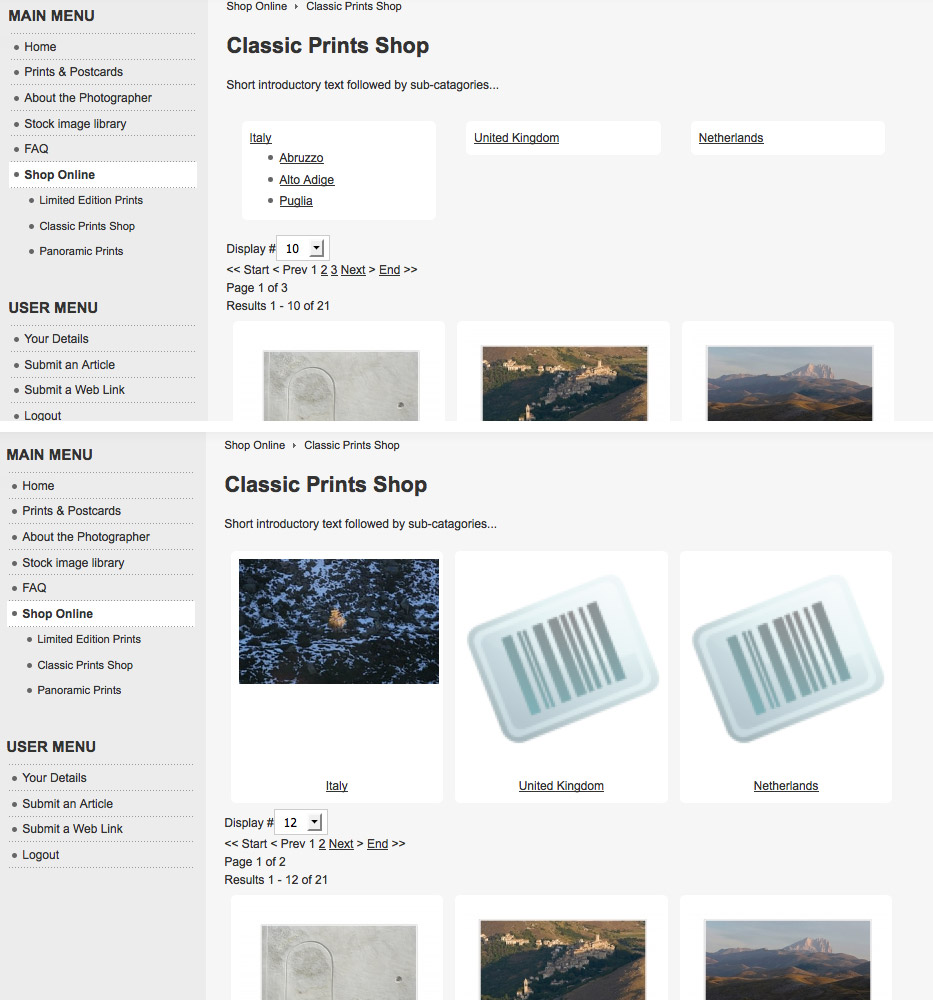
Although each page now shows correctly the products within the categories page, the listing of categories above the products are not the same, when using the link from within the previous page or from the main menu.
One shows each category with sub categories as a list, the other shows the top level of categories with images.
I thought it had something to do with the parameters not matching in the menu and associated module, but they do not have the same parameter options/values to select from.
The menu params are:
- ordering field: category_ordering
- show sub category: all direct sub categories
The associated module params are:
- ordering field: ordering
- content on product page: in the same categories
I can enable your access to the back end again if need be.
Here's a screenshot.
Thanks.
Please Log in or Create an account to join the conversation.
15 years 8 months ago #8518
by agrfoto
Replied by agrfoto on topic Re: Products not showing when linked from Category
Actually, I think I solved part of it.
It's the parameters for the DIV that do not match in the menu and associated module.
Just need to work out why the product box goes narrower when the sub categories are listed with title and image.
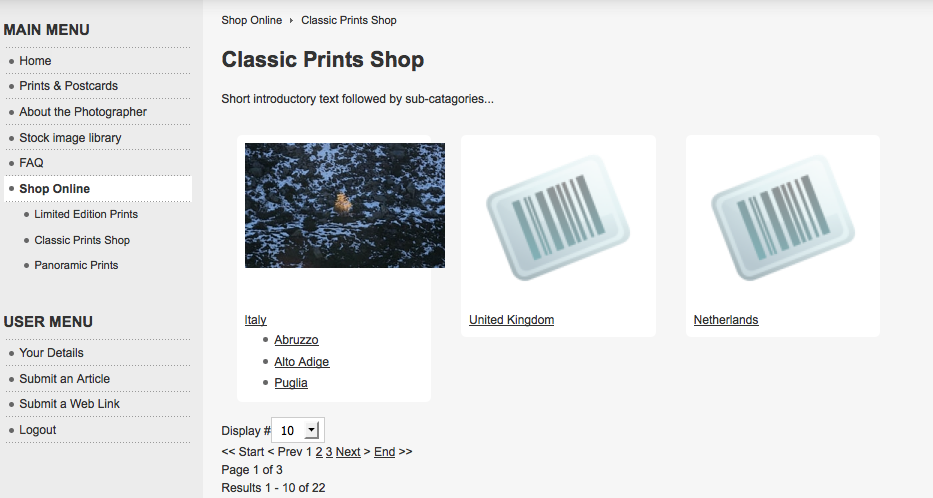
It's the parameters for the DIV that do not match in the menu and associated module.
Just need to work out why the product box goes narrower when the sub categories are listed with title and image.
Please Log in or Create an account to join the conversation.
15 years 8 months ago #8522
by agrfoto
I realise now that this is because one has Type of Content set as Product and the other set to Category.
However if I set both to Type of Content Category then the page linked from the main menu shows two copies of the category list and no products.
This does not make sense. The link from within the page shows the Categories AND the products, when it is set to Product layout... and if I change it to Category? Nothing changes, it's the same content.
Replied by agrfoto on topic Re: Products not showing when linked from Category
I thought it had something to do with the parameters not matching in the menu and associated module, but they do not have the same parameter options/values to select from.
The menu params are:
- ordering field: category_ordering
- show sub category: all direct sub categories
The associated module params are:
- ordering field: ordering
- content on product page: in the same categories
I realise now that this is because one has Type of Content set as Product and the other set to Category.
However if I set both to Type of Content Category then the page linked from the main menu shows two copies of the category list and no products.
This does not make sense. The link from within the page shows the Categories AND the products, when it is set to Product layout... and if I change it to Category? Nothing changes, it's the same content.
Please Log in or Create an account to join the conversation.
15 years 8 months ago #8524
by agrfoto
Replied by agrfoto on topic Re: Products not showing when linked from Category
I've tried turning off (disabling) the associated module, and as expected only the products appear on the page after navigating there from the main menu. However, the category list is still there if I navigate from the link in the page.
It's almost like it's cached somewhere. I've cleared the back-end cache and in the local browser.
Logged out and in again, but it's still there. Where is the category content coming from?
Is there anyone else out there with this issue?
It's almost like it's cached somewhere. I've cleared the back-end cache and in the local browser.
Logged out and in again, but it's still there. Where is the category content coming from?
Is there anyone else out there with this issue?
Please Log in or Create an account to join the conversation.
15 years 8 months ago #8548
by nicolas
Replied by nicolas on topic Re: Products not showing when linked from Category
You need to understand how it works:
When you create a listing of categories menu, the options of the menu apply to the listing of categories. The listing of products which is attached to the menu is displayed by the associated module and uses the options of the associated module. So it's normal that the menu has a type of content of category and the associated module a type of content of product since the first one is displaying the categories and the second one the products in the categories.
So, if you turn off the associated module, the system will detect that you're trying to display a listing of categories without an associated module to display the products below it and it will create automatically a new associated module for it.
There is no cache on it, it's just a matter of understanding how it works.
When you create a listing of categories menu, the options of the menu apply to the listing of categories. The listing of products which is attached to the menu is displayed by the associated module and uses the options of the associated module. So it's normal that the menu has a type of content of category and the associated module a type of content of product since the first one is displaying the categories and the second one the products in the categories.
So, if you turn off the associated module, the system will detect that you're trying to display a listing of categories without an associated module to display the products below it and it will create automatically a new associated module for it.
There is no cache on it, it's just a matter of understanding how it works.
Please Log in or Create an account to join the conversation.
15 years 8 months ago - 15 years 8 months ago #8570
by agrfoto
Replied by agrfoto on topic Re: Products not showing when linked from Category
So does that mean I am trying to achieve something that is not possible? That is to have exactly the same page content displayed when a user clicks on the main menu item or the category link within a list/page.
Actually having now said that, the two resulting pages do look identical. All I did was turn back on the associated module again, after I deleted all files in the temp and cache folders using ftp. I have no idea if this was the solution because that's what I tried yesterday with no success.
Well for the moment I guess it is solved.
Thanks.
Actually having now said that, the two resulting pages do look identical. All I did was turn back on the associated module again, after I deleted all files in the temp and cache folders using ftp. I have no idea if this was the solution because that's what I tried yesterday with no success.
Well for the moment I guess it is solved.
Thanks.
Last edit: 15 years 8 months ago by agrfoto.
Please Log in or Create an account to join the conversation.
15 years 8 months ago #8582
by nicolas
Replied by nicolas on topic Re: Products not showing when linked from Category
No, no it's totally possible to display the same thing from a menu and a category link. You just need to have your menus/modules configured properly for that. Normally, that should be the case by default.
The best way to do that is to first configure the default display options in the config and once that's done, you can create your menus and hikashop should generate the associated stuff automatically using the default options of the config and you should have the same display.
The best way to do that is to first configure the default display options in the config and once that's done, you can create your menus and hikashop should generate the associated stuff automatically using the default options of the config and you should have the same display.
Please Log in or Create an account to join the conversation.
15 years 8 months ago #8586
by agrfoto
Replied by agrfoto on topic Re: Products not showing when linked from Category
Thanks Nicolas
Yes, I understand that and it is how I have it set up. They weren't displaying the same until, as I said, I enabled the associated module again, after I deleted all files in the temp and cache folders using ftp.
Thanks for clarifying anyway.
Yes, I understand that and it is how I have it set up. They weren't displaying the same until, as I said, I enabled the associated module again, after I deleted all files in the temp and cache folders using ftp.
Thanks for clarifying anyway.
Please Log in or Create an account to join the conversation.
15 years 8 months ago #10476
by Bugger101
Replied by Bugger101 on topic Re: Products not showing when linked from Category
I am having the same problem I think... My products are not showing up after I assign them to categories :huh:
Please Log in or Create an account to join the conversation.
15 years 8 months ago #10514
by nicolas
Replied by nicolas on topic Re: Products not showing when linked from Category
So did the solution provided here solved your problem ?
Do you see your product on the back end ? On the front end ?
Do you have a link to the page on the front end where you don't see your products ?
Do you see your product on the back end ? On the front end ?
Do you have a link to the page on the front end where you don't see your products ?
Please Log in or Create an account to join the conversation.
15 years 8 months ago #10557
by Bugger101
Replied by Bugger101 on topic Re: Products not showing when linked from Category
Hi Nicolas,
I had a fiddle and went through the documentation again and just can't seem to wrap my head around it. I can see themn in the backend, but they dont show up in the front end.
I have sent you an email
Thanks!
I had a fiddle and went through the documentation again and just can't seem to wrap my head around it. I can see themn in the backend, but they dont show up in the front end.
I have sent you an email
Thanks!
Please Log in or Create an account to join the conversation.
15 years 8 months ago #10574
by nicolas
Replied by nicolas on topic Re: Products not showing when linked from Category
Could you go in the menu Display->Content menus and edit the options of your category listing menu with the id 52 ?
Then, disable the associated module and save.
That should display an error message to create automatically a listing of products module with the good options and associate it to your menu.
Then, disable the associated module and save.
That should display an error message to create automatically a listing of products module with the good options and associate it to your menu.
Please Log in or Create an account to join the conversation.
15 years 8 months ago #10583
by Bugger101
Replied by Bugger101 on topic Re: Products not showing when linked from Category
Worked like a charm! Thanks so much
Please Log in or Create an account to join the conversation.
15 years 8 months ago #10718
by emilio
Replied by emilio on topic Re: Products not showing when linked from Category
Thanks to all and specially Nicholas, now I understand how it works and saved more days of study and frustration.
Merci,
Emilio Arrufat
Merci,
Emilio Arrufat
Please Log in or Create an account to join the conversation.

Less
More
- Posts: 21
- Thank you received: 0
15 years 7 months ago #11582
by srochefort
Replied by srochefort on topic Re: Products not showing when linked from Category
Hi,
I do have the same problem : product do not show when selecting a category from the list.
I did follow this post and try several things for hours now and I still have the same problem.
I did create a Joomla menu item with the HikaShop product listing type and and it works fine on the front end as I am able to see my products.
I do not know where to look know.... Please help
Pierre
I do have the same problem : product do not show when selecting a category from the list.
I did follow this post and try several things for hours now and I still have the same problem.
I did create a Joomla menu item with the HikaShop product listing type and and it works fine on the front end as I am able to see my products.
I do not know where to look know.... Please help
Pierre
Please Log in or Create an account to join the conversation.
Time to create page: 0.118 seconds