

- Posts: 96
- Thank you received: 0
Images not uploading
15 years 11 months ago #69
by manamaga
Images not uploading was created by manamaga
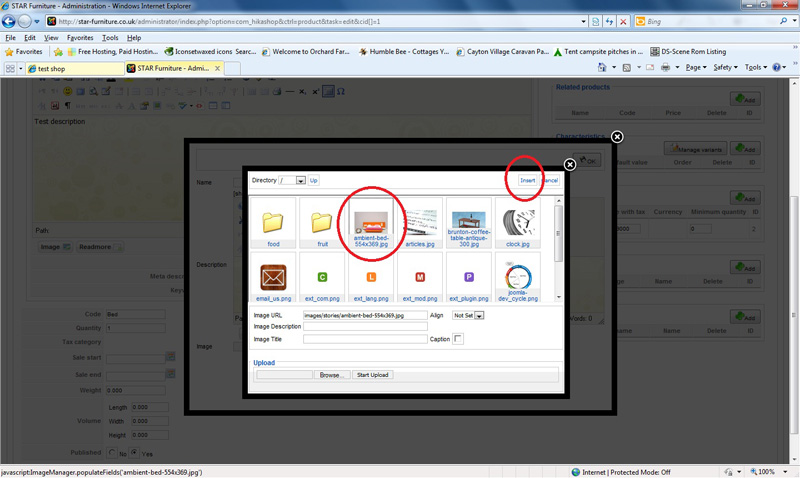
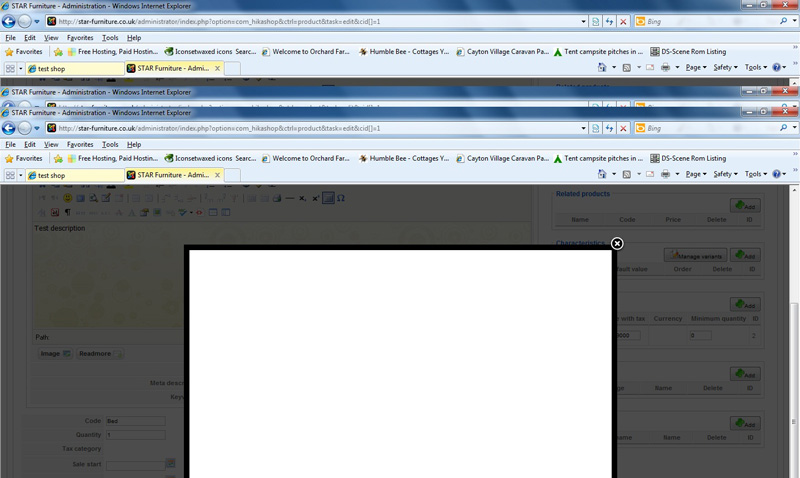
I have tried to add an image to my product but it wont upload after clicking OK, the lightbox goes white:
Please Log in or Create an account to join the conversation.
15 years 11 months ago #70
by manamaga
Replied by manamaga on topic Re: Images not uploading
How frustrating, my image is not showing in this post 
Please Log in or Create an account to join the conversation.

15 years 11 months ago #71
by nicolas
Replied by nicolas on topic Re: Images not uploading
Which browser are you using ?
If you try on our demo website, do you have the same problem ?
If you try on our demo website, do you have the same problem ?
Please Log in or Create an account to join the conversation.
15 years 11 months ago #72
by nicolas
Replied by nicolas on topic Re: Images not uploading
When you post an image on the forum you need to include the tag
in your message
Code:
[img/]
Please Log in or Create an account to join the conversation.
15 years 11 months ago #73
by manamaga
Replied by manamaga on topic Re: Images not uploading
Not tried your demo website. I am building a new website for my client and thought i would try this shopping cart, as all the others are either too much for what i need or too little. I wish i could post my screen shots. I am using IE8
Please Log in or Create an account to join the conversation.
15 years 11 months ago - 15 years 11 months ago #74
by manamaga
Replied by manamaga on topic Re: Images not uploading
I think my screen shot image is too large, 1 min
Last edit: 15 years 11 months ago by manamaga.
Please Log in or Create an account to join the conversation.
15 years 11 months ago #75
by manamaga
Replied by manamaga on topic Re: Images not uploading
My image is 249kb, is that too large?
Please Log in or Create an account to join the conversation.
15 years 11 months ago #76
by manamaga
Replied by manamaga on topic Re: Images not uploading
Please Log in or Create an account to join the conversation.
15 years 11 months ago #77
by nicolas
Replied by nicolas on topic Re: Images not uploading
It might be the resolution. I increased the limit on our forum to 2000*2000 where before it was limited to 800*800.
You can upload images up to 5MB.
You can upload images up to 5MB.
Please Log in or Create an account to join the conversation.
15 years 11 months ago - 15 years 11 months ago #78
by manamaga
Replied by manamaga on topic Re: Images not uploading
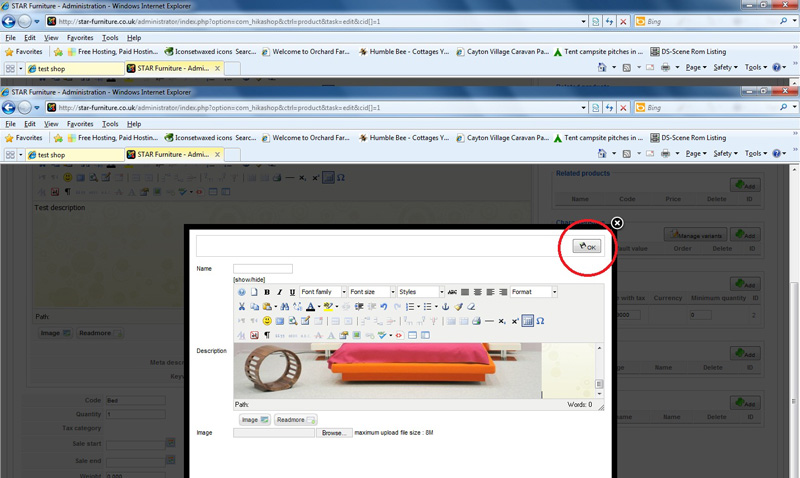
Step 2
Last edit: 15 years 11 months ago by manamaga.
Please Log in or Create an account to join the conversation.
15 years 11 months ago #79
by manamaga
Replied by manamaga on topic Re: Images not uploading
Step 3
Please Log in or Create an account to join the conversation.
15 years 11 months ago #80
by manamaga
Replied by manamaga on topic Re: Images not uploading
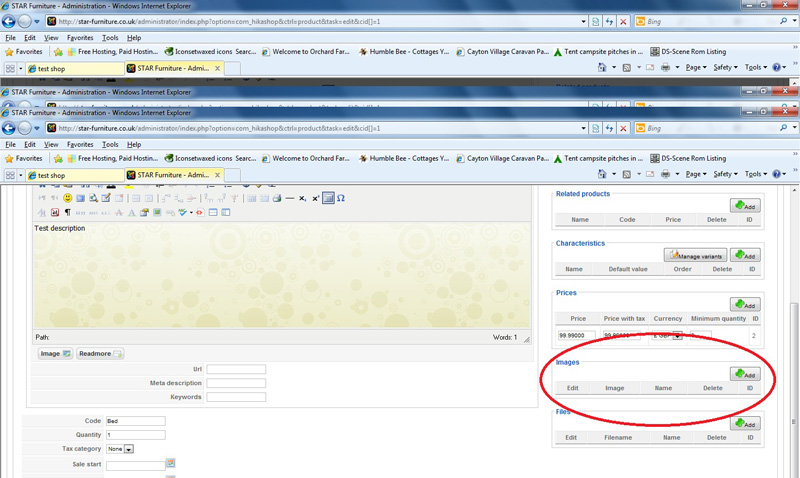
Result
Please Log in or Create an account to join the conversation.
15 years 11 months ago #81
by nicolas
Replied by nicolas on topic Re: Images not uploading
I see that you are trying to add an image in the description of an image (you have two popups). I tested that on our demo website and it's working fine.
However, if you do not add an image in the image browse field below the description, nothing will be added. We should display an error message insted of a blank screen in the popup, but it's normal it doesn't work if you don't provide an image in the image browse field of the first popup coming on the screen.
However, if you do not add an image in the image browse field below the description, nothing will be added. We should display an error message insted of a blank screen in the popup, but it's normal it doesn't work if you don't provide an image in the image browse field of the first popup coming on the screen.
Please Log in or Create an account to join the conversation.
15 years 11 months ago #82
by manamaga
Replied by manamaga on topic Re: Images not uploading
Not sure i understand. If i click the +ADD image button on the right hand side, as in my last screen shot, i get a pop-up light box, where i browse for the image and click insert, nothing happens. Let me try again.
Please Log in or Create an account to join the conversation.
15 years 11 months ago #83
by nicolas
Replied by nicolas on topic Re: Images not uploading
Yes that's normal.
After clicking on the Add button. You get a popup. There, instead of trying to add an image to the description field where you have the HTML editor by clicking on the Image button, you should add your image via the Browse button below the Image button of the HTML editor.
After clicking on the Add button. You get a popup. There, instead of trying to add an image to the description field where you have the HTML editor by clicking on the Image button, you should add your image via the Browse button below the Image button of the HTML editor.
Please Log in or Create an account to join the conversation.
15 years 11 months ago #84
by manamaga
Replied by manamaga on topic Re: Images not uploading
Ahhhh, OK, clicking the browse button will open local machine, choose image and click OK, it works. Clicking the 'image' button under the editor will open the server browser. So, its not possible to insert images which are already on the server, they have to be inserted from local machine?
Please Log in or Create an account to join the conversation.
15 years 11 months ago #85
by nicolas
Replied by nicolas on topic Re: Images not uploading
Indeed.
Please Log in or Create an account to join the conversation.
15 years 11 months ago #86
by manamaga
Replied by manamaga on topic Re: Images not uploading
Excellent! I have to say, thanks for the very quick replies. I will go and have a play around with the other settings now to see if i can get it working how my client would like. It is looking very good and i will have no problem recommending to others if this works. Many thanks!
Please Log in or Create an account to join the conversation.
15 years 11 months ago - 15 years 11 months ago #87
by manamaga
Replied by manamaga on topic Re: Images not uploading
WOW, next problem, i added to cart then proceed to checkout, look what happened:
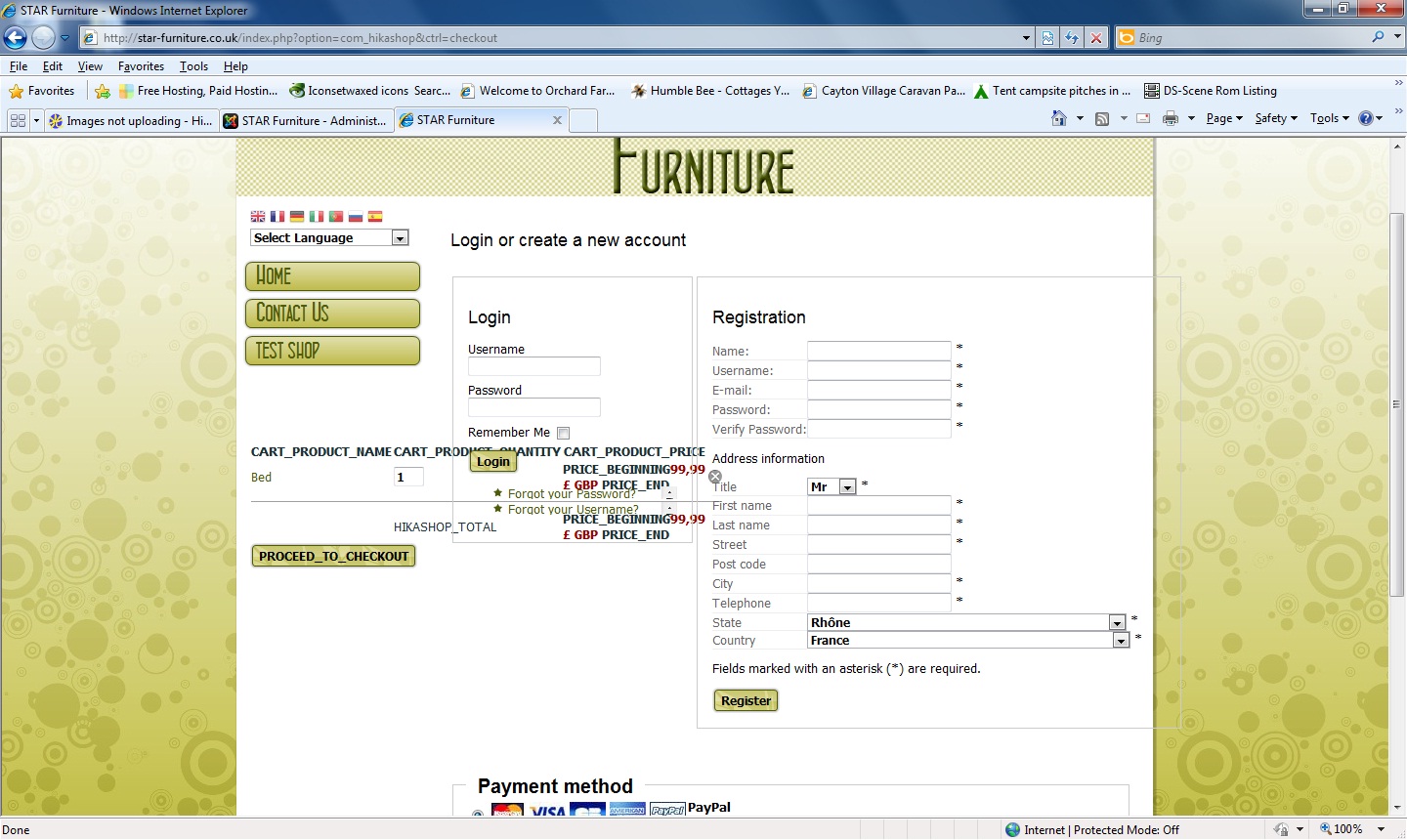
Also, is it possible to set so that the user does not have to register to buy?
Also, is it possible to set so that the user does not have to register to buy?
Last edit: 15 years 11 months ago by manamaga.
Please Log in or Create an account to join the conversation.
15 years 11 months ago #88
by nicolas
Replied by nicolas on topic Re: Images not uploading
We will try to add some javascript check on that to be sure the user selected a file when clicking on the OK button.
Concering the cart issue, it seems that the cart module translations were not found when trying to display the cart. It's strange because the translations are found on the main page.
Concering the cart issue, it seems that the cart module translations were not found when trying to display the cart. It's strange because the translations are found on the main page.
Please Log in or Create an account to join the conversation.
Time to create page: 0.296 seconds