

- Posts: 96
- Thank you received: 0
Images not uploading
15 years 11 months ago #109
by manamaga
Replied by manamaga on topic Re: Images not uploading
Looks great now, thanks so much for your help in this. I`m working on the ftp in joomla now, i didnt realise i had not set this up  Thanks again.
Thanks again. Please Log in or Create an account to join the conversation.
15 years 11 months ago - 15 years 11 months ago #110
by manamaga
Replied by manamaga on topic Re: Images not uploading
I`m having real trouble setting up how i want this to look. I`m beginning to think that this software is also too big for what i need but i really like the look and configurability of it and dont want to give up on it. I am wanting to have a link in the left column, for example 'Our Shop', when clicking this link there becomes underneath, sub menus like Coffee Tables, Soft Furnishings, Beds, etc, then when the user clicks a sub menu, they get all the items listed in that catagory appear on the right. I have been trying different settings and have read your tutorials for hours but there must be something i`m doing wrong.
Last edit: 15 years 11 months ago by manamaga.
Please Log in or Create an account to join the conversation.

15 years 11 months ago #111
by nicolas
Replied by nicolas on topic Re: Images not uploading
Hi,
So I understand that you want a module which will display your categories. Then, when clicking on a category it will display a listing of its products.
That's exactly what we have on the demo website with the module "categories of products" which display the categories we have setted up and then when you click on a category, you get a listing of the products in that category.
In order to accomplish that, you first need to create a module displaying products which is synchronized (there is an option for that on the left part of the hikashop options of the module). Then, you need to create a category listing menu which you will leave unpublished and to which you will associate the module displaying the products thanks to the "associated module" option. Finally, you will want to create a module displaying your list of category. In its hikashop options, you will have to select the menu you previously created in the dropdown called menu.
That's explained by the last tutorial on this page www.hikashop.com/support/documentation/6...ml#categories_module in combination with the tutorial on how to create a listing of categories with a menu.
You can look at how we did it on our demo website which displays exactly what you want with the module called "categories of products".
So I understand that you want a module which will display your categories. Then, when clicking on a category it will display a listing of its products.
That's exactly what we have on the demo website with the module "categories of products" which display the categories we have setted up and then when you click on a category, you get a listing of the products in that category.
In order to accomplish that, you first need to create a module displaying products which is synchronized (there is an option for that on the left part of the hikashop options of the module). Then, you need to create a category listing menu which you will leave unpublished and to which you will associate the module displaying the products thanks to the "associated module" option. Finally, you will want to create a module displaying your list of category. In its hikashop options, you will have to select the menu you previously created in the dropdown called menu.
That's explained by the last tutorial on this page www.hikashop.com/support/documentation/6...ml#categories_module in combination with the tutorial on how to create a listing of categories with a menu.
You can look at how we did it on our demo website which displays exactly what you want with the module called "categories of products".
Please Log in or Create an account to join the conversation.
15 years 11 months ago #112
by manamaga
Replied by manamaga on topic Re: Images not uploading
I did try to follow that tutorial, there is obviously something i missed. I dont give up easily so i`ll give it another try! I think its just a case of taking plenty of time to get used to how this system works. I`ll report back soon
Please Log in or Create an account to join the conversation.
15 years 11 months ago #113
by nicolas
Replied by nicolas on topic Re: Images not uploading
You can try to use the same modules and menus options we have in the demo website. There is no reason you wouldn't get the same result.
Please Log in or Create an account to join the conversation.
15 years 11 months ago #114
by manamaga
Replied by manamaga on topic Re: Images not uploading
Something still not working, i`m soory but it sounds like a really long way round to achieve what i`m wanting, create a module which displays a module which has catagoies etc etc. I have tried to follow the tutorial 4 times now and still dont get the result. I now have a 'Products' module in the left column which when clicked displays the catagories on the right column, i wanted it to display underneath, like sub-menus. Please could you check if i have set this up right? you are welcome to use the login details from yesterday.
Please Log in or Create an account to join the conversation.
15 years 11 months ago - 15 years 11 months ago #115
by nicolas
Replied by nicolas on topic Re: Images not uploading
I set it up for you.
Basically, you didn't set the "menu" option of the categories module to the menu "products" you had created.
Also, I disabled your products module so that it doesn't display on the left (you want it only in the main page) and I change the products menu to a new menu called "no display" so that the "products" menu, while being used for the Itemid of the categories module links in order to tell the system how the page should display once you click on a category link, is not displayed on your website main menu.
Basically, you didn't set the "menu" option of the categories module to the menu "products" you had created.
Also, I disabled your products module so that it doesn't display on the left (you want it only in the main page) and I change the products menu to a new menu called "no display" so that the "products" menu, while being used for the Itemid of the categories module links in order to tell the system how the page should display once you click on a category link, is not displayed on your website main menu.
Last edit: 15 years 11 months ago by nicolas.
Please Log in or Create an account to join the conversation.
15 years 11 months ago #116
by manamaga
Replied by manamaga on topic Re: Images not uploading
I appreciate this so much. I really wish i understood what you just said and i cant help but think that the tutorials could be a little more 'step by step' type of approach. Somehow, my cart seems to have changed so i`m going to see if i can get this back to how it was yesterday.
and i cant help but think that the tutorials could be a little more 'step by step' type of approach. Somehow, my cart seems to have changed so i`m going to see if i can get this back to how it was yesterday. Please Log in or Create an account to join the conversation.
15 years 11 months ago #117
by nicolas
Replied by nicolas on topic Re: Images not uploading
The display options of your cart module where on Off instead of On. I put them back On.
We need to make that process a bit simpler and the tutorial as well. You're right that it's not all that simple because you need to understand how joomla modules and menus work before following the tutorial. On the other end, when you know how to use the system, you can display stuff the way you want pretty much easily. Without having to hack in files, etc.
HikaShop is still young, so we will work on improving that stuff along the way
We need to make that process a bit simpler and the tutorial as well. You're right that it's not all that simple because you need to understand how joomla modules and menus work before following the tutorial. On the other end, when you know how to use the system, you can display stuff the way you want pretty much easily. Without having to hack in files, etc.
HikaShop is still young, so we will work on improving that stuff along the way
Please Log in or Create an account to join the conversation.
15 years 11 months ago #118
by manamaga
Replied by manamaga on topic Re: Images not uploading
Absolutely, and as soon as i have time i will install HikaShop on my demo site on my local machine so i can have a play around with it. I have just one last question, is it possible to display only '£' instead of '£GBP', this would mean turning off 'GBP' if possible.
Please Log in or Create an account to join the conversation.
15 years 11 months ago #119
by nicolas
Replied by nicolas on topic Re: Images not uploading
You need to go to the currency management listing hikashop menu System->Currencies. Then, you can edit the GBP currency. On the right part of the screen you need to change the display format from %ni to %n
More info on that at: www.hikashop.com/support/documentation/i...ncy-form.html#locale
More info on that at: www.hikashop.com/support/documentation/i...ncy-form.html#locale
Please Log in or Create an account to join the conversation.
15 years 11 months ago - 15 years 11 months ago #120
by manamaga
Replied by manamaga on topic Re: Images not uploading
For your information, i`m finding it difficult to edit Zones. When i click 'System>Zones' then changes display to view 'All', my browser locks up and i cant make any changes:
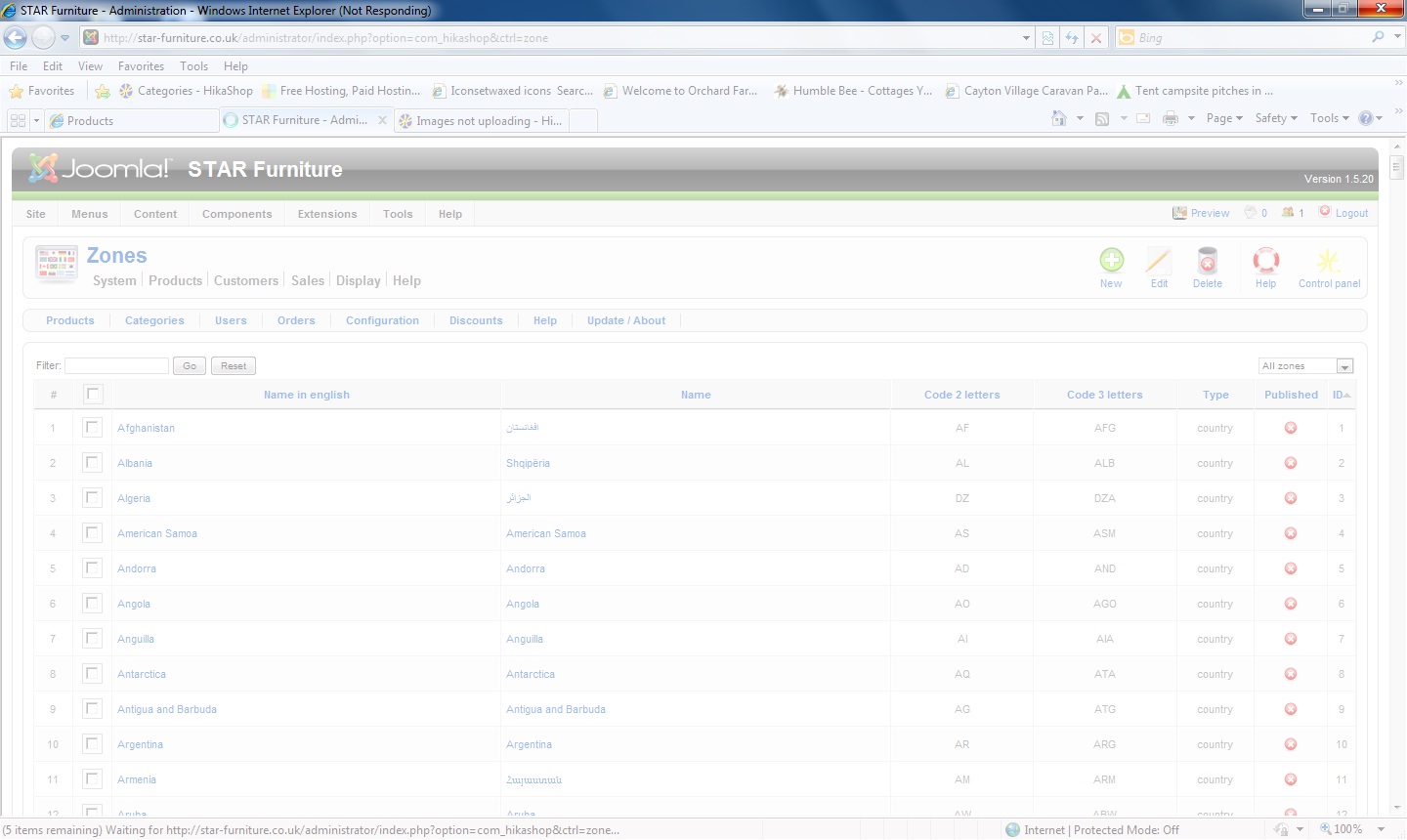
Just to add that this doesnt happen in Firefox, only in IE8 it seems.
Just to add that this doesnt happen in Firefox, only in IE8 it seems.
Last edit: 15 years 11 months ago by manamaga.
Please Log in or Create an account to join the conversation.
15 years 11 months ago - 15 years 11 months ago #121
by nicolas
Replied by nicolas on topic Re: Images not uploading
That's normal. There are around 5000 zones by default in HikaShop. If you try to display them all on one page your browser will struggle to process all that information and result in the problem you had.
It's the same with any joomla listing when you have a lot of information in it.
If you want to unpublish countries, you should first select the filter on the right to countries. Then, when you select all, it will only display 200 items which should be ok.
You don't need to unpublish states of unpublished countries because by just unpublishing a country, all its states won't be displayable by your users.
It's the same with any joomla listing when you have a lot of information in it.
If you want to unpublish countries, you should first select the filter on the right to countries. Then, when you select all, it will only display 200 items which should be ok.
You don't need to unpublish states of unpublished countries because by just unpublishing a country, all its states won't be displayable by your users.
Last edit: 15 years 11 months ago by nicolas.
Please Log in or Create an account to join the conversation.
15 years 11 months ago #122
by manamaga
Replied by manamaga on topic Re: Images not uploading
Cool, though i found that when clicking to view 'All', firefox does actually cope pretty well and it only take a few seconds to process the info  Next question (sorry to keep asking), if i go to HikaShop>Configuration>Display>Custom Fields, i want to delete the fields which i dont need and reorder the ones that i do need, but nothing happens when i try to do this. The only thing it will let me do is to add new fields or amend existing fields, not delete or sort them into the correct order. Any advice on this?
Next question (sorry to keep asking), if i go to HikaShop>Configuration>Display>Custom Fields, i want to delete the fields which i dont need and reorder the ones that i do need, but nothing happens when i try to do this. The only thing it will let me do is to add new fields or amend existing fields, not delete or sort them into the correct order. Any advice on this? Please Log in or Create an account to join the conversation.
15 years 11 months ago #123
by nicolas
Replied by nicolas on topic Re: Images not uploading
It's not allowed to delete default fields. However, you can upublish them. Ordering should work although I must say we didn't test the ordering on this particular listing so there could indeed be a problem... Thanks for the report... We'll look deaper into that on monday and fix what needs to be fixed.
Please Log in or Create an account to join the conversation.
15 years 11 months ago #124
by manamaga
Replied by manamaga on topic Re: Images not uploading
I only wanted to delete unused fields just to keep things tidy at the backend but thats fine, i`ll just unpublish them. Ordering would be good if you could let me know when there is a fix available, i`m hoping to hand over the website by the end of next week to my client.
Please Log in or Create an account to join the conversation.
15 years 11 months ago #125
by nicolas
Replied by nicolas on topic Re: Images not uploading
Hi,
We have found the problem already and corrected it on our development version. We also added an error message when deleting a core custom field so that it's less confusing.
We will release all those fixes along with others tomorrow.
We have found the problem already and corrected it on our development version. We also added an error message when deleting a core custom field so that it's less confusing.
We will release all those fixes along with others tomorrow.
Please Log in or Create an account to join the conversation.
15 years 11 months ago #126
by manamaga
Replied by manamaga on topic Re: Images not uploading
Once again, you are a star!! :woohoo:
Please Log in or Create an account to join the conversation.
15 years 11 months ago #133
by nicolas
Replied by nicolas on topic Re: Images not uploading
Hi,
The new version of HikaShop is available. You can download it and install it without uninstalling the previous version.
It fixes a lot of small things you reported and the ordering bug on custom fields.
How to update documentation:
www.hikashop.com/en/support/documentation/59.html#update
The new version of HikaShop is available. You can download it and install it without uninstalling the previous version.
It fixes a lot of small things you reported and the ordering bug on custom fields.
How to update documentation:
www.hikashop.com/en/support/documentation/59.html#update
Please Log in or Create an account to join the conversation.
15 years 11 months ago #135
by manamaga
Replied by manamaga on topic Re: Images not uploading
Thanks for the quick update, i have installed this but joomla throws up some errors after clicking install:
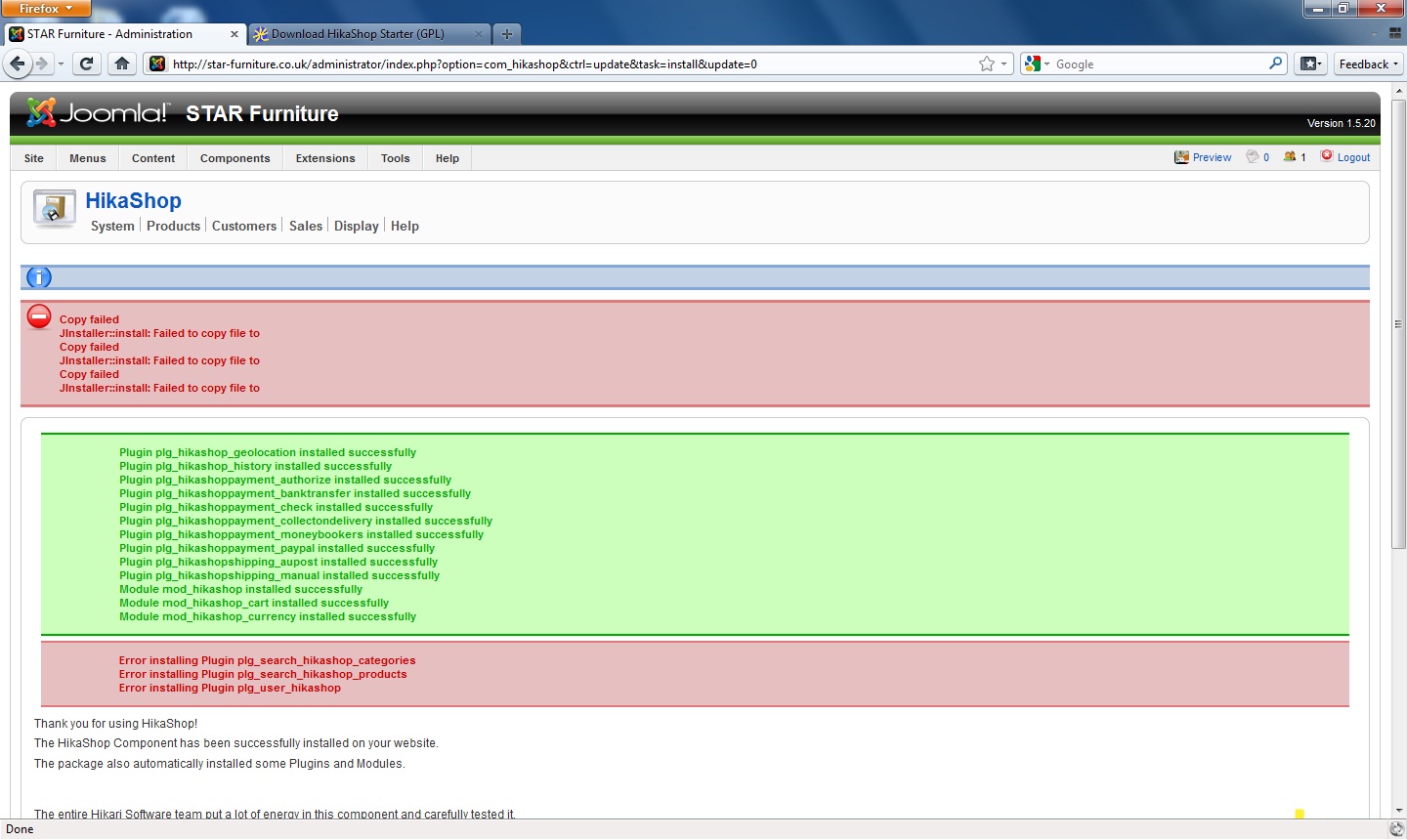
Please Log in or Create an account to join the conversation.
Time to create page: 0.416 seconds