

- Posts: 86242
- Thank you received: 14229
Images not uploading
15 years 11 months ago - 15 years 11 months ago #89
by nicolas
Replied by nicolas on topic Re: Images not uploading
Could you try to change some code ?
in the file administrator/components/com_hikashop/helpers/helper.php few lines before the end there is this code:
if you replace it by :
and try to refresh the page , does that fix the problem ?
in the file administrator/components/com_hikashop/helpers/helper.php few lines before the end there is this code:
Code:
$lang =& JFactory::getLanguage();
$lang->load(HIKASHOP_COMPONENT,JPATH_SITE);
Code:
static $lang_loaded = false;
if(! $lang_loaded){
$lang_loaded=true;
$lang =& JFactory::getLanguage();
$lang->load(HIKASHOP_COMPONENT,JPATH_SITE);
}
Last edit: 15 years 11 months ago by nicolas.
Please Log in or Create an account to join the conversation.

15 years 11 months ago #90
by manamaga
Replied by manamaga on topic Re: Images not uploading
Maybe i might not have something set correctly in configuration? Is it possible you could take a look? I have an administrator account setup i could send in PM
Please Log in or Create an account to join the conversation.
15 years 11 months ago - 15 years 11 months ago #91
by nicolas
Replied by nicolas on topic Re: Images not uploading
We do not offer a checkout without registration.
The problem with that is that your users can't access their order once finished, they can't receive the notification emails, you can't contact them, etc.
The problem with that is that your users can't access their order once finished, they can't receive the notification emails, you can't contact them, etc.
Last edit: 15 years 11 months ago by nicolas.
Please Log in or Create an account to join the conversation.
15 years 11 months ago #92
by nicolas
Replied by nicolas on topic Re: Images not uploading
I would need access to the FTP as well so that I can fix the problem if it's a bug. you can send the information to nicolas@hikashop.com
Please Log in or Create an account to join the conversation.
15 years 11 months ago #93
by manamaga
Replied by manamaga on topic Re: Images not uploading
nicolas wrote:
Is this for the misplaced fonts??
Could you try to change some code ?
in the file administrator/components/com_hikashop/helpers/helper.php few lines before the end there is this code:if you replace it by :Code:$lang =& JFactory::getLanguage(); $lang->load(HIKASHOP_COMPONENT,JPATH_SITE);and try to refresh the page , does that fix the problem ?Code:static $lang_loaded = false; if(! $lang_loaded){ $lang_loaded=true; $lang =& JFactory::getLanguage(); $lang->load(HIKASHOP_COMPONENT,JPATH_SITE); }
Is this for the misplaced fonts??
Please Log in or Create an account to join the conversation.
15 years 11 months ago #94
by nicolas
Replied by nicolas on topic Re: Images not uploading
For the translation strings not converted properly.
Please Log in or Create an account to join the conversation.
15 years 11 months ago #95
by manamaga
Replied by manamaga on topic Re: Images not uploading
Cannot find in helper.php:
$lang =& JFactory::getLanguage();$lang->load(HIKASHOP_COMPONENT,JPATH_SITE);
I have attached the file
$lang =& JFactory::getLanguage();$lang->load(HIKASHOP_COMPONENT,JPATH_SITE);
I have attached the file
Please Log in or Create an account to join the conversation.
15 years 11 months ago #96
by manamaga
Replied by manamaga on topic Re: Images not uploading
Sorry, had to zip the file because .php files are not allowed for upload
This attachment is hidden for guests.
This attachment is hidden for guests.
Please log in or register to see it.
Please Log in or Create an account to join the conversation.
15 years 11 months ago - 15 years 11 months ago #97
by nicolas
Replied by nicolas on topic Re: Images not uploading
It's on line 1320
Last edit: 15 years 11 months ago by nicolas.
Please Log in or Create an account to join the conversation.
15 years 11 months ago #98
by manamaga
Replied by manamaga on topic Re: Images not uploading
OK, i have replaced the code as per your instruction and still the same on the checkout page:
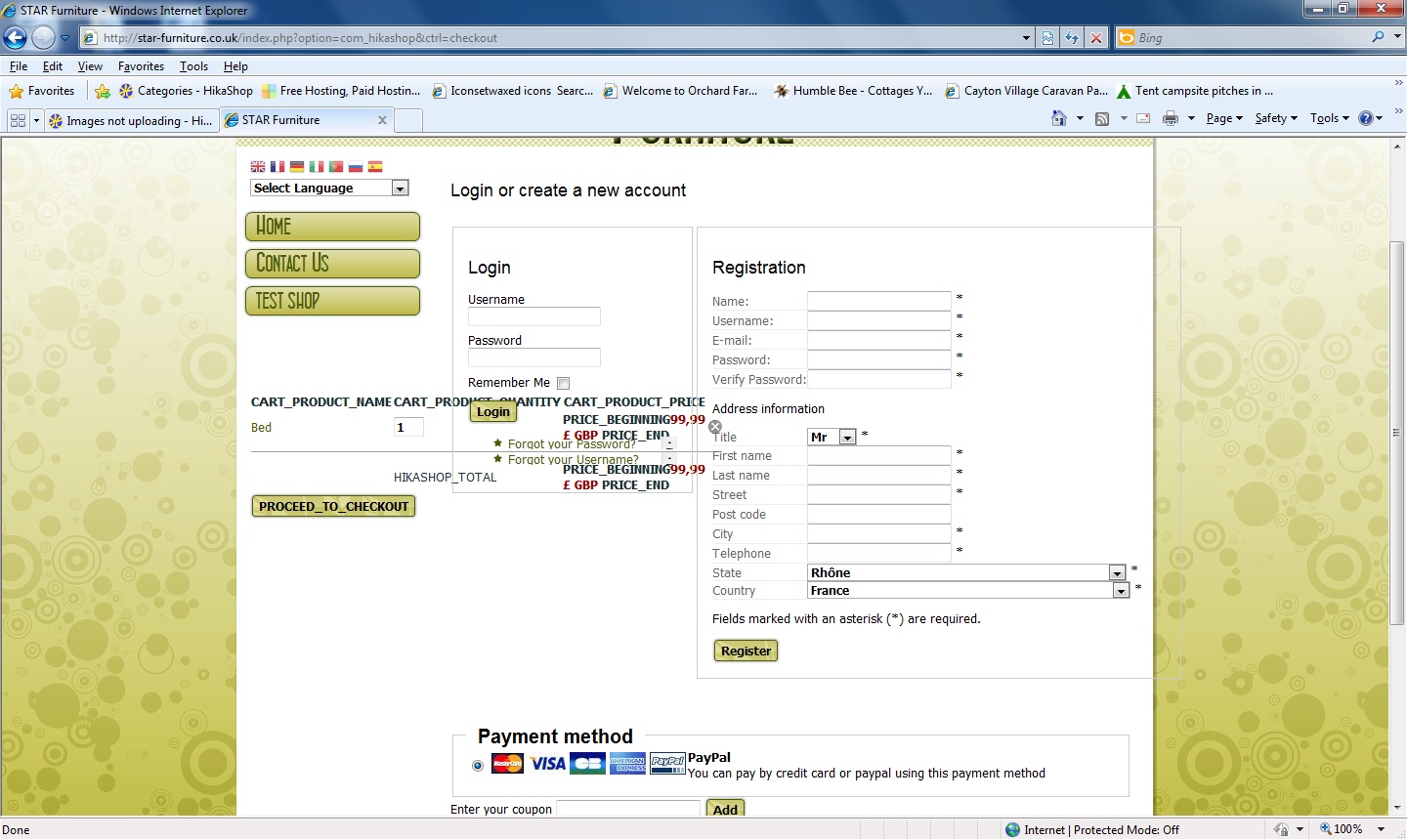
Please Log in or Create an account to join the conversation.
15 years 11 months ago #99
by nicolas
Replied by nicolas on topic Re: Images not uploading
I will need an FTP access to your website and the URL of your website in order to find the problem and fix it. You can send send me your details at nicolas@hikashop.com
Please Log in or Create an account to join the conversation.
15 years 11 months ago #100
by manamaga
Replied by manamaga on topic Re: Images not uploading
Thanks for your help in this, i have emailed ftp details.
Please Log in or Create an account to join the conversation.
15 years 11 months ago #101
by manamaga
Replied by manamaga on topic Re: Images not uploading
I wont do any more configuring whilst you are looking, just in case anything clashes.
Please Log in or Create an account to join the conversation.
15 years 11 months ago #102
by nicolas
Replied by nicolas on topic Re: Images not uploading
I tried to put some traces in our cart module files. However, I don't see the traces on your website pages. Are you using some kind of caching system ?
Would it be possible to deactivate it for our modules ?
Would it be possible to deactivate it for our modules ?
Please Log in or Create an account to join the conversation.
15 years 11 months ago #103
by manamaga
Replied by manamaga on topic Re: Images not uploading
The cache is turned off in Joomla Global Config. Not sure about anything more than that?
Please Log in or Create an account to join the conversation.
15 years 11 months ago #104
by manamaga
Replied by manamaga on topic Re: Images not uploading
I have emailed you a Joomla login if you would like to have a look to see if i have setup the cart properly.
Please Log in or Create an account to join the conversation.
15 years 11 months ago #105
by manamaga
Replied by manamaga on topic Re: Images not uploading
Just to give you a brief idea about my clients business. They are a very small shop dealing in second hand retro furniture and really only deliver locally, so they probably wont be using the postage / shipping part of the cart. The use of the cart is really only to provide their customers to be able to browse their products and pay by using paypal. So they probably wont use the full potential of the cart software, at least until they might expand their business.
Please Log in or Create an account to join the conversation.
15 years 11 months ago #106
by nicolas
Replied by nicolas on topic Re: Images not uploading
Ah, I understand why even if I try to put an exit in the module it didn't change anything aven though the cache is turned off.
The FTP access you gave me doesn't allow me to edit the files. Could you allow write access to this account ?
The FTP access you gave me doesn't allow me to edit the files. Could you allow write access to this account ?
Please Log in or Create an account to join the conversation.
15 years 11 months ago #107
by manamaga
Replied by manamaga on topic Re: Images not uploading
You should be able to edit, i have emailed you again just to confirm the details.
Please Log in or Create an account to join the conversation.
15 years 11 months ago #108
by nicolas
Replied by nicolas on topic Re: Images not uploading
So, I was not able to edit the hikashop files. That's because you didn't configure your FTP details in the joomla configuration. So when you install a component, all its files get the access rights of the web server and not the FTP server. Then, you won't be able to change those files via FTP because the owner of the files is the web server not the ftp server.
I had to go around that by uploading a php file which I then run on my browser to change the rights of the hikashop files. Then, I was able to edit them via FTP.
I highly recommend you to setup your FTP details on joomla as you will have the same problem with all the things you add to your joomla.
I was all to put traces and I believe I've fixed the problem. That fix will go in the next release of HikaShop as other users might have the same problem.
I had to go around that by uploading a php file which I then run on my browser to change the rights of the hikashop files. Then, I was able to edit them via FTP.
I highly recommend you to setup your FTP details on joomla as you will have the same problem with all the things you add to your joomla.
I was all to put traces and I believe I've fixed the problem. That fix will go in the next release of HikaShop as other users might have the same problem.
Please Log in or Create an account to join the conversation.
Time to create page: 0.327 seconds