
attach 1 serial per item in product list

8 years 5 months ago #292565
by Jerome
Jerome - Obsidev.com
HikaMarket & HikaSerial developer / HikaShop core dev team.
Replied by Jerome on topic attach 1 serial per item in product list
Hello,
The HikaSerial workflow
1 - A pack is assigned to a product ( ok )
2 - When that product is bought, HikaSerial can assign serials to the order.
3 - The assignation depend on the order status (see setting "assignable order status" in your screenshot).
4 - HikaSerial use the pack setting for the serial assignation.
5 - Due to your "pack data", HikaSerial will first look for "free" serials in your database.
6 - Since there is no "free to use serials" (you can check the statistics in the pack screenshot) ; it will call the serial generator.
7 - You are using a "coupon generator"
Documentation of the coupon generator
www.hikashop.com/support/documentation/1...ugins-coupongen.html
If your order have the right order status and you do not have serials ; it would indicate that the generator did not (cannot) create the serials
The general issue is that you did not fully configured the coupon generator by missing the "coupon template" setting (if the coupon generator do not have a coupon template, it cannot duplicate that template to create a new coupon).
For the first time, I would recommend you to start with a "random generator" and once your workflow is working, you could switch on a "coupon generator".
Regards,
The HikaSerial workflow
1 - A pack is assigned to a product ( ok )
2 - When that product is bought, HikaSerial can assign serials to the order.
3 - The assignation depend on the order status (see setting "assignable order status" in your screenshot).
4 - HikaSerial use the pack setting for the serial assignation.
5 - Due to your "pack data", HikaSerial will first look for "free" serials in your database.
6 - Since there is no "free to use serials" (you can check the statistics in the pack screenshot) ; it will call the serial generator.
7 - You are using a "coupon generator"
Documentation of the coupon generator
www.hikashop.com/support/documentation/1...ugins-coupongen.html
If your order have the right order status and you do not have serials ; it would indicate that the generator did not (cannot) create the serials
The general issue is that you did not fully configured the coupon generator by missing the "coupon template" setting (if the coupon generator do not have a coupon template, it cannot duplicate that template to create a new coupon).
For the first time, I would recommend you to start with a "random generator" and once your workflow is working, you could switch on a "coupon generator".
Regards,
Jerome - Obsidev.com
HikaMarket & HikaSerial developer / HikaShop core dev team.
Please Log in or Create an account to join the conversation.

8 years 5 months ago #292597
by verzevoul
Replied by verzevoul on topic attach 1 serial per item in product list
it looks really complex for me, and I feel like an fooool.
Since You know what I want to do (assign a serial for every product is sold in hikashop orders), can you tell me why random generator the new setup with random generator isn t assigned to the product? Its in the order but not associated to the product
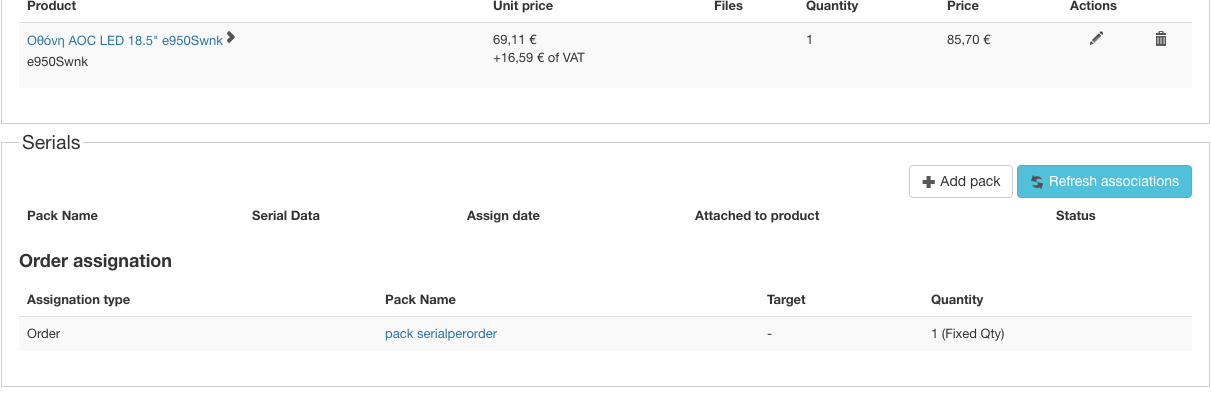
Since You know what I want to do (assign a serial for every product is sold in hikashop orders), can you tell me why random generator the new setup with random generator isn t assigned to the product? Its in the order but not associated to the product
Please Log in or Create an account to join the conversation.
8 years 5 months ago #292598
by Jerome
Jerome - Obsidev.com
HikaMarket & HikaSerial developer / HikaShop core dev team.
Replied by Jerome on topic attach 1 serial per item in product list
Hello,
You have assigned manually a pack to an order ; but since that pack ( serialperorder ) is still using the "coupon generator" ; the generation issue that I explained previously is still there.
Please create a "random generator" configuration and use it in your pack ( serialperorder) as generator.
www.hikashop.com/support/documentation/2...html#tuto_first_conf
Regards,
You have assigned manually a pack to an order ; but since that pack ( serialperorder ) is still using the "coupon generator" ; the generation issue that I explained previously is still there.
Please create a "random generator" configuration and use it in your pack ( serialperorder) as generator.
www.hikashop.com/support/documentation/2...html#tuto_first_conf
Regards,
Jerome - Obsidev.com
HikaMarket & HikaSerial developer / HikaShop core dev team.
Please Log in or Create an account to join the conversation.
8 years 5 months ago #292618
by verzevoul
Replied by verzevoul on topic attach 1 serial per item in product list
I ll send you screenshots to see my configuration. When I assign a serial pack in my product , the products quantity goes unlimited. I change it to 1 . After saving it goes unlimited again. Why? If I delete the pack it keeps the right quantity,
Also I even tried with unbublished coupon generator, but again my order has no serials.
I tried with different configuration and in the screenshots you ll see my last saved configuration ,no success.
Also I even tried with unbublished coupon generator, but again my order has no serials.
I tried with different configuration and in the screenshots you ll see my last saved configuration ,no success.
Please Log in or Create an account to join the conversation.
8 years 5 months ago #292635
by Jerome
Jerome - Obsidev.com
HikaMarket & HikaSerial developer / HikaShop core dev team.
Replied by Jerome on topic attach 1 serial per item in product list
Hello,
1 - Unlimited quantity.
Deactivate the setting "link product quantity" : www.hikashop.com/support/documentation/1...ration.html#main_adv
2 - Order serial assignation
The assignation is made only when the order is going in confirmation state.
Since you have change the pack settings, you must click on the button "refresh associations" to force the refreshing of serial association in the order.
Regards,
1 - Unlimited quantity.
Deactivate the setting "link product quantity" : www.hikashop.com/support/documentation/1...ration.html#main_adv
2 - Order serial assignation
The assignation is made only when the order is going in confirmation state.
Since you have change the pack settings, you must click on the button "refresh associations" to force the refreshing of serial association in the order.
Regards,
Jerome - Obsidev.com
HikaMarket & HikaSerial developer / HikaShop core dev team.
The following user(s) said Thank You: verzevoul
Please Log in or Create an account to join the conversation.
8 years 5 months ago #292670
by verzevoul
Replied by verzevoul on topic attach 1 serial per item in product list
Ok, I got it Jerome !
Thank you!
The last goal would be if I could assign also 1 serial per product when I add a new product with a quantity of 5 for example.
So each item can have its serial, when I create a new product. When I buy 5 iphone 6s for example, each item in the invoice has already its serial. Is this possible?
Thank you!
The last goal would be if I could assign also 1 serial per product when I add a new product with a quantity of 5 for example.
So each item can have its serial, when I create a new product. When I buy 5 iphone 6s for example, each item in the invoice has already its serial. Is this possible?
Please Log in or Create an account to join the conversation.
Moderators: Obsidev
Time to create page: 0.153 seconds