
- Posts: 85
- Thank you received: 9
Add vendor name in order status notification email
- pagemaster
-
 Topic Author
- Offline
Less
More
6 years 4 months ago - 5 years 11 months ago #318817
by pagemaster
Add vendor name in order status notification email was created by pagemaster
-- HikaShop version -- : 4.2.3
-- Joomla version -- : 3.9.18
-- PHP version -- : 7.2.26
Hello,
is it possible to add the vendor name of the order in the order status notification email?
I know that is possible the email under System - Email - Notification order status but I don`t find the tag for this.
P.S. I don`t know if change something, but I limited the number of the vendors in the carriage to one
Thank you for your support
-- Joomla version -- : 3.9.18
-- PHP version -- : 7.2.26
Hello,
is it possible to add the vendor name of the order in the order status notification email?
I know that is possible the email under System - Email - Notification order status but I don`t find the tag for this.
P.S. I don`t know if change something, but I limited the number of the vendors in the carriage to one
Thank you for your support
Last edit: 5 years 11 months ago by pagemaster.
Please Log in or Create an account to join the conversation.

6 years 4 months ago #318822
by Jerome
Jerome - Obsidev.com
HikaMarket & HikaSerial developer / HikaShop core dev team.
Replied by Jerome on topic Add vendor name in order status notification email
Hello,
www.hikashop.com/support/documentation/1...#config_market_email
Setting : Display vendor name in emails
Regards,
www.hikashop.com/support/documentation/1...#config_market_email
Setting : Display vendor name in emails
Regards,
Jerome - Obsidev.com
HikaMarket & HikaSerial developer / HikaShop core dev team.
The following user(s) said Thank You: pagemaster
Please Log in or Create an account to join the conversation.
- pagemaster
-
Topic Author
- Offline
Less
More
- Posts: 85
- Thank you received: 9
6 years 4 months ago - 6 years 4 months ago #318851
by pagemaster
Replied by pagemaster on topic Add vendor name in order status notification email
Thank you very much. Now it works
Last edit: 6 years 4 months ago by pagemaster.
Please Log in or Create an account to join the conversation.
- pagemaster
-
Topic Author
- Offline
Less
More
- Posts: 85
- Thank you received: 9
6 years 4 months ago #318968
by pagemaster
Replied by pagemaster on topic Add vendor name in order status notification email
Is it also possible to show the vendor address?
Please Log in or Create an account to join the conversation.
6 years 4 months ago #318998
by Jerome
Jerome - Obsidev.com
HikaMarket & HikaSerial developer / HikaShop core dev team.
Replied by Jerome on topic Add vendor name in order status notification email
Hello,
It requires some customization in your HikaShop order email if you want to force that.
Since you can have multiple vendor (and some other reasons), HikaMarket do not override other fields in the HikaShop order status notification email.
But when a vendor send an email via its interface, the displayed address is the vendor address.
Regards,
It requires some customization in your HikaShop order email if you want to force that.
Since you can have multiple vendor (and some other reasons), HikaMarket do not override other fields in the HikaShop order status notification email.
But when a vendor send an email via its interface, the displayed address is the vendor address.
Regards,
Jerome - Obsidev.com
HikaMarket & HikaSerial developer / HikaShop core dev team.
The following user(s) said Thank You: pagemaster
Please Log in or Create an account to join the conversation.
- pagemaster
-
Topic Author
- Offline
Less
More
- Posts: 85
- Thank you received: 9
6 years 4 months ago #319019
by pagemaster
Replied by pagemaster on topic Add vendor name in order status notification email
Just to know if I procede in the right way. I have to add the custom code in the bottom section "Precharged version"?
Please Log in or Create an account to join the conversation.
6 years 4 months ago #319064
by Jerome
Jerome - Obsidev.com
HikaMarket & HikaSerial developer / HikaShop core dev team.
Replied by Jerome on topic Add vendor name in order status notification email
Hello,
In the "preload" part of the email you can add some PHP code and modify variables content, such as the store address.
Regards,
In the "preload" part of the email you can add some PHP code and modify variables content, such as the store address.
Regards,
Jerome - Obsidev.com
HikaMarket & HikaSerial developer / HikaShop core dev team.
The following user(s) said Thank You: pagemaster
Please Log in or Create an account to join the conversation.
- pagemaster
-
Topic Author
- Offline
Less
More
- Posts: 85
- Thank you received: 9
5 years 11 months ago #325463
by pagemaster
Replied by pagemaster on topic Add vendor name in order status notification email
I added the vendor address with success. Thank you very much for your support
Please Log in or Create an account to join the conversation.
Less
More
- Posts: 424
- Thank you received: 11
5 years 7 months ago #330238
by BluepointWebdesign
Replied by BluepointWebdesign on topic Add vendor name in order status notification email
Hello how did you get the vendor adress in the order status notification??
I have this setting but do not get the vendors name in the email:
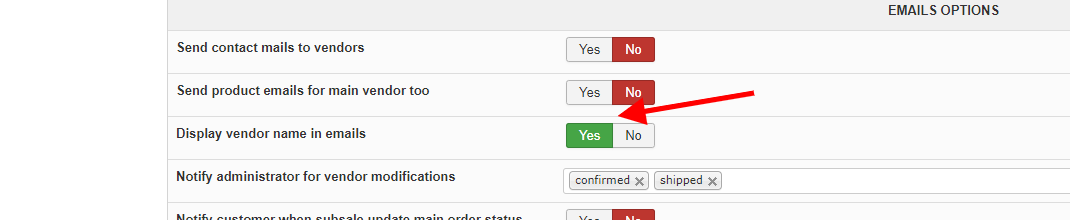
But if pagemaster shows me how he got the adress in??
I would be happy..
Thanks
I have this setting but do not get the vendors name in the email:
But if pagemaster shows me how he got the adress in??
I would be happy..
Thanks
Please Log in or Create an account to join the conversation.
5 years 7 months ago #330269
by Jerome
Jerome - Obsidev.com
HikaMarket & HikaSerial developer / HikaShop core dev team.
Replied by Jerome on topic Add vendor name in order status notification email
Hello,
The setting "Display vendor name in emails" will add the text "Sold by VENDOR" with the product name in the email.
But there is no still setting to change the billing address in the HikaShop email ; that address will be available in the message generated by the vendor in the front-end.
Regards,
The setting "Display vendor name in emails" will add the text "Sold by VENDOR" with the product name in the email.
But there is no still setting to change the billing address in the HikaShop email ; that address will be available in the message generated by the vendor in the front-end.
Since you can have multiple vendor (and some other reasons), HikaMarket do not override other fields in the HikaShop order status notification email.
But when a vendor send an email via its interface, the displayed address is the vendor address.
Regards,
Jerome - Obsidev.com
HikaMarket & HikaSerial developer / HikaShop core dev team.
Please Log in or Create an account to join the conversation.
Less
More
- Posts: 424
- Thank you received: 11
5 years 7 months ago #330286
by BluepointWebdesign
Replied by BluepointWebdesign on topic Add vendor name in order status notification email
We only need that the vendor name is displayed in the mail.
We turned on the setting: "Display vendor name in emails"
But we do not get the name of the vendor in the emails..??
How is this possible?
If you want to have look i can give you credentials for the website.
Regards,
Mark
We turned on the setting: "Display vendor name in emails"
But we do not get the name of the vendor in the emails..??
How is this possible?
If you want to have look i can give you credentials for the website.
Regards,
Mark
Please Log in or Create an account to join the conversation.
5 years 7 months ago - 5 years 7 months ago #330321
by Jerome
Jerome - Obsidev.com
HikaMarket & HikaSerial developer / HikaShop core dev team.
Replied by Jerome on topic Add vendor name in order status notification email
Hello,
Which email exactly are you talking about ?
Do you have email overrides ?
Regards,
Which email exactly are you talking about ?
Do you have email overrides ?
Regards,
Jerome - Obsidev.com
HikaMarket & HikaSerial developer / HikaShop core dev team.
Last edit: 5 years 7 months ago by Jerome.
Please Log in or Create an account to join the conversation.
Less
More
- Posts: 424
- Thank you received: 11
5 years 7 months ago #330331
by BluepointWebdesign
Replied by BluepointWebdesign on topic Add vendor name in order status notification email
Hi,
In the ORDER_STATUS_NOTIFICATION_SUBJECT of hikashop, the e-mail the customer gets when he buys a product from vendor.
In the ORDER_STATUS_NOTIFICATION_SUBJECT of hikashop, the e-mail the customer gets when he buys a product from vendor.
Please Log in or Create an account to join the conversation.
5 years 6 months ago #330405
by Jerome
Jerome - Obsidev.com
HikaMarket & HikaSerial developer / HikaShop core dev team.
Replied by Jerome on topic Add vendor name in order status notification email
Hello,
That email should be processed by the trigger.
I will perform some tests during the weekend.
Regards,
That email should be processed by the trigger.
I will perform some tests during the weekend.
Regards,
Jerome - Obsidev.com
HikaMarket & HikaSerial developer / HikaShop core dev team.
Please Log in or Create an account to join the conversation.
5 years 6 months ago #330685
by Jerome
Jerome - Obsidev.com
HikaMarket & HikaSerial developer / HikaShop core dev team.
Replied by Jerome on topic Add vendor name in order status notification email
Hello,
On the latest version, enabling the setting "Display vendor name in emails", I made a test order on one test website and here a screenshot of the content (from the HikaShop email history) :
pasteboard.co/JSauXlb.png
So, even if you have an empty string for the "sold by" translation ; I can't explain why it's not working for you.
Regards,
On the latest version, enabling the setting "Display vendor name in emails", I made a test order on one test website and here a screenshot of the content (from the HikaShop email history) :
pasteboard.co/JSauXlb.png
So, even if you have an empty string for the "sold by" translation ; I can't explain why it's not working for you.
Regards,
Jerome - Obsidev.com
HikaMarket & HikaSerial developer / HikaShop core dev team.
Please Log in or Create an account to join the conversation.
Less
More
- Posts: 424
- Thank you received: 11
5 years 5 months ago #331554
by BluepointWebdesign
Replied by BluepointWebdesign on topic Add vendor name in order status notification email
Hello.
In the attached pdf you see the confirmation email the customer gets.
But after update suddenly the order number is not shown any more,
How can we get it back??
Also in the subject line of the email the order number is not shown.
De bestelling met Nr. (ordernumber missing) is nu Bevestigd op 06.bluepoint-concept.nl/
As you also can see we like to have the vendor name and telefoonnumber in it but how can we get it triggered in this email??
Please help,
Thanks.
In the attached pdf you see the confirmation email the customer gets.
But after update suddenly the order number is not shown any more,
How can we get it back??
Also in the subject line of the email the order number is not shown.
De bestelling met Nr. (ordernumber missing) is nu Bevestigd op 06.bluepoint-concept.nl/
As you also can see we like to have the vendor name and telefoonnumber in it but how can we get it triggered in this email??
Please help,
Thanks.
This attachment is hidden for guests.
Please log in or register to see it.
Please log in or register to see it.
Please Log in or Create an account to join the conversation.

5 years 5 months ago #331559
by nicolas
Replied by nicolas on topic Add vendor name in order status notification email
Hi,
Well, it's hard to say much without more information about the issue. Your PDF only has a screenshot of the content of the email and as I don't read your language, and your email has been heavily customized, I don't know where the order number should appear.
Could you provide a screenshot of the email in the Customers>Email history menu ?
There, the subject and the content of the email will appear.
Also, where is the order number supposed to appear in your email ? In which text ? And what did you use for the translation override for that text ?
To get the vendor name, supposing that you only have one vendor for the ordrer, you can use such code in the email HTML:
And for the vendor telephone, you can use the same code but with vendor_address_telephone instead of vendor_name
Well, it's hard to say much without more information about the issue. Your PDF only has a screenshot of the content of the email and as I don't read your language, and your email has been heavily customized, I don't know where the order number should appear.
Could you provide a screenshot of the email in the Customers>Email history menu ?
There, the subject and the content of the email will appear.
Also, where is the order number supposed to appear in your email ? In which text ? And what did you use for the translation override for that text ?
To get the vendor name, supposing that you only have one vendor for the ordrer, you can use such code in the email HTML:
Code:
$orderClass = hikamarket::get('class.order');
$vendorId = $orderClass->getVendorIdFromOrderProducts($data->cart);
$vendorClass = hikamarket::get('class.vendor');
$vendor = $vendorClass->get($vendorId);
echo $vendor->vendor_name;
Please Log in or Create an account to join the conversation.
Less
More
- Posts: 424
- Thank you received: 11
5 years 5 months ago #331585
by BluepointWebdesign
Replied by BluepointWebdesign on topic Add vendor name in order status notification email
Hi Nicolas,
Sorry for the dutch language
1. I will implement your code for the vendor name and telephone number.. thanks..
2. The pdf is what the customer gets in his e-mail without ordernumber, but the order number is also not in the subject line? this is since the last update.. i assume but must say i could be wrong..
Attachted a screenshot of the preview of the status notification i altered. There the ordernumber is visible.. ?? Very strange..
Hope you can help..
Thanks.
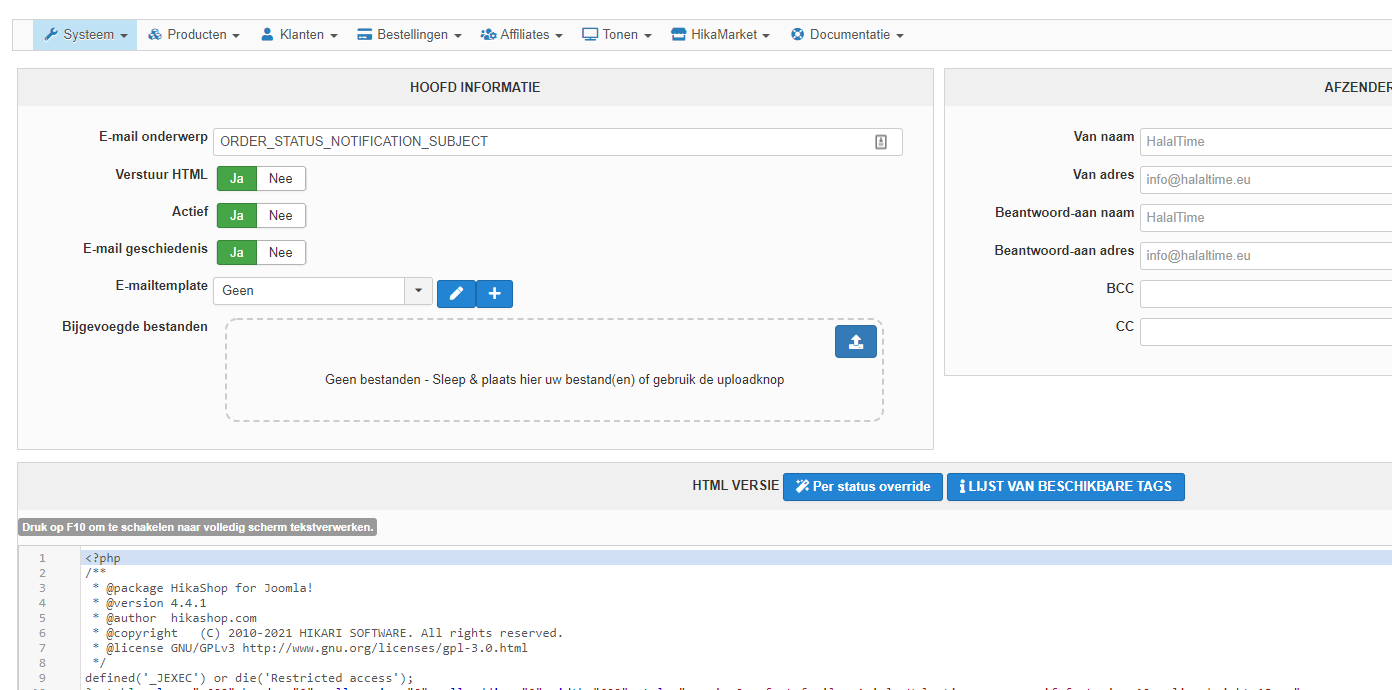
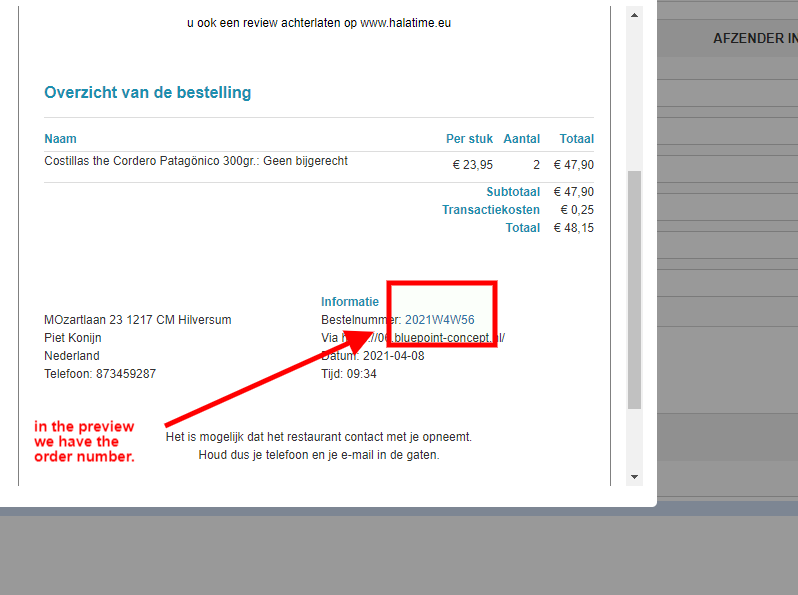
Sorry for the dutch language
1. I will implement your code for the vendor name and telephone number.. thanks..
2. The pdf is what the customer gets in his e-mail without ordernumber, but the order number is also not in the subject line? this is since the last update.. i assume but must say i could be wrong..
Attachted a screenshot of the preview of the status notification i altered. There the ordernumber is visible.. ?? Very strange..
Hope you can help..
Thanks.
Please Log in or Create an account to join the conversation.
Less
More
- Posts: 424
- Thank you received: 11
5 years 5 months ago #331592
by BluepointWebdesign
Replied by BluepointWebdesign on topic Add vendor name in order status notification email
Hi Nicolas,
I am struggling a bit with your code,
I implemented it in de status notification mail, confirmed HTML part as you said, but when i preview the mail i get to see this error notice:
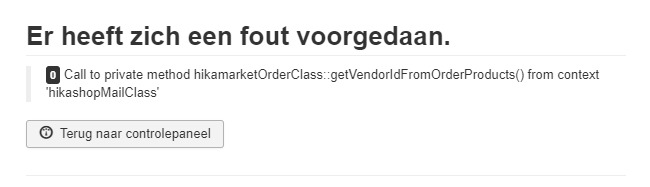
I am struggling a bit with your code,
I implemented it in de status notification mail, confirmed HTML part as you said, but when i preview the mail i get to see this error notice:
Please Log in or Create an account to join the conversation.
5 years 5 months ago - 5 years 5 months ago #331586
by nicolas
Replied by nicolas on topic Add vendor name in order status notification email
Hi,
1. If you're saying that the PDF of your previous message is generated by the PDF invoice plugin and that you want to set the vendor name and vendor telephone in there and not in the email, then the code I provided won't work since the code I gave is to add them in the email. For the PDF, you would have to edit the file plugins/hikashop/attachinvoice/attachinvoice/invoice.php
You could then use the same code, but you'll have to replace $data->cart by $order as the order information is not in the same variable in the PDF invoice.
2. For the order number in the email, I asked for a screenshot of the email with the issue in the Customers>Emails history, and not a screenshot of the preview. Could you please provide that ?
3. My bad. I had not seen that the function getVendorIdFromOrderProducts could not be used.
Well, it will be difficult without it as you would need 2 dozens of extra lines of code. So I'm afraid you'll have to change the line:
private function getVendorIdFromOrderProducts($order_product_id, &$order) {
to:
public function getVendorIdFromOrderProducts($order_product_id, &$order) {
in the file administrator/components/com_hikamarket/classes/order.php so that your code will be able to use that getVendorIdFromOrderProducts function and avoid the error.
1. If you're saying that the PDF of your previous message is generated by the PDF invoice plugin and that you want to set the vendor name and vendor telephone in there and not in the email, then the code I provided won't work since the code I gave is to add them in the email. For the PDF, you would have to edit the file plugins/hikashop/attachinvoice/attachinvoice/invoice.php
You could then use the same code, but you'll have to replace $data->cart by $order as the order information is not in the same variable in the PDF invoice.
2. For the order number in the email, I asked for a screenshot of the email with the issue in the Customers>Emails history, and not a screenshot of the preview. Could you please provide that ?
3. My bad. I had not seen that the function getVendorIdFromOrderProducts could not be used.
Well, it will be difficult without it as you would need 2 dozens of extra lines of code. So I'm afraid you'll have to change the line:
private function getVendorIdFromOrderProducts($order_product_id, &$order) {
to:
public function getVendorIdFromOrderProducts($order_product_id, &$order) {
in the file administrator/components/com_hikamarket/classes/order.php so that your code will be able to use that getVendorIdFromOrderProducts function and avoid the error.
Last edit: 5 years 5 months ago by nicolas.
Please Log in or Create an account to join the conversation.
Time to create page: 0.271 seconds