
- Posts: 61
- Thank you received: 3
Cart dromdown override
- demoisellegol
-
 Topic Author
- Offline
Less
More
2 years 1 month ago #362620
by demoisellegol
Cart dromdown override was created by demoisellegol
-- url of the page with the problem -- :
demoisellegol.fr/fr/cart
-- HikaShop version -- : 5.1.0
-- Joomla version -- : 5.1.2
-- PHP version -- : 8.1
hi
how can i add a class name to this dropdown via overrides ?
i'm using UIKit framework and i need this dropdown to have "uk-select" class
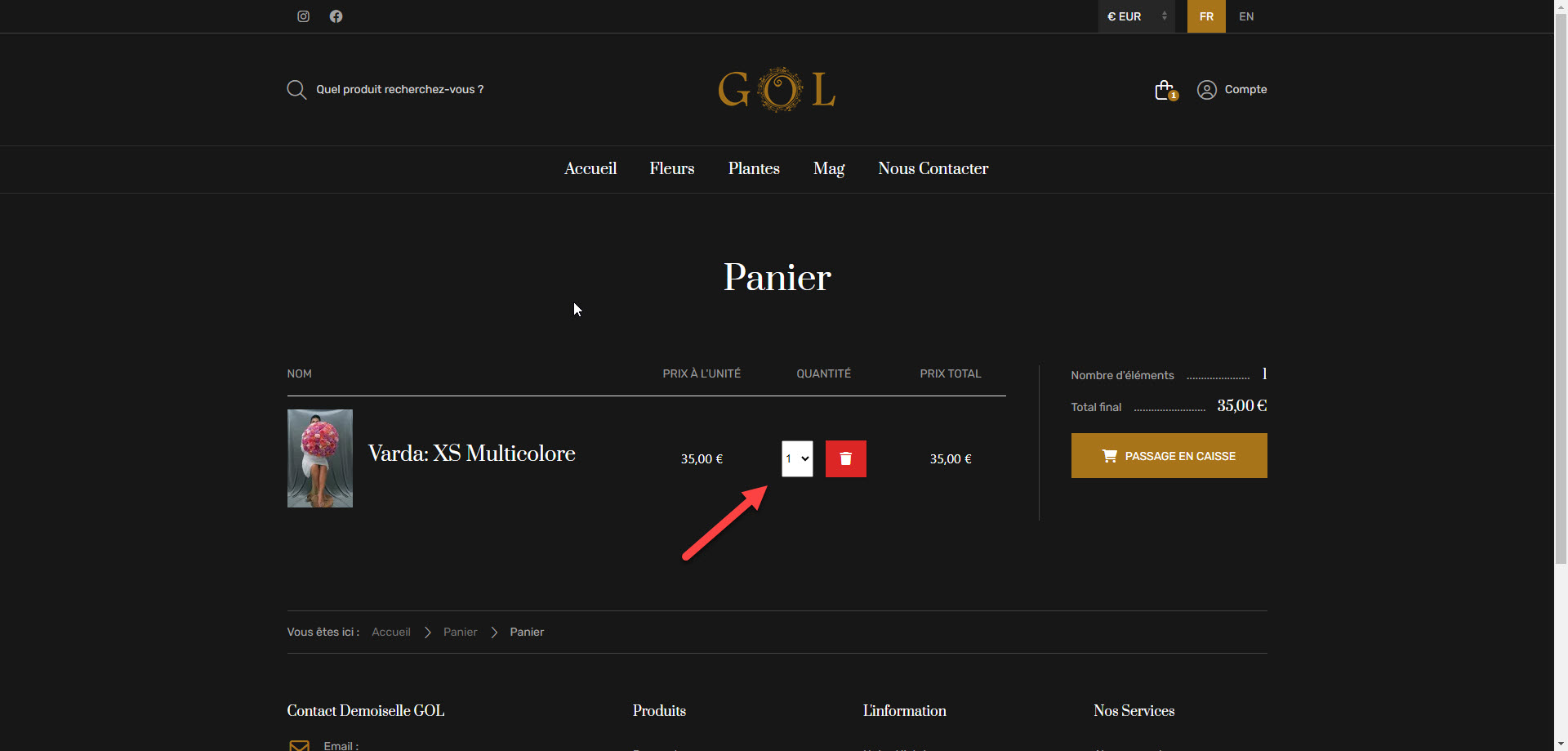
-- HikaShop version -- : 5.1.0
-- Joomla version -- : 5.1.2
-- PHP version -- : 8.1
hi
how can i add a class name to this dropdown via overrides ?
i'm using UIKit framework and i need this dropdown to have "uk-select" class
Please Log in or Create an account to join the conversation.

2 years 1 month ago #362627
by nicolas
Replied by nicolas on topic Cart dromdown override
Hi,
In order to find which view file displays it, you could activate the "display view files" setting of the HikaShop configuration.
You'll see that it should be the layouts / quantity.php view file.
So you can edit it for your frontend template via the menu Display>Views.
There, I think you can just change the line:
$extra_classes = '';
to:
$extra_classes = 'uk-select';
In order to find which view file displays it, you could activate the "display view files" setting of the HikaShop configuration.
You'll see that it should be the layouts / quantity.php view file.
So you can edit it for your frontend template via the menu Display>Views.
There, I think you can just change the line:
$extra_classes = '';
to:
$extra_classes = 'uk-select';
Please Log in or Create an account to join the conversation.
- demoisellegol
-
Topic Author
- Offline
Less
More
- Posts: 61
- Thank you received: 3
2 years 1 month ago #362631
by demoisellegol
Replied by demoisellegol on topic Cart dromdown override
i enabeld that option
when I hover on every element i can see the view file exepct that dropdown !!\
I also added the desired class to $extra_classes in layouts/quantity.php but it did not worked
when I hover on every element i can see the view file exepct that dropdown !!\
I also added the desired class to $extra_classes in layouts/quantity.php but it did not worked
Please Log in or Create an account to join the conversation.

2 years 1 month ago - 2 years 1 month ago #362633
by Philip
Replied by Philip on topic Cart dromdown override
Hello,
I'm really sorry, but if this doesn't work then there is probably an error in your php/html code.
From there, I can only invite you to double-check your code, also remember that you can also do reviews via AI applications like ChatGPT by example.
Regards
I'm really sorry, but if this doesn't work then there is probably an error in your php/html code.
From there, I can only invite you to double-check your code, also remember that you can also do reviews via AI applications like ChatGPT by example.
Regards
Last edit: 2 years 1 month ago by Philip.
Please Log in or Create an account to join the conversation.
- demoisellegol
-
Topic Author
- Offline
Less
More
- Posts: 61
- Thank you received: 3
2 years 1 month ago #362653
by demoisellegol
Replied by demoisellegol on topic Cart dromdown override
i exactly know where in the files of the main component (not view files) can add a class to this select field .. I only dont know how to create that override !
components/com_hikashop/views/layouts/tmpl/quantity.php
line 141
but the override of this file doesnt work
components/com_hikashop/views/layouts/tmpl/quantity.php
line 141
but the override of this file doesnt work
Please Log in or Create an account to join the conversation.
2 years 1 month ago - 2 years 1 month ago #362657
by Philip
Replied by Philip on topic Cart dromdown override
Hello,
In details, follow me step by step :
1. in your layouts/quantity, go around line 145
2. AFTER "<div id="<?php echo $id; ?>_area" class="hikashop_product_quantity_div hikashop_product_quantity_input_div_select"><?php" (line 143 in my screenshot)
add this code : "$extra_classes .= "uk-select";"
To get this :

Hope this will help you
In details, follow me step by step :
1. in your layouts/quantity, go around line 145
2. AFTER "<div id="<?php echo $id; ?>_area" class="hikashop_product_quantity_div hikashop_product_quantity_input_div_select"><?php" (line 143 in my screenshot)
add this code : "$extra_classes .= "uk-select";"
To get this :
Hope this will help you
Last edit: 2 years 1 month ago by Philip.
Please Log in or Create an account to join the conversation.
Time to create page: 0.208 seconds