Hi, thank you for your answer.
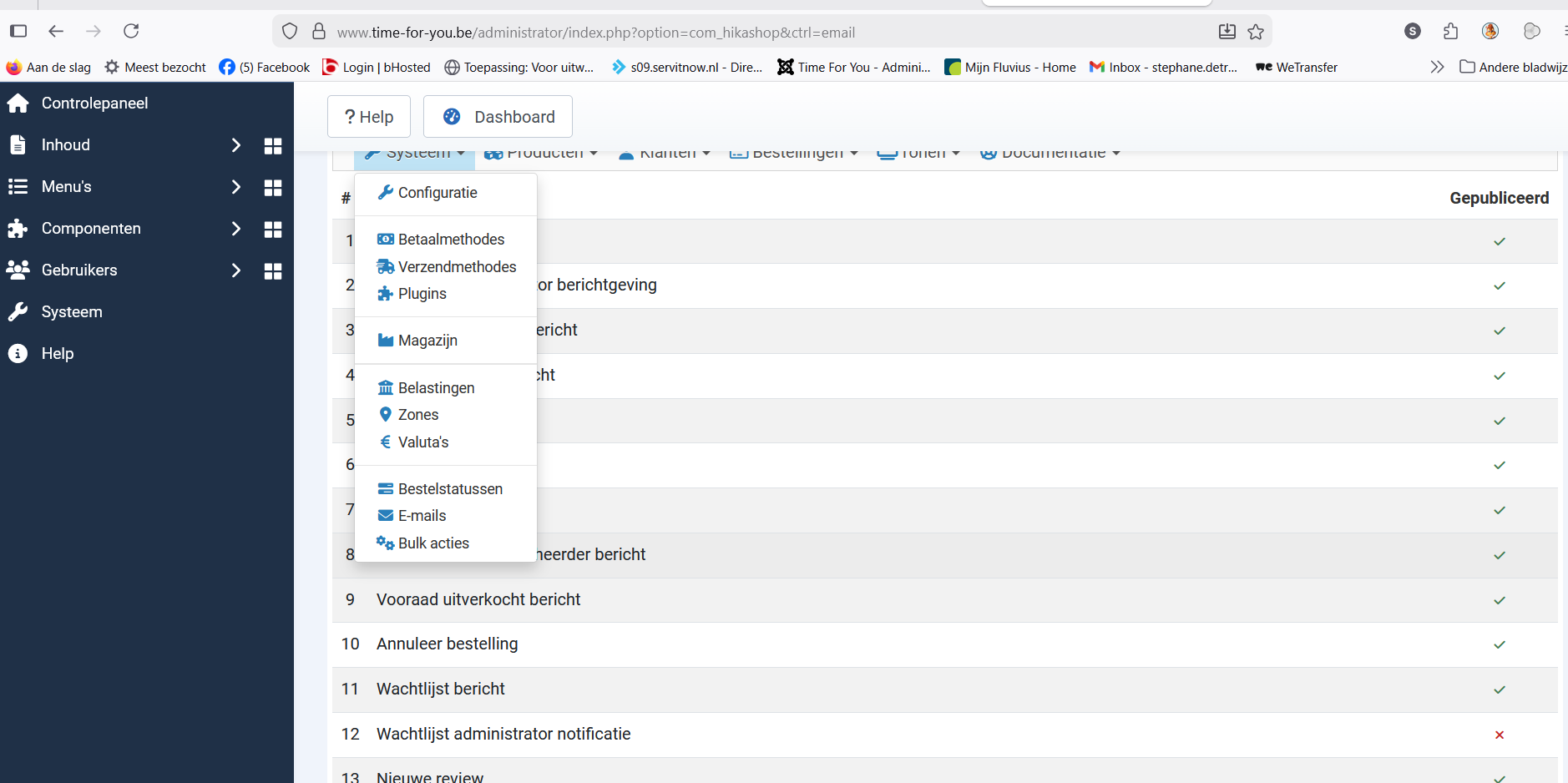
1. There is no mail included. I cannot find where to install this nor where to set up the mail. As we use different versions it would be nice to see by picture where to do this.
What do you mean by this ? If you check my previous screenshot to access System>Payment methods, you can also see the "Emails" section there: imgur.com/RaIyqmx
There is no way you don't have that menu in your HikaShop. Please check again.
Your picture is not the same version as i have i think. But still I cannot find the place to enable sending the emails. It is definetely not to find in the way of your picture. So I still don't find where I can give hikashop the order to send a mail after ordering or paying or so. This way is just not working. Not even close to where I want to be.
2. If you're saying that your problem is that HikaShop is not sending any emails, then it probably means that you have a problem with the email configuration in the Joomla configuration page: guide.joomla.org/user-manual/configurati...tion-smtp-mail-gmail
I don't think Joomla is the problem as it mails perfectly with anymailing plugin. Also registration on hkashop is working as a mail has been send. I tested this with a coworker so i don't think the problem is with joomla. The problem has to be with hikashop but i cant find where. Anyway i tryed to put gmail as host ut nothing changed. The testmail arrived properly.
3. If you want to customize the text of the emails, you can do so with translation overrides under the Languages tab of the HikaShop configuration:
www.hikashop.com/download/languages.html#modify
No this is not workeng either. I don't need to translate. I need to write myself the message in the email. So I need acces to the file itself so i can write myself a text in that file or mail so it can be send. If ever possible.
4. When she regitered she got mail to activate it. But when I try the same for a test i don't receive a mail to activate. I don't understand why the same procedure doesn't work for me but does for her.
It could either be because you're already logged in on your website, and thus there is no registration during the checkout for you and thus no activation needed.
I checked the situation on your checkout and I also got the registration with the activation email.
This is indeed very possible. And as you see hikashop sends an email here ...
5.I checked the situation on your website checkout with PayPal and I found that you have this issue:
Supposing that the buttons are displayed, if you click on the "PayPal" button and you don't get the PayPal payment popup, or you get a blank popup on top of the normal popup, it's likely you have a problem with the Cross Origin Opener Policy of your website. You need to configure your System - HTTP Headers plugin, via the Joomla plugins manager. In its Plugin tab, change its "Cross-Origin-Opener-Policy" setting to "same-origin-allow-popups"
www.hikashop.com/support/documentation/4...out-form.html#issues
So follow this and it should help.
I understand nothing about what you are talking about here. So i tryed something else.
As you can see I used this plugin but i am not sure i used the right one.
Then i did some configuration. First i tryed the link, pointed with arrow but this didnt work even when paypal said it worked. Then i looked up the id's and filled in the info. Marked with a cross. So this worked.
So this seemed to work. But then paypal rederects me and i get 2 icon's for payment with PP or creditcard. Is this normal? Should i not just receive the icon for paypal as this is what i want to pay with? I do not wish the option for creditcard.
When i choose paypal i get this screen.
This is strange as it serves nothing. What can i do about it? Because when i close it i get this.
It would be nice to have this screen immidiately. Is there something i can do for this?
So bottom line, i still don't have acces to the emails; i cannot let hikashop send them; i am not sure if i use the good plugin for paypal as i see there are more plugins for paypal but no explanation wich one to use.
Thanks for your time
Greetings




 HIKASHOP ESSENTIAL 60€The basic version. With the main features for a little shop.
 HIKAMARKETAdd-on Create a multivendor platform. Enable many vendors on your website.
 HIKASERIALAdd-on Sale e-tickets, vouchers, gift certificates, serial numbers and more!
 MARKETPLACEPlugins, modules and other kinds of integrations for HikaShop


