

- Posts: 23
- Thank you received: 1
Hide System menu
6 years 4 months ago #320974
by plnabais
Hide System menu was created by plnabais
-- HikaShop version -- : 4.3.0
-- Joomla version -- : 3.9.19
-- PHP version -- : 7.2
Hello, I need to hide the System menu from a group of users, but even when is empty, is still visible in the menu.
How can I hide it?
thank you
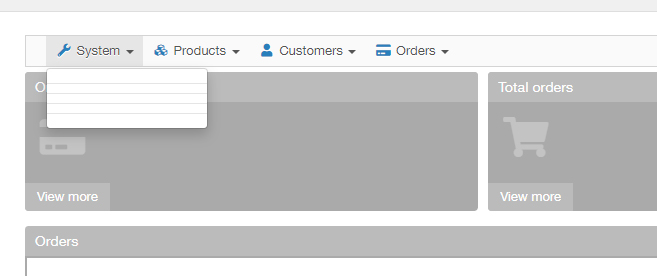
-- Joomla version -- : 3.9.19
-- PHP version -- : 7.2
Hello, I need to hide the System menu from a group of users, but even when is empty, is still visible in the menu.
How can I hide it?
thank you
Please Log in or Create an account to join the conversation.

6 years 4 months ago #320978
by nicolas
Replied by nicolas on topic Hide System menu
Hi,
Go in the menu Display>Views and edit the file "default.php of the view "menu" for your backend template.
There, add the line:
before the line:
and that should normally do it.
Please let us know how it goes as we will include that modification in the next version of HikaShop.
Go in the menu Display>Views and edit the file "default.php of the view "menu" for your backend template.
There, add the line:
Code:
if(!empty($child['url']))
Code:
$dropdown = true;
Please let us know how it goes as we will include that modification in the next version of HikaShop.
Please Log in or Create an account to join the conversation.
6 years 4 months ago #321060
by plnabais
Replied by plnabais on topic Hide System menu
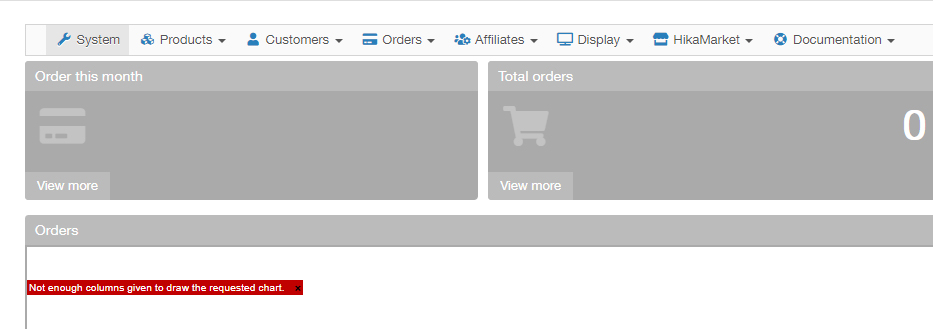
The dropdown is unavailable but the item "System" is still visible.
Please Log in or Create an account to join the conversation.
6 years 4 months ago #321087
by nicolas
Replied by nicolas on topic Hide System menu
Hi,
I did a test with my own website on local with that patch and it works fine:
monosnap.com/file/aW0yG3jvGCDSGjrri0sqemhaPp5syb
So I can only think that the current user you're using still have access to the HikaShop configuration.
Please check your ACLs.
I did a test with my own website on local with that patch and it works fine:
monosnap.com/file/aW0yG3jvGCDSGjrri0sqemhaPp5syb
So I can only think that the current user you're using still have access to the HikaShop configuration.
Please check your ACLs.
The following user(s) said Thank You: plnabais
Please Log in or Create an account to join the conversation.
6 years 4 months ago #321147
by plnabais
Replied by plnabais on topic Hide System menu
Yes, it works, I only have the view disabled but is necessary disable the manage, after that its works fine.
Thank you
Thank you
Please Log in or Create an account to join the conversation.
Time to create page: 0.066 seconds