Hi Nicolas,
Thank you, that pointed us in the right direction. Here is what we found.
First a correction to our original post: our back-end runs in English (en-GB), so the file that matters here is en-GB.com_hikashop.ini, not the nl-NL one. Apologies for the confusion.
We followed your steps:
1. Via FTP we deleted everything inside administrator/cache/language (there was no cache/language folder). After reloading the back-end, the raw keys
were still there.
2. We set Global Configuration > System > Debug Language to Yes and opened a HikaShop back-end page. In the "Language files loaded" list, com_hikashop is not loaded from any location - all four candidate paths are marked as not found, while com_hikashop.sys loads fine. The full "Loaded" and "Untranslated" exports are attached (two .txt files).
3. That made us check the folder administrator/language/en-GB itself over FTP: and the en-GB.com_hikashop.ini is simply not there. The folder only contains en-GB.com_hikashop.sys.ini (4.8 KB) plus a few plugin language files (screenshot 5 attached).
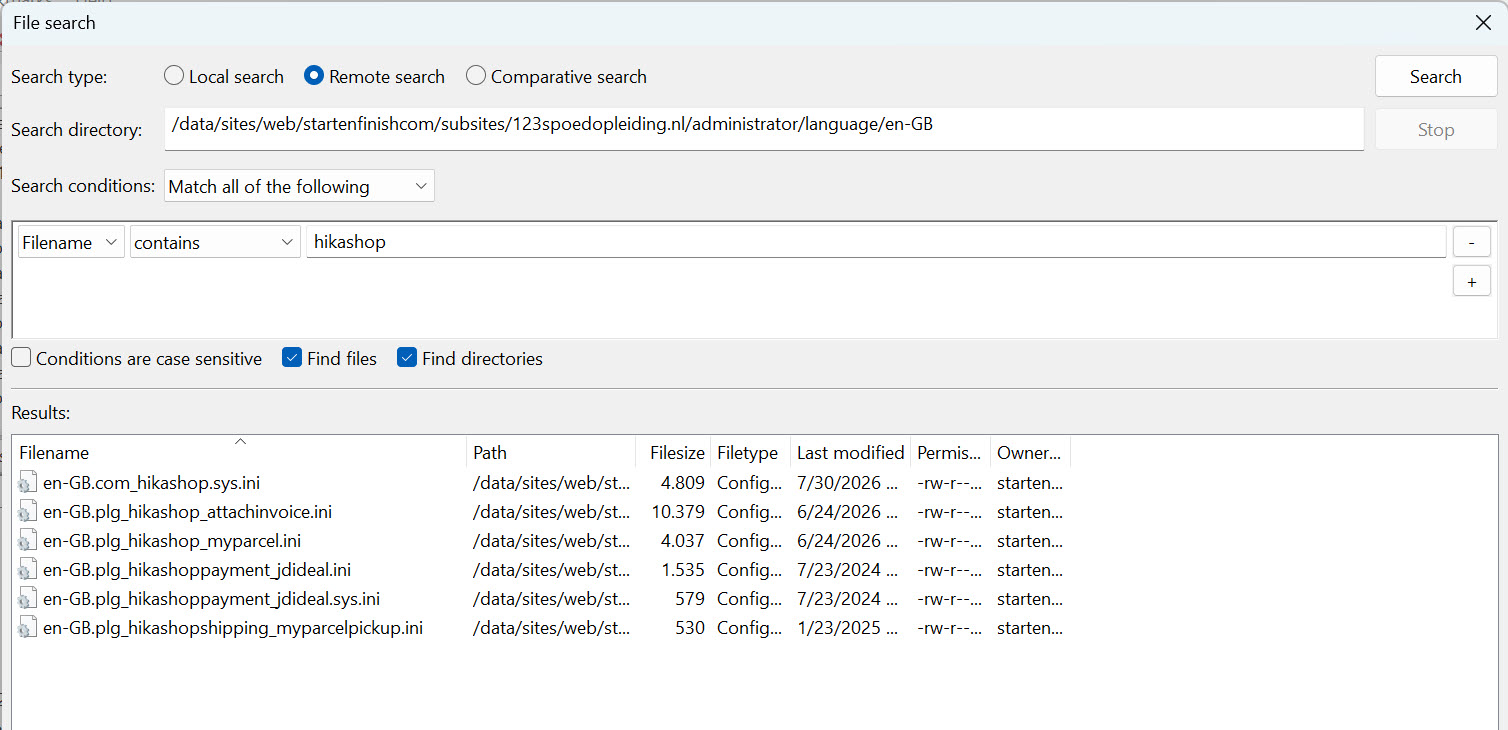
So this is not a stale/empty cache entry - the main .ini was never present on disk. We also confirmed there is no unprefixed com_hikashop.ini in /language/en-GB/ or /language/nl-NL/. See screensho 6.
4. We then checked the Apache error log and found this repeatedly, from our host's (Combell) ModSecurity firewall, on back-end requests:
ModSecurity: Rule ... [id "35013"] ... Execution error - PCRE limits exceeded (-8): (null). [hostname "123spoedopleiding.nl"] [uri "/administrator/index.php"]
The firewall aborts the request when that rule exceeds its PCRE match limit while scanning the content (so it is not a byte-size limit as such).
Our reading is that this interrupted the writing of en-GB.com_hikashop.ini during the update: the small en-GB.com_hikashop.sys.ini has today's date, but the main .ini was never written.
Fix: we extracted en-GB.com_hikashop.ini from the 6.5.2 package and uploaded it manually via FTP to administrator/language/en-GB/. The back-end shows all texts again.
What we do not understand yet, and would value your view on:
On 6.5.0 everything worked, so en-GB.com_hikashop.ini was present and correct before the update. The update must therefore have replaced it. So:
- During the update (or the "load latest language" step), does HikaShop write/refresh this language file through an admin HTTP request to
/administrator/index.php? That is the request our firewall aborts.
- During that process, does HikaShop first delete or empty the existing .ini before writing the new one? If the delete succeeds but the write is then
aborted by our firewall, that would explain why the file was completely gone instead of just outdated.
Since a disk write was aborted here without any visible error, we realise other files could in theory have been affected too. We understand the real
fix is on our side - getting our host (Combell) to stop its firewall from aborting these requests - and we are taking that up with them.
Our only remaining question for you: apart from the language files, does the update (or the automatic language refresh) write any other files to disk through the back-end / an HTTP request? In other words, is checking and restoring the HikaShop / HikaSerial language files via FTP enough to be sure
the installation is complete, or are there other files written the same way that we should verify?
Kind regards,
Lumiga





 HIKASHOP ESSENTIAL 60€The basic version. With the main features for a little shop.
 HIKAMARKETAdd-on Create a multivendor platform. Enable many vendors on your website.
 HIKASERIALAdd-on Sale e-tickets, vouchers, gift certificates, serial numbers and more!
 MARKETPLACEPlugins, modules and other kinds of integrations for HikaShop


