Hi,
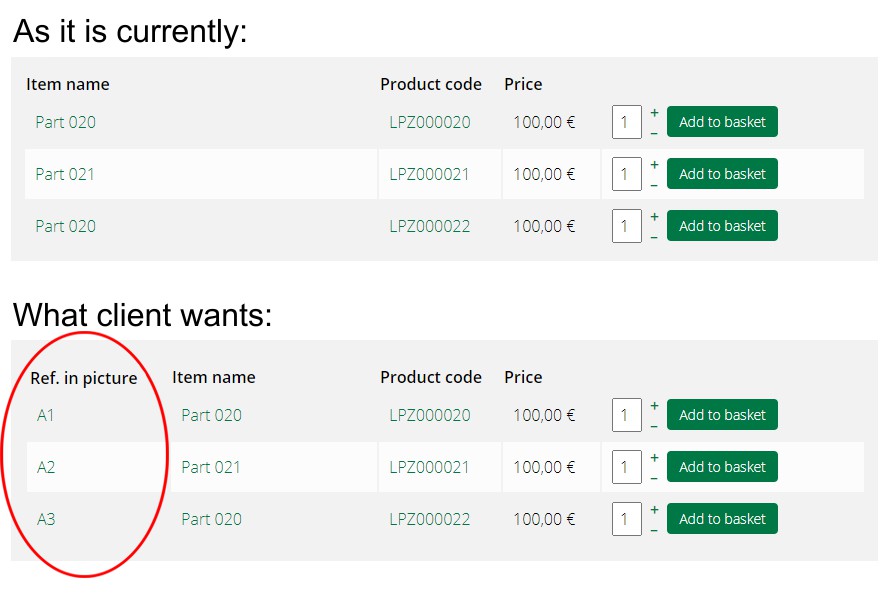
Supposing that this is a screenshot of a products listing (and not a variants listing), and supposing that you don't have an old override on the product view and supposing that you really have the 4.4.1 installed on your website and not an old version of HikaShop, you don't need to edit any code.
Just create a custom field of the table "product" via the Display>Custom fields menu in the backend and in its display options, make sure that the "frontend products listing" setting is activated. Then, just fill it in for your products and the column will appear automatically on the products listing.
And if you want to move the column to be at the beginning and not in the middle, you can edit the view file listing_table via the menu Display>Views and move the blocks of code displaying the custom product fields:
<?php
	if(hikashop_level(2) && !empty($this->productFields)) {
		$usefulFields = array();
		foreach ($this->productFields as $field) {
			$fieldname = $field->field_namekey;
			foreach($this->rows as $product) {
				if(!empty($product->$fieldname)) {
					$usefulFields[] = $field;
					break;
				}
			}
		}
		$productFields = $usefulFields;

		if(!empty($productFields)) {
			foreach($productFields as $field) {
				$columns++;
?>
					<th class="hikashop_product_field title hk_center"><?php
						echo $this->fieldsClass->getFieldName($field);
					?></th>
<?php
			}
		}
	}
?>
and:
<?php
	if(hikashop_level(1) && !empty($productFields)) {
		foreach($productFields as $field) {
			$namekey = $field->field_namekey;
?>
						<td><?php
			if(!empty($field->field_products)) {
							$field_products = is_string($field->field_products) ? explode(',', trim($field->field_products, ',')) : $field->field_products;
							if(!in_array($this->row->product_id, $field_products))
								continue;
			}
			if(!empty($this->row->$namekey))
				echo '<p class="hikashop_product_field'.$namekey.'">'.$this->fieldsClass->show($field,$this->row->$namekey).'</p>';
						?></td>
<?php
		}
	}
?>





 HIKASHOP ESSENTIAL 60€The basic version. With the main features for a little shop.
 HIKAMARKETAdd-on Create a multivendor platform. Enable many vendors on your website.
 HIKASERIALAdd-on Sale e-tickets, vouchers, gift certificates, serial numbers and more!
 MARKETPLACEPlugins, modules and other kinds of integrations for HikaShop