

- Posts: 220
- Thank you received: 8
2 house numbers after update Myparcel plugin
3 years 9 months ago #348315
by Udo
2 house numbers after update Myparcel plugin was created by Udo
-- HikaShop version -- : 4.5.0
-- Joomla version -- : 3.10.11
-- PHP version -- : 8.0.25
Hi,
I've updated an outdated 2020 version of the Myparcel label and track plugin. Now we use version 1.1.4
In our address configuration street and house number have two seperate fields. The house number is in field address_street2.
To make that work in the old plugin we added custom code to myparcel.php like Nicolas suggested in the forum. That worked fine.
After the update this hack is unnecessary since Hikashop added a house number field in the settings of the plugin.
But now the house number shows twice in the labels! The number is displayed in the same line as the street name and once more in a new line.
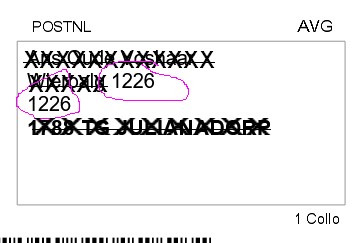
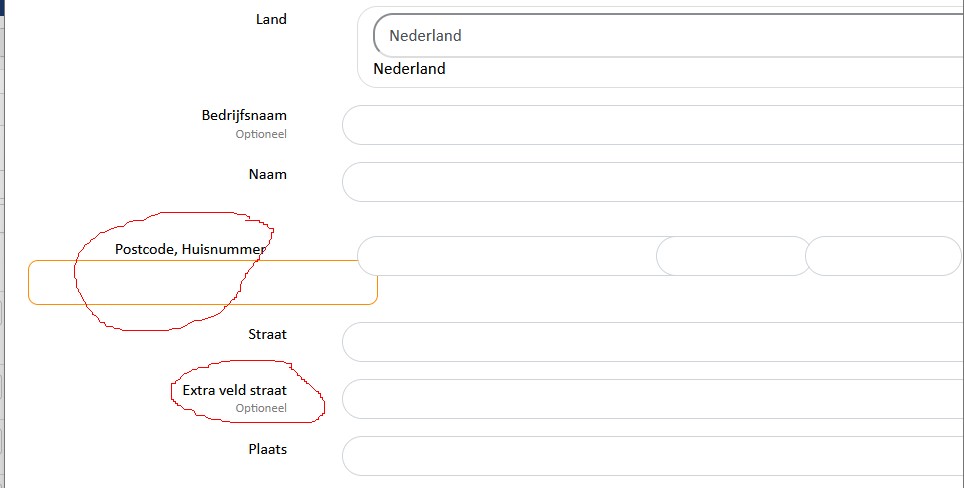
See screen prints.
Please advise.
Udo
-- Joomla version -- : 3.10.11
-- PHP version -- : 8.0.25
Hi,
I've updated an outdated 2020 version of the Myparcel label and track plugin. Now we use version 1.1.4
In our address configuration street and house number have two seperate fields. The house number is in field address_street2.
To make that work in the old plugin we added custom code to myparcel.php like Nicolas suggested in the forum. That worked fine.
After the update this hack is unnecessary since Hikashop added a house number field in the settings of the plugin.
But now the house number shows twice in the labels! The number is displayed in the same line as the street name and once more in a new line.
See screen prints.
Please advise.
Udo
Please Log in or Create an account to join the conversation.

3 years 9 months ago #348319
by nicolas
Replied by nicolas on topic 2 house numbers after update Myparcel plugin
Hi,
You should:
- create a new custom field of the table "address" to store the house number
- change the "address format" setting in the HikaShop configuration to add the corresponding tag
- run an address mass action to copy the address_street2 to that new custom field for all the existing addresses
- run an address mass action to empty the address_street2 field
- change the settings of the MyParcel plugin to use that new field instead of the address_street2 field for the house number.
- optionnally, you can deactivate the address_street2 field or rename it to "additional information" or something like that so that the customers can provide extra information on the address.
You should:
- create a new custom field of the table "address" to store the house number
- change the "address format" setting in the HikaShop configuration to add the corresponding tag
- run an address mass action to copy the address_street2 to that new custom field for all the existing addresses
- run an address mass action to empty the address_street2 field
- change the settings of the MyParcel plugin to use that new field instead of the address_street2 field for the house number.
- optionnally, you can deactivate the address_street2 field or rename it to "additional information" or something like that so that the customers can provide extra information on the address.
Please Log in or Create an account to join the conversation.
3 years 9 months ago #348392
by Udo
Replied by Udo on topic 2 house numbers after update Myparcel plugin
Hi Nicolas,
Thanks for the plan of action. However, it's quite a hassle. There are about 15,000 addresses.
And to be honest I don't know how to set up a mass action to copy the address_street2 to the new custom field.
For now I've applied a simple modification to myparcel.php that I used before in the old version of the plugin.
I've commented these 2 lines
That's certainly not the best solution, but the second house number is gone. I hope there are no drawbacks.
Regards,
Udo
Thanks for the plan of action. However, it's quite a hassle. There are about 15,000 addresses.
And to be honest I don't know how to set up a mass action to copy the address_street2 to the new custom field.
For now I've applied a simple modification to myparcel.php that I used before in the old version of the plugin.
I've commented these 2 lines
Code:
// if(!empty($order->shipping_address->address_street2))
// $consignment->setStreetAdditionalInfo($order->shipping_address->address_street2);
That's certainly not the best solution, but the second house number is gone. I hope there are no drawbacks.
Regards,
Udo
Please Log in or Create an account to join the conversation.
3 years 9 months ago #348395
by nicolas
Replied by nicolas on topic 2 house numbers after update Myparcel plugin
Hi,
The mass action will allow you to process all the addresses at once, so whether you have 10 addresses or thousands, it shouldn't matter.
The mass action is not that complex. For the first mass action, you need just an action 'update the values' on the column XXX (where XXX is the column name of the new custom address field) with the mode "operation" and the value address.address_street2
You also need to increase the number of elements from 500 to 20000 in the "limitations" area so that it can handle all the addresses at once.
For the second mass action, you do the same but on the address_street2 column with the mode "string" and the value left empty.
You sure can modify the code of the plugin. No drawbacks. You'll just have to redo the modification each time you update the plugin.
The mass action will allow you to process all the addresses at once, so whether you have 10 addresses or thousands, it shouldn't matter.
The mass action is not that complex. For the first mass action, you need just an action 'update the values' on the column XXX (where XXX is the column name of the new custom address field) with the mode "operation" and the value address.address_street2
You also need to increase the number of elements from 500 to 20000 in the "limitations" area so that it can handle all the addresses at once.
For the second mass action, you do the same but on the address_street2 column with the mode "string" and the value left empty.
You sure can modify the code of the plugin. No drawbacks. You'll just have to redo the modification each time you update the plugin.
The following user(s) said Thank You: Udo
Please Log in or Create an account to join the conversation.
Time to create page: 0.165 seconds