
Worldline Direct / CAWL
This plugin is a payment solution via Worldline's Direct payment gateway using the Hosted Checkout API and the CreatePayment API. It also supports other endpoints: CAWL, ANZ Worldline Solutions, GlobalCollect, WL Online Payment Acceptance, Ogone and TechProcess.
Features- Once installed, it will be configurable like a normal payment method with the "new" button in the menu System>Payment methods of HikaShop
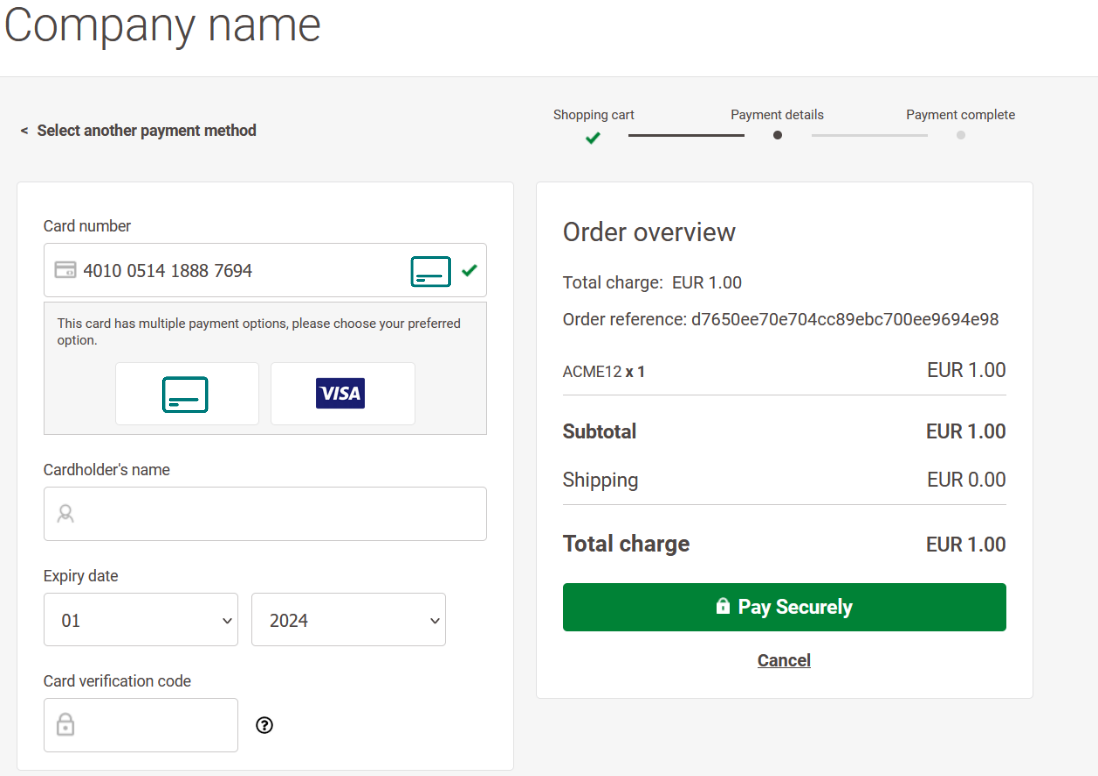
- At the end of the checkout, the user will be redirected to the Worldline Direct's payment page.
- The user will be able to select among a list of payment methods you can configure in your merchant account.
- A wide range of payment methods are available. Among them, you'll find: Credit card, Google Pay, Apple Pay, PayPal, Bank account, bancontact, Ideal, etc. Find the whole list here
- After the payment, the user will be redirected back to the thank you page of your shop, his order will be confirmed, and he will also receive a confirmation email from HikaShop.
- Compatible with the UCP (Universal Commerce Protocol) plugin for headless commerce. UCP clients can submit Google Pay tokens directly and the plugin will process them server-to-server via Worldline's CreatePayment API, with full 3D Secure support.
Installation
- 1) Download the plugin on our website via the download link provided to you after the purchase
- 2) Install it on your Joomla website (extension manager)
- 3) In your HikaShop System>Payment methods menu, click on the "new" button to create a new payment method and then select the Worldline Direct payment plugin.
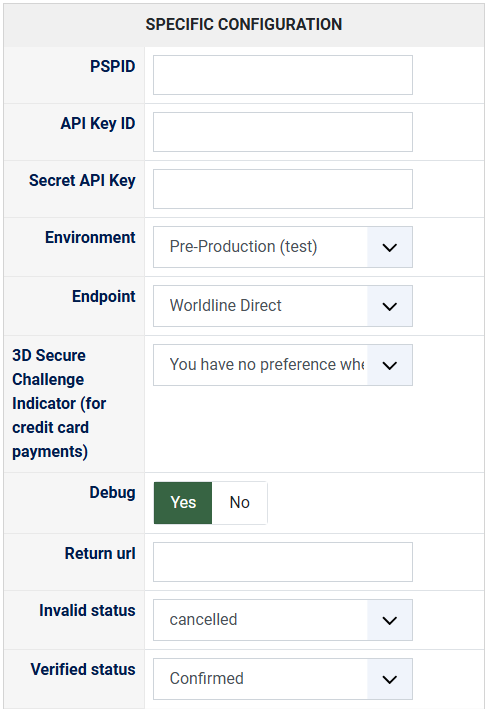
- 4) Configure the settings of the plugin after retrieving your PSPID, API Key and Secret API Key from your merchant account. Make sure you select the appropriate Environment and Endpoint. The Variant name field can be set with the variant name from the branding page in your merchant account. The debug setting can be turned on if you have an issue and you'll then be able to check debug data in the "payment log file" of the HikaShop configuration page. The other settings don't usually need to be changed.
- 5) If your website uses Akeeba Admin Tools' .htaccess Maker (or any other server-level hardening that restricts which PHP files can be reached at the website root, often called "entry point filtering" or "allowed front-end files"), you need to whitelist
worldlinedirect_*.phpin the list of allowed files and regenerate your .htaccess. When the payment method is saved, the plugin writes a small return-handler file namedworldlinedirect_<payment_id>.phpat the root of your website (next toconfiguration.phpandindex.php) and points Worldline at that short URL, so the customer return URL stays within Worldline's 200-character limit. If your hardening blocks direct access to that file, customers will see a "403 Forbidden" page when they come back from the Worldline payment page even though the payment itself was successful, and the order will stay in its "created" status until the webhook reaches HikaShop. On installations where the website root is not writable by PHP, the plugin transparently falls back to a longer return URL going throughindex.php, which is not affected by entry point filtering.
- This plugin is compatible with all the editions of HikaShop
- Compatible with PHP 7.4 minimum
- No limit of time
- No limit of use
- 30-day money-back guarantee
2.1.6 on the 13th of October 2026
- Updated the bundled Worldline Direct PHP SDK to its 11.2.1 patch release. None of the classes or properties the plugin relies on were affected.
2.1.5 on the 7th of October 2026
- Updated the bundled Worldline Direct PHP SDK to its latest 11.2.0 release, keeping up with Worldline's payment method and API additions. None of the classes or properties the plugin relies on were affected by this release.
2.1.4 on the 4th of October 2026
- Updated the bundled Worldline Direct PHP SDK to its latest 11.1.0 release, keeping up with Worldline's payment method and API additions. None of the classes or properties the plugin relies on were affected by the SDK's intervening major versions.
2.1.3 on the 22nd of September 2026
- Payments made through the Worldline payment page now send Worldline the webhook address again, so orders are confirmed by the gateway notification. Since 2.1.2, websites showing PHP warnings displayed "Undefined variable $feedbackUrl" at the end of the checkout, and Worldline received no webhook address for these payments.
2.1.2 on the 4th of May 2026
- The customer return URL the plugin sends to Worldline is now short enough to stay under the gateway's 200-character limit on every HikaShop install. The previous URL pattern (the full HikaShop notify endpoint with all its routing query parameters) routinely landed at 200 to 230 characters depending on how long the site host name and the order token were, and Worldline rejected such requests with the generic "incorrect request error response" message and an INVALID_VALUE error on every returnUrl property. Customers paying on those installs were unable to reach the Worldline payment page at all. The plugin now writes a small return file at the website root when the payment method is saved (the same approach used by several other HikaShop payment plugins), and points Worldline at that short URL. Sites where the website root is not writable transparently fall back to a stripped-down version of the previous URL, with only the routing keys actually consumed by the notify handler.
- When Worldline rejects a payment request, the HikaShop log now contains the full request that was sent to the gateway (with the return URLs, payment-method-specific inputs and the complete order data) alongside the gateway's structured response. Previously only the order data was logged, which made it hard to diagnose problems caused by the rest of the request, such as a return URL the merchant account hadn't whitelisted or a malformed site URL.
2.1.1 on the 1st of May 2026
- Worldline can now process orders whose order number contains slashes, dates or other special characters. The plugin now sanitises the value sent to Worldline as the bank-statement descriptor and as the merchant reference, keeping only letters, digits, spaces, hyphens and underscores. Customers were previously seeing the same generic "incorrect request" error from the gateway when their order number happened to include a date pattern like "B1A2/04/26".
- French, Belgian, Italian and Spanish addresses where the house number sits at the start of the street (e.g. "14, rue de la Tour" or "14 Avenida de Mayo") are now correctly split into a street name and a house number when sent to Worldline. The previous logic only recognised the German / English / Dutch convention where the number sits at the end of the street, leaving the house number empty for everything else.
- When Worldline rejects a request, the HikaShop log now also contains the gateway's structured per-field response (the JSON breakdown returned alongside the validation error), instead of only the generic "the payment platform returned an error response" line. Makes diagnosing rejected orders much faster.
2.1.0 on the 30th of April 2026
- Updated the bundled Worldline Direct PHP SDK to its latest 8.4.0 release. The previous SDK was several major versions behind and used class names that the latest payment gateway no longer accepted on every request.
- The plugin now ships its own SSL certificate bundle and points the SDK at it, so the connection to the payment gateway works on hosts where the system curl certificate bundle is missing or out of date (typical on shared hosting and on Windows servers). Customers who were previously seeing a generic "the payment platform returned an incorrect request error response" or a cURL SSL error when clicking the payment button should now be redirected to the Worldline payment page as expected.
- The country code (and the state code, where applicable) of the customer's billing and shipping address is now always sent to Worldline. Until now, depending on the way the address had been loaded, those fields could end up empty in the request, which Worldline rejects with the same generic "incorrect request" error. The plugin now falls back to the resolved country and state objects when the flat code fields are not populated, and uses FR as a last resort if no country information at all is available, so the request still goes through and can be corrected from the Worldline backend.
- Fixed the additional address line not being passed to Worldline (it was sent only when empty, and never when actually filled in).
- Fixed a typo in the SDK class name used for discount, payment fee and additional cart lines that caused a PHP error on any order containing a discount, a coupon, or a payment fee.
2.0.1 on the 11th of March 2026
- Added getUcpGooglePayConfig() method for automatic Google Pay gateway detection by the UCP plugin, removing the need to manually configure the gateway name and merchant ID in UCP settings.
2.0.0 on the 10th of March 2026
- Added UCP (Universal Commerce Protocol) support for headless commerce integration via the getPaymentURL method which generates hosted checkout URLs for UCP checkout sessions.
- Added server-to-server Google Pay token processing via the new onUcpPaymentProcess event handler using Worldline's CreatePayment API with mobile payment method input (product 320).
- Added 3D Secure redirect handling for PAN_ONLY Google Pay tokens that require additional authentication.
- The payment notification handler now supports both hosted checkout callbacks and direct payment callbacks.
- Refactored the SDK client creation and order building logic into shared private methods for better maintainability.
1.0.3 on the 16th of June 2025
- The update server was missing from the XML of the plugin preventing the auto update via the Joomla update manager from taking the plugin into account.
1.0.2 on the 14th of June 2025
- The plugin now provides the current local to the payment gateway, making sure that it only provides locales supported by it, and otherwise defaults to English.
1.0.1 on the 13th of June 2025
- We've added a new option "Variant name" to the Worldline Direct / CAWL payment plugin. This will allow you to use the customized template options configured in your merchant account.
- The merchant reference of transactions on the merchant account now use the order number instead of the order id for easier order matching.
1.0.0 on the 12th of June 2025
- Initial release of the plugin

- Type
- Payment plugin
Access to updates included for 4 years
A tax rate (between 17% and 27% based on your country) will be added if your address is in the European Union and that you don't provide a valid VAT number or if your address is in France as per the European Union law.