

- Posts: 8
- Thank you received: 0
icons for product "symptomps"
11 years 10 months ago #181199
by kamakura
icons for product "symptomps" was created by kamakura
-- HikaShop version -- : 2.3.2
-- Joomla version -- : 3.3.3
Hello
is is possible to somehow implement "symptom icons" for products?
I tried to use budges, but I am not able to sort them one, near to another if there are more.
I need to add similar icons for product like it is at the attached screen.
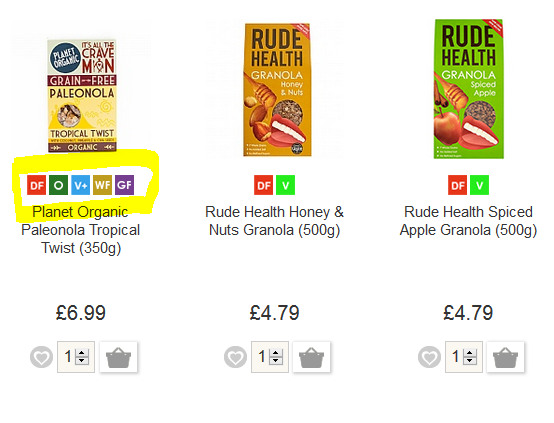
Thank you a lot for your support
-- Joomla version -- : 3.3.3
Hello
is is possible to somehow implement "symptom icons" for products?
I tried to use budges, but I am not able to sort them one, near to another if there are more.
I need to add similar icons for product like it is at the attached screen.
Thank you a lot for your support
Please Log in or Create an account to join the conversation.

11 years 10 months ago #181243
by nicolas
Replied by nicolas on topic icons for product "symptomps"
Hi,
Indeed, badges are close but not everything you need.
In your case, I would recommend instead to create a custom field of the table "product" and of the type "checkbox" with the column name "badge" via the menu Display>Custom fields.
Then, for each value of the field, enter a translation key like this: DF_VALUE
And then, in your translation file, add an override like this: DF_VALUE="<img src='http//mywebsite.com/df_image.png' />"
Then, in your products you can select the values you want at the bottom of the product edition page.
And finally, edit the listing_img_title file of the product view via the menu Display>Views and add such code:
<?php echo JText::_($this->row->badge); ?>
Indeed, badges are close but not everything you need.
In your case, I would recommend instead to create a custom field of the table "product" and of the type "checkbox" with the column name "badge" via the menu Display>Custom fields.
Then, for each value of the field, enter a translation key like this: DF_VALUE
And then, in your translation file, add an override like this: DF_VALUE="<img src='http//mywebsite.com/df_image.png' />"
Then, in your products you can select the values you want at the bottom of the product edition page.
And finally, edit the listing_img_title file of the product view via the menu Display>Views and add such code:
<?php echo JText::_($this->row->badge); ?>
Please Log in or Create an account to join the conversation.
11 years 7 months ago #192580
by kamakura
Replied by kamakura on topic icons for product "symptomps"
Hi Nicolas
thank you very much for your imput. I did it like this. But I have one problem. I can still see just one symbol. First one. How can I do so I can see all icons?
Thank you for your support.
Kind regards
Michal
thank you very much for your imput. I did it like this. But I have one problem. I can still see just one symbol. First one. How can I do so I can see all icons?
Thank you for your support.
Kind regards
Michal
Please Log in or Create an account to join the conversation.
11 years 7 months ago #192586
by nicolas
Replied by nicolas on topic icons for product "symptomps"
Hi,
I don't see why you would only see one symbol with that method.
Could you provide more information on what you did ? Screenshot of the field settings, screenshot of the product settings page, link to the products listing page ?
I don't see why you would only see one symbol with that method.
Could you provide more information on what you did ? Screenshot of the field settings, screenshot of the product settings page, link to the products listing page ?
Please Log in or Create an account to join the conversation.
11 years 7 months ago #192621
by kamakura
Replied by kamakura on topic icons for product "symptomps"
Hi I will try to provide as much info as posible:
listing_img_title
I also tried:
it works as well but with same issue - just one (first) valuse is shown
Trnaslation file:
Whati is important - in backend I can see names, no pictures and I updated language file for admin part as well.
In attachment, you can see settings of the custome filed, and settings in the product itself. I can see pictore of first marked value only. so If I uncheck "BIO" I can see another picture, but still just one.
If you need any additional information or name and password so you can access page directly I can provide you.
Thank you for your support.
Kind regards
Michal
listing_img_title
Code:
....
<!-- VLASTNOSTI -->
<div class="vlastnosti">
<?php echo JText::_($this->row->vlastnosti); ?>
</div>
<!-- EO VLASTNOSTI -->
...
I also tried:
Code:
<div class="vlastnosti">
<?php echo $this->element->characteristics; ?>
</div>
Trnaslation file:
Code:
DF_GASTRO="<img src='/images/vlastnosti/gastro.png' />"
DF_SK="<img src='/images/vlastnosti/SK.png' />"
DF_FAIR="<img src='/images/vlastnosti/fair.png' />"
DF_MLIEKO="<img src='/images/vlastnosti/mlieko.png' />"
DF_CUKOR="<img src='/images/vlastnosti/cukor.png' />"
DF_LEPOK="<img src='/images/vlastnosti/lepok.png' />"
DF_RAW="<a href="http://bodka.azurewebsites.net/vlastnosti"><img src='/images/vlastnosti/raw.png' /></a>"
DF_BIO="<img src='/images/vlastnosti/bio.png' />"
Whati is important - in backend I can see names, no pictures and I updated language file for admin part as well.
In attachment, you can see settings of the custome filed, and settings in the product itself. I can see pictore of first marked value only. so If I uncheck "BIO" I can see another picture, but still just one.
If you need any additional information or name and password so you can access page directly I can provide you.
Thank you for your support.
Kind regards
Michal
Please Log in or Create an account to join the conversation.
11 years 7 months ago #192640
by nicolas
Replied by nicolas on topic icons for product "symptomps"
Ah, I see the problem.
Instead of: <?php echo JText::_($this->row->badge); ?>
use that code:
<?php foreach(explode(',',$this->row->badge) as $k){ echo JText::_($k); } ?>
Instead of: <?php echo JText::_($this->row->badge); ?>
use that code:
<?php foreach(explode(',',$this->row->badge) as $k){ echo JText::_($k); } ?>
Please Log in or Create an account to join the conversation.
11 years 7 months ago #192690
by kamakura
Replied by kamakura on topic icons for product "symptomps"
Great 
thank you - it is working now
great support.
thank you - it is working now
great support.
Please Log in or Create an account to join the conversation.
Time to create page: 0.226 seconds