






|
|
Description
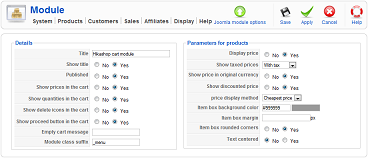
The HikaShop cart module will display a list of the products the customer has in his cart. It's a pivotal feature of an online shop.
You can activate the module by enabling it via the Joomla Modules manager of your website backend. Then, you can configure it by editing it via the menu Display->Content modules of HikaShop.
Toolbar

- Joomla module options : Go to the joomla options of the module. It will be handy for positioning the module and set restrictions of access on the module thanks to the standard joomla module options.
- Save : Save the module instance and return to the content modules listing screen.
- Apply : Apply the modifications to the content module instance and stay on the same screen.
- Cancel : Return to the previous screen without saving the modifications.
- Help : This button enables you to turn ON/OFF the help section, and this screen will appear or disappear.
Details
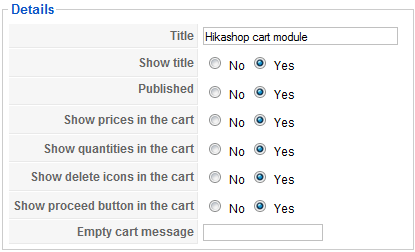
- Title : The title of the module. That is the same option as the one in the joomla options of the module.
- Show title : You can display the module title or not with this option.
- Published : If the cart module is published it means that it will be displayed by joomla on the position you set for it in your template.
- Mini cart : This option will enable you to switch the cart module display to a smaller interface, without listing of the products but just the number of items in the cart and a link to empty the cart's content.
- Display images in cart : You can select if you want to display the image of the products in the cart.
- Show proceed button in the cart : You can select if you want to display a proceed button in the cart.
- Show products name in the cart : You can select if you want to display the name of the products in the cart.
- Show quantities in the cart : You can select if you want to display quantities in the cart.
- Show delete icons in the cart : You can select if you want to display delete icons in the cart.
- Show coupon in the cart : You can select if you want to display the coupon value in the cart.
- Show shipping in the cart : You can select if you want to display the shipping value in the cart.
- Empty cart message : You can set here a specific message when the cart is empty. By default, there will be a message displayed which you can edit in the configuration of HikaShop in the languages tab. This key used is "CART_EMPTY".
Product options
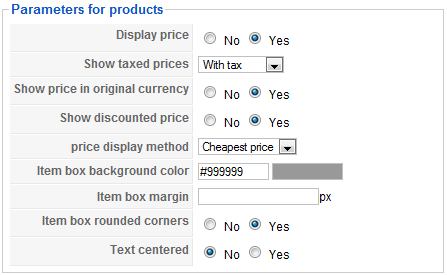
- Display price : You can choose to display or not the prices of products in the module.
- Show taxed prices : This option enables you to display either the prices without taxes, or the prices with taxes, or both.
- Show price in original currency : Based on how you configured your store, HikaShop might have to convert prices dynamically. When doing so, it can add the original price to the converted price.
- Show discounted price : If HikaShop needs to apply discounts to the prices displayed in the module, it can also show the price before the discount was applied as an incentive for your customers to buy the products.
- Price display method : When you have several prices in the same currency for the same product, the system needs to decide what to display. That will be the case for prices based on the quantity. Show you will either be able to display the lowest of all the prices, or display the price for buying only one item, or the lowest and highest prices as a range of prices.
- The option below while be useful only for defining the buttons style of the cart if you set in the configuration to display them as rounded :
- Item box background color : The color of the button.
- Item box margin : The margin of the button.
- Item box rounded corners : Set it to yes if you want your button to have rounded corners.
- Text centered : Set it to yes if you want the text inside the button to be centered.
- Item box background color : The color of the button.

