

- Posts: 86
- Thank you received: 3
Holiday mode for vendors
8 years 1 month ago - 8 years 1 month ago #296400
by SEKME
Holiday mode for vendors was created by SEKME
-- HikaShop version -- : 3.5.1
-- HikaMarket version -- : 2.1.1
-- Joomla version -- : 3.8.11
Hi,
I'm trying to find holiday mode for vendors. Does Hikamarket has this option? This is quite important function for multivendor market, where vendors administrate their shops in fron-end.
If it is in future plans, till then would be helpful, if vendor could select all his products and unpublish them with one click.,... something similar as it is for variants (select and then appear delete / dublicate)---for vendor products list -> select all then appear button " publish / unpublish" and vendor can go for calm holiday ... of course this is not the best user(vendor) experience way... the best would be button in vendor profile "put shop in holiday" mode
Or maybe there is some other quick way to do this?
Thanks
-- HikaMarket version -- : 2.1.1
-- Joomla version -- : 3.8.11
Hi,
I'm trying to find holiday mode for vendors. Does Hikamarket has this option? This is quite important function for multivendor market, where vendors administrate their shops in fron-end.
If it is in future plans, till then would be helpful, if vendor could select all his products and unpublish them with one click.,... something similar as it is for variants (select and then appear delete / dublicate)---for vendor products list -> select all then appear button " publish / unpublish" and vendor can go for calm holiday
... of course this is not the best user(vendor) experience way... the best would be button in vendor profile "put shop in holiday" modeOr maybe there is some other quick way to do this?
Thanks
Last edit: 8 years 1 month ago by SEKME.
Please Log in or Create an account to join the conversation.

8 years 1 month ago #296413
by Jerome
Jerome - Obsidev.com
HikaMarket & HikaSerial developer / HikaShop core dev team.
Replied by Jerome on topic Holiday mode for vendors
Hello,
There is no holiday mode in HikaMarket and our plans were not in that very specific direction. We were more seeing a plugin like "shop hours" which allow to authorize or block the checkout depending the day/time.
So the vendor products will still be visible but if the customer try to buy them, he will get a message telling him that the vendor is closed until (...).
If you want to place a vendor is some kind of "holiday mode", you can unpublish the vendor.
The HikaMarket plugin will automatically an dynamically hide the vendor products in HikaShop.
Afterwards, with a little customization ; it could be possible to use the vendor publish state and a vendor custom field (that the vendor could access in its panel).
Regards,
There is no holiday mode in HikaMarket and our plans were not in that very specific direction. We were more seeing a plugin like "shop hours" which allow to authorize or block the checkout depending the day/time.
So the vendor products will still be visible but if the customer try to buy them, he will get a message telling him that the vendor is closed until (...).
If you want to place a vendor is some kind of "holiday mode", you can unpublish the vendor.
The HikaMarket plugin will automatically an dynamically hide the vendor products in HikaShop.
Afterwards, with a little customization ; it could be possible to use the vendor publish state and a vendor custom field (that the vendor could access in its panel).
Regards,
Jerome - Obsidev.com
HikaMarket & HikaSerial developer / HikaShop core dev team.
Please Log in or Create an account to join the conversation.
8 years 1 month ago - 8 years 1 month ago #296434
by SEKME
Replied by SEKME on topic Holiday mode for vendors
Hi Jerome,
Thank you for replay. This plugin you are talking about, is it already exists? According working hours in e-shop...to see vendors working hours in his profile is one thing - it give buyer clearity when to contact to vendor or expect to get answer to questions, request, but to have availability to purschase online from vendor 7days/24hours is must have for online shop and should not be equal to vendors working hours. Maybe I do not understood correctly how this plugin will work.
The solution to unpublish vendor in back -end --- yes, at the begining it will be acceptable, but it is extra work for administrator, and would be much easier for all if vendor could put his shop offline himself, without mediator.
JEROME: "Afterwards, with a little customization ; it could be possible to use the vendor publish state and a vendor custom field (that the vendor could access in its panel)."
---> I would like to know about this customization in more details, how you see its working.
Thank you
Thank you for replay. This plugin you are talking about, is it already exists? According working hours in e-shop...to see vendors working hours in his profile is one thing - it give buyer clearity when to contact to vendor or expect to get answer to questions, request, but to have availability to purschase online from vendor 7days/24hours is must have for online shop and should not be equal to vendors working hours. Maybe I do not understood correctly how this plugin will work.
The solution to unpublish vendor in back -end --- yes, at the begining it will be acceptable, but it is extra work for administrator, and would be much easier for all if vendor could put his shop offline himself, without mediator.
JEROME: "Afterwards, with a little customization ; it could be possible to use the vendor publish state and a vendor custom field (that the vendor could access in its panel)."
---> I would like to know about this customization in more details, how you see its working.
Thank you
Last edit: 8 years 1 month ago by SEKME.
Please Log in or Create an account to join the conversation.
8 years 1 month ago #296451
by Jerome
Jerome - Obsidev.com
HikaMarket & HikaSerial developer / HikaShop core dev team.
Replied by Jerome on topic Holiday mode for vendors
Hello,
The plugin doesn't exist yet.
But you can take a look at the HikaShop plugin "Hikashop Shop Close Hours Plugin" for more details ( HikaShop > System > Plugins )
The solution to unpublish the vendor is a workaround so you can have that "feature" right now.
And regarding the customization ; It is not "working". it is an idea of custom development and it will be complicated for me to give you more details about it.
I gave you the baseline but afterwards, it would become very technical or would require hours.
It is a possible solution but it is not the only possible solution to implement such kind of feature. I can't say it's the best but it is the first one I though about.
Regards,
The plugin doesn't exist yet.
But you can take a look at the HikaShop plugin "Hikashop Shop Close Hours Plugin" for more details ( HikaShop > System > Plugins )
The solution to unpublish the vendor is a workaround so you can have that "feature" right now.
And regarding the customization ; It is not "working". it is an idea of custom development and it will be complicated for me to give you more details about it.
I gave you the baseline but afterwards, it would become very technical or would require hours.
It is a possible solution but it is not the only possible solution to implement such kind of feature. I can't say it's the best but it is the first one I though about.
Regards,
Jerome - Obsidev.com
HikaMarket & HikaSerial developer / HikaShop core dev team.
The following user(s) said Thank You: SEKME
Please Log in or Create an account to join the conversation.
8 years 1 month ago #296470
by SEKME
Replied by SEKME on topic Holiday mode for vendors
Thank you Jerome for your time and patiance.
I will take a look at the plugin you recommend and for the project begining I supose will be good solution through the backend unpublish vendor.
Regards
I will take a look at the plugin you recommend and for the project begining I supose will be good solution through the backend unpublish vendor.
Regards
Please Log in or Create an account to join the conversation.

8 years 1 month ago - 8 years 1 month ago #296498
by trevsmiff
Replied by trevsmiff on topic Holiday mode for vendors
I have written a plugin which allows the vendor to set a holiday start and end date and a holiday message. The message is displayed on all the vendors products if the date falls between the start and end date and the message is enabled. An example message might be:
"PLEASE NOTE: I will be on holiday from the 2nd to the 31st July and will not be able to process orders until I return. The delivery quoted below will be from the 31st Jul."
The plugin settings allow the main vendor to be notified when a vendor has set a holiday message.
The plugin needs 4 custom fields added to the hikamarket_vendor table:
Feel free to use it if it helps (the code is not very elegant!)
regards Trevor
"PLEASE NOTE: I will be on holiday from the 2nd to the 31st July and will not be able to process orders until I return. The delivery quoted below will be from the 31st Jul."
The plugin settings allow the main vendor to be notified when a vendor has set a holiday message.
The plugin needs 4 custom fields added to the hikamarket_vendor table:
- vendor_holiday_start advanced date picker
- vendor_holiday_end advanced date picker
- vendor_holiday_enable radio button
- vendor_holiday_message text area
Feel free to use it if it helps (the code is not very elegant!)
regards Trevor
Last edit: 8 years 1 month ago by trevsmiff.
Please Log in or Create an account to join the conversation.
8 years 1 month ago #296508
by Jerome
Jerome - Obsidev.com
HikaMarket & HikaSerial developer / HikaShop core dev team.
Replied by Jerome on topic Holiday mode for vendors
Thanks you very much for the share Trevor !
Jerome - Obsidev.com
HikaMarket & HikaSerial developer / HikaShop core dev team.
Please Log in or Create an account to join the conversation.
8 years 1 month ago - 8 years 1 month ago #296530
by SEKME
Replied by SEKME on topic Holiday mode for vendors
Hi,
Trevor, thank you so much for sharing this.
Trevor, thank you so much for sharing this.
Last edit: 8 years 1 month ago by SEKME.
Please Log in or Create an account to join the conversation.
8 years 1 month ago - 8 years 1 month ago #296560
by SEKME
Replied by SEKME on topic Holiday mode for vendors
How to achieve that if custom field is not in use (left empty), in shop do not show field label?
Thank you
Thank you
Last edit: 8 years 1 month ago by SEKME.
Please Log in or Create an account to join the conversation.
8 years 1 month ago - 8 years 1 month ago #296564
by SEKME
Replied by SEKME on topic Holiday mode for vendors
Hi Trevor,
Could you please take a look what I'm doing wrong.
i installed your plugin, enabled it. Created custom fields according your post (attached image). But it shows as regular custom fields on vendor page and no holiday message on product page.
thank you in advance
Could you please take a look what I'm doing wrong.
i installed your plugin, enabled it. Created custom fields according your post (attached image). But it shows as regular custom fields on vendor page and no holiday message on product page.
thank you in advance
Last edit: 8 years 1 month ago by SEKME.
Please Log in or Create an account to join the conversation.
8 years 1 month ago #296567
by Jerome
Jerome - Obsidev.com
HikaMarket & HikaSerial developer / HikaShop core dev team.
Replied by Jerome on topic Holiday mode for vendors
Hello,
Edit the custom fields setting to not let these fields visible in the front-end but let them editable by the vendor in their profile.
Regards,
Edit the custom fields setting to not let these fields visible in the front-end but let them editable by the vendor in their profile.
Regards,
Jerome - Obsidev.com
HikaMarket & HikaSerial developer / HikaShop core dev team.
The following user(s) said Thank You: SEKME
Please Log in or Create an account to join the conversation.
8 years 1 month ago #296587
by trevsmiff
Replied by trevsmiff on topic Holiday mode for vendors
Sorry, been away and just got your messages.
Here are the settings for the holiday_message field, the other fields are similar.
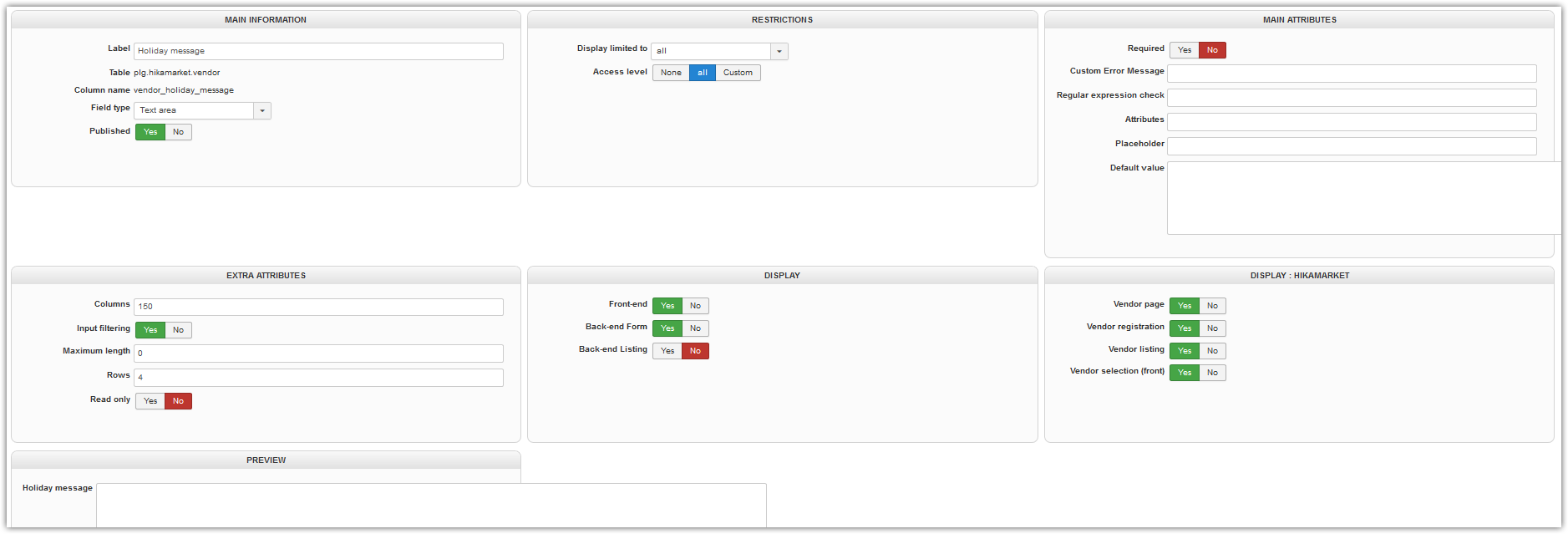
Here are the settings for the holiday_message field, the other fields are similar.
Please Log in or Create an account to join the conversation.
8 years 1 month ago - 8 years 1 month ago #296620
by SEKME
Replied by SEKME on topic Holiday mode for vendors
Trevor thank you so much for screenshot....my all configure was same, except that I chosed TEXT, instead of TEXT AREA ...and vuola all working
I testing this plugin... and find out, that if vendor in front end turn of the holiday mode (radio button), but still all earlier entered dates and holiday message appear in vendors page (not ion product page). I attach how radio butoon custom field I configurated.
I testing this plugin... and find out, that if vendor in front end turn of the holiday mode (radio button), but still all earlier entered dates and holiday message appear in vendors page (not ion product page). I attach how radio butoon custom field I configurated.
Last edit: 8 years 1 month ago by SEKME.
Please Log in or Create an account to join the conversation.
8 years 1 month ago #296621
by SEKME
Replied by SEKME on topic Holiday mode for vendors
Sorry, but how to do that? If I turn off show in front-end, the custom field do not appear in vendors profile, where he should make changes....
And one more question about custom fields - how to do, that if field value do not filled with information (left empty) by vendor, that this custom field do not appear in front end vendors page at all (no label as well)?
Thank you
And one more question about custom fields - how to do, that if field value do not filled with information (left empty) by vendor, that this custom field do not appear in front end vendors page at all (no label as well)?
Thank you
Please Log in or Create an account to join the conversation.
8 years 1 month ago #296622
by Jerome
Jerome - Obsidev.com
HikaMarket & HikaSerial developer / HikaShop core dev team.
Replied by Jerome on topic Holiday mode for vendors
Hello,
I might not have explain it the best way.
All I wanted to say is that you needed to tweak the "display" settings to let the field be editable by the vendor in its profile.
Regards,
I might not have explain it the best way.
All I wanted to say is that you needed to tweak the "display" settings to let the field be editable by the vendor in its profile.
Regards,
Jerome - Obsidev.com
HikaMarket & HikaSerial developer / HikaShop core dev team.
Please Log in or Create an account to join the conversation.
8 years 1 month ago - 8 years 1 month ago #296631
by trevsmiff
Replied by trevsmiff on topic Holiday mode for vendors
I set a default value for the date fields to prevent the empty field problem. Here are my settings for the vendor_holiday_start field
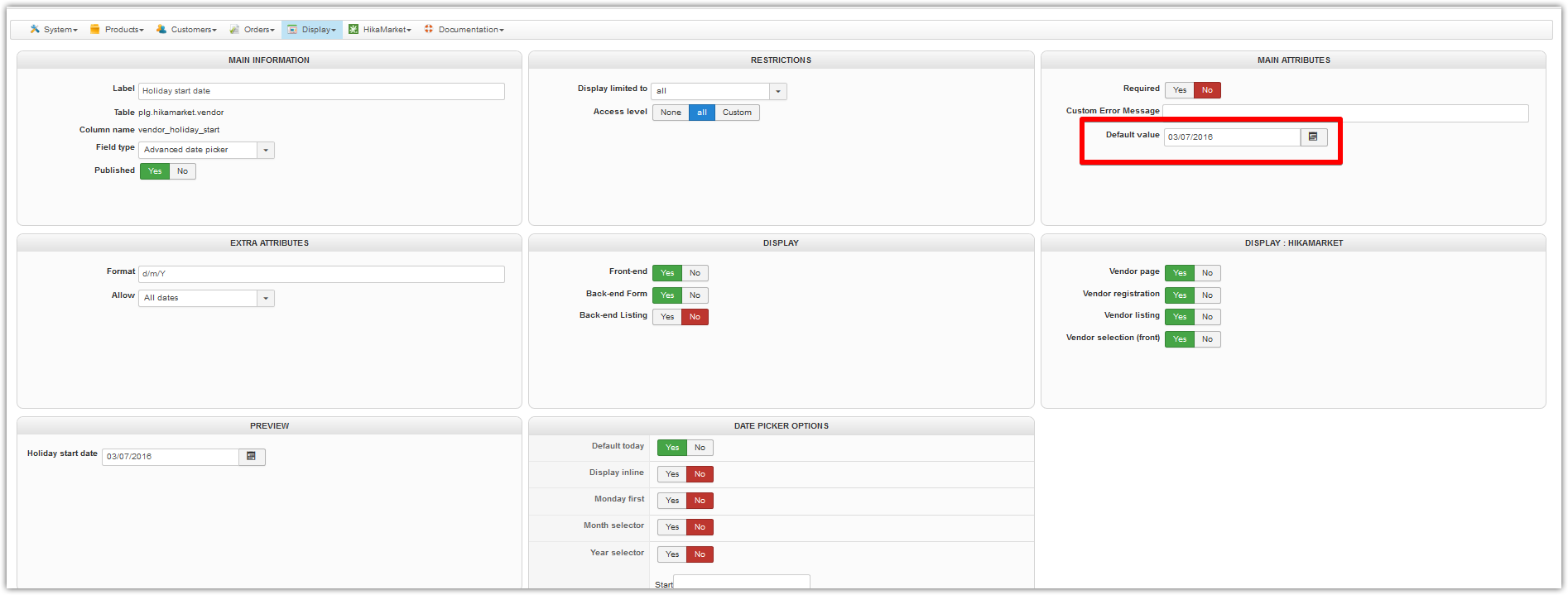
regards
Trevor
regards
Trevor
Last edit: 8 years 1 month ago by trevsmiff.
The following user(s) said Thank You: SEKME
Please Log in or Create an account to join the conversation.
8 years 1 month ago #296762
by SEKME
Replied by SEKME on topic Holiday mode for vendors
Hello Trevor,
Sorry for late replay, was out for long weekend. Thank you for your replay. I was set the default date value as you show. The concern is that the command turn on/off the holiday is not working as I expected. I thought that if I swich the OFF (disable holiday mode -> radio button = vendor_holiday_enable) the custom fields should be hidden on vendor page as well as it happens on product page. On product page the holiday message disapear when holiday enable custom field is OFF. But all custom fields related to holiday mode is still on vendors page - and it should be hidden as well , dont they?
Sorry for late replay, was out for long weekend. Thank you for your replay. I was set the default date value as you show. The concern is that the command turn on/off the holiday is not working as I expected. I thought that if I swich the OFF (disable holiday mode -> radio button = vendor_holiday_enable) the custom fields should be hidden on vendor page as well as it happens on product page. On product page the holiday message disapear when holiday enable custom field is OFF. But all custom fields related to holiday mode is still on vendors page - and it should be hidden as well , dont they?
Please Log in or Create an account to join the conversation.
8 years 1 month ago #296769
by trevsmiff
Replied by trevsmiff on topic Holiday mode for vendors
Hi SEKME
OK I see what you mean. I never used the vendor page so it wasn't a problem for me.
When I get time I will se if I can find a solution but I think it might mean customising the view. In the mean time you could remove the holiday fields from the vendor page altogether in the 'custom fields' settings by setting 'Vendor page' to 'No' in the 'Display::Hikamarket' panel:
take.ms/54ttZ
regards
Trevor
OK I see what you mean. I never used the vendor page so it wasn't a problem for me.
When I get time I will se if I can find a solution but I think it might mean customising the view. In the mean time you could remove the holiday fields from the vendor page altogether in the 'custom fields' settings by setting 'Vendor page' to 'No' in the 'Display::Hikamarket' panel:
take.ms/54ttZ
regards
Trevor
The following user(s) said Thank You: SEKME
Please Log in or Create an account to join the conversation.
8 years 1 month ago #296772
by SEKME
Replied by SEKME on topic Holiday mode for vendors
Thank you Trevor, I did as you offered , turn off Display::Hikamarket -> Vendor page. It is quite good solution. I even see, that it would be enough, that if holiday message (or other custom field ) is empty= do not display this field at all.
I'm so grateful to you for what you already did and that you share it.
I'm so grateful to you for what you already did and that you share it.
Please Log in or Create an account to join the conversation.
Moderators: Obsidev
Time to create page: 0.325 seconds