

- Posts: 42
- Thank you received: 2
Cart on phone has no quantity
6 years 2 months ago - 6 years 2 months ago #322194
by aisweb
Cart on phone has no quantity was created by aisweb
-- url of the page with the problem -- :
vixenfire.com.au/index.php/your-quote-cart
-- HikaShop version -- : 4.3.0
-- Joomla version -- : 3.9.19
-- PHP version -- : 7.3
-- Browser(s) name and version -- : FF 77.0.1
-- Error-message(debug-mod must be tuned on) -- : none
Hi, we have changed the cart to be a Quote Cart, i.e. no prices.
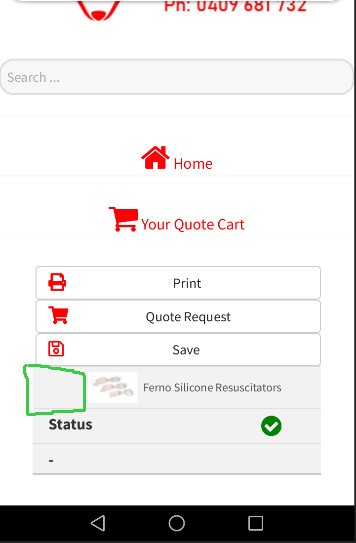
The small cart on the phone has no Quantity but on Desktop it does show Quantity. Please see screenshots.

I have looked in Views: rt_versla > cart > show and I think it's here:
How can I get that tiny cart to show the quantity?
Thanks for your help,
Paul
Admin Login sent.
-- HikaShop version -- : 4.3.0
-- Joomla version -- : 3.9.19
-- PHP version -- : 7.3
-- Browser(s) name and version -- : FF 77.0.1
-- Error-message(debug-mod must be tuned on) -- : none
Hi, we have changed the cart to be a Quote Cart, i.e. no prices.
The small cart on the phone has no Quantity but on Desktop it does show Quantity. Please see screenshots.
I have looked in Views: rt_versla > cart > show and I think it's here:
Code:
<tr class="hika_show_cart_total_text_2">
<td data-title="<?php echo JText::_('PRODUCT_QUANTITY'); ?>" class="hika_show_cart_total_quantity"><?php
echo (int)@$this->cart->package['total_items'];
?></td>
How can I get that tiny cart to show the quantity?
Thanks for your help,
Paul
Admin Login sent.
Last edit: 6 years 2 months ago by aisweb.
Please Log in or Create an account to join the conversation.

6 years 2 months ago - 6 years 2 months ago #322201
by Philip
Replied by Philip on topic Cart on phone has no quantity
Hello,
After analyze it seems that you use the style.css (frontend file), and it seems that you have custom it.
In details, around the 1620 line, remove this part, see my screenshot :

If you remove this part, your quantity block will appear.
Note : Have a look on this tutorial to see how to modify frontend file css.
Regards
After analyze it seems that you use the style.css (frontend file), and it seems that you have custom it.
In details, around the 1620 line, remove this part, see my screenshot :
If you remove this part, your quantity block will appear.
Note : Have a look on this tutorial to see how to modify frontend file css.
Regards
Last edit: 6 years 2 months ago by Philip.
The following user(s) said Thank You: aisweb
Please Log in or Create an account to join the conversation.
6 years 2 months ago - 6 years 2 months ago #322540
by Philip
Replied by Philip on topic Cart on phone has no quantity
Hello,
I don't know why you have edit your message so long after had posted it, but now for us this topic isn't clear anymore...
PLEASE DON'T DO THIS, if you have to edit a message you do it just after have posted it... Or you create a new message.
A forum is for everyone, that maybe later will have same needs than you, and unfortunately, now the logic of ideas is broken...
Plus, this mess up our ticket job organisation...
Please, post a new message and keep following the thread ideas, that will be better for everyone, and able us to better answer you.
Awaiting a new message please.
Thanks for your attention !
Regards
I don't know why you have edit your message so long after had posted it, but now for us this topic isn't clear anymore...
PLEASE DON'T DO THIS, if you have to edit a message you do it just after have posted it... Or you create a new message.
A forum is for everyone, that maybe later will have same needs than you, and unfortunately, now the logic of ideas is broken...
Plus, this mess up our ticket job organisation...
Please, post a new message and keep following the thread ideas, that will be better for everyone, and able us to better answer you.
Awaiting a new message please.
Thanks for your attention !
Regards
Last edit: 6 years 2 months ago by Philip.
Please Log in or Create an account to join the conversation.
Time to create page: 0.205 seconds