1) Have a VNPAY merchant account: VNPAY sends the terminal code (vnp_TmnCode) and the hash secret (vnp_HashSecret) by email, with the production address of its payment page. For tests, register a test merchant on sandbox.vnpayment.vn/devreg: its terminal code and secret arrive by email too.
2) Install this plugin with the Joomla extension manager and enable it.
3) In HikaShop, make sure your shop sells in Vietnamese dong (VND): the method only shows for orders in VND.
4) In HikaShop, go to System > Payment methods, click New and choose the VNPAY plugin.
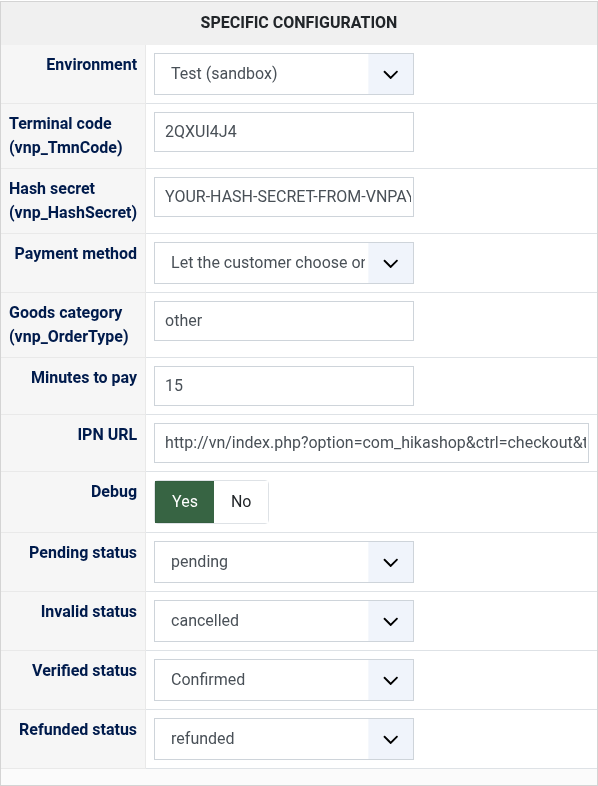
5) Choose the environment, fill in the terminal code and the hash secret, publish the method and save.
6) Copy the IPN URL shown in the settings and register it for your terminal: in VNPAY's merchant admin when it offers the field, or by sending it to VNPAY with your terminal code. VNPAY does not take it with each payment. Your shop must be reachable from the internet, with HTTPS.
7) For the live environment, send us the production address VNPAY gave with your contract if the method stays hidden: it is set in the plugin without a new version.
Configuration
Environment: Test sends the payments to VNPAY's sandbox, where nothing is charged; Live to the production host of your contract. Use the terminal code and hash secret of the same environment.
Terminal code (vnp_TmnCode): the 8 letters and digits of your terminal.
Hash secret (vnp_HashSecret): the secret key which signs every message between your shop and VNPAY.
Payment method: "Let the customer choose on VNPAY's page", or one way of paying the customer goes straight to: VNPAY-QR, domestic ATM card or bank account, international card.
Goods category (vnp_OrderType): the category of VNPAY's list for what your shop sells, as declared to VNPAY. Empty: other.
Minutes to pay: how long VNPAY's page stays open for an order, from 1 to 1440. Empty: 15.
IPN URL: the address to register with VNPAY (step 6), shown for information. It cannot be changed.
Debug: writes every payment sent, every message of VNPAY and every call to VNPAY to the payment log of HikaShop.
Pending status: the status of an order VNPAY debited but holds as suspected fraud (code 07), until you check it in VNPAY's merchant admin, "pending" by default.
Invalid status: the status of an order whose payment failed or was cancelled, "cancelled" by default.
Verified status: the status of a paid order, "confirmed" by default.
Refunded status: giving a paid order this status refunds its whole payment at VNPAY, "refunded" by default.
Troubleshooting
VNPAY's page says "Invalid signature" (code 70): the hash secret does not match the terminal code, or they belong to the other environment.
VNPAY's page says "The bank is not support for this website": the way of paying chosen in the Payment method setting is not open on your terminal. Ask VNPAY to open it, or let the customer choose on VNPAY's page.
The method does not show at the checkout: the cart is not in Vietnamese dong, the terminal code or the hash secret is missing, or, on the live environment, the production host is not set yet.
Orders stay unpaid although the customer paid: VNPAY cannot reach your IPN URL (not registered for the terminal, a local address, a firewall, no HTTPS). Use the "Check the payment at VNPAY" button on the order.
The customer cannot pay again from the order after a failed payment: HikaShop only lets the customer pay orders in an unpaid status (the "created" status by default). Choose "created" as the invalid status, or add the invalid status to the unpaid statuses of the HikaShop configuration.
The "Check the payment at VNPAY" button says VNPAY did not answer (Request is duplicated): VNPAY answers about the same payment only once every few minutes. Check again five minutes later.
"The status was not changed: VNPAY did not refund the payment", with "Too many refund count": the payment was already refunded, for example from VNPAY's merchant admin. Set the status without the refund, or check the refund there.
VNPAY takes no payment under 5,000 VND: such an order is refused before the customer leaves your shop.