
Description
The HikaShop plugin for OSMap puts your categories and your products in the sitemap of your Joomla website, so that search engines are told about them instead of having to find them by following links. It works with OSMap, mapX and the other sitemap extensions that read the same kind of plugins (the plugin is named "Xmap - HikaShop Plugin" in the Joomla plugins manager).
For every HikaShop menu item in your sitemap, the plugin goes through the categories under it and lists the products they hold. A sitemap that covers only part of your shop lists only that part. On a shop served on several domain names with the Domains plugin, each domain gets a sitemap with the products it actually sells.
Requirements
- OSMap (or another sitemap extension supporting these plugins), installed and configured.
- HikaShop menu items in the menus that your sitemap covers.
Installing the plugin
1-Install and configure OSMap first. You can download it here.
2-Get the plugin on our marketplace: Get the plugin on our marketplace
3-In your Joomla administration, go to the extensions installer (System > Install > Extensions) and upload the plugin you downloaded.
4-Go to the Joomla plugins manager (System > Plugins), search for "HikaShop", open the plugin "Xmap - HikaShop Plugin", set its Status to Enabled and save.
5-Your products and categories should now be visible in your sitemap, under the HikaShop menu items it already covers.
OSMap has its own documentation for this plugin: the HikaShop integration guide.
Settings
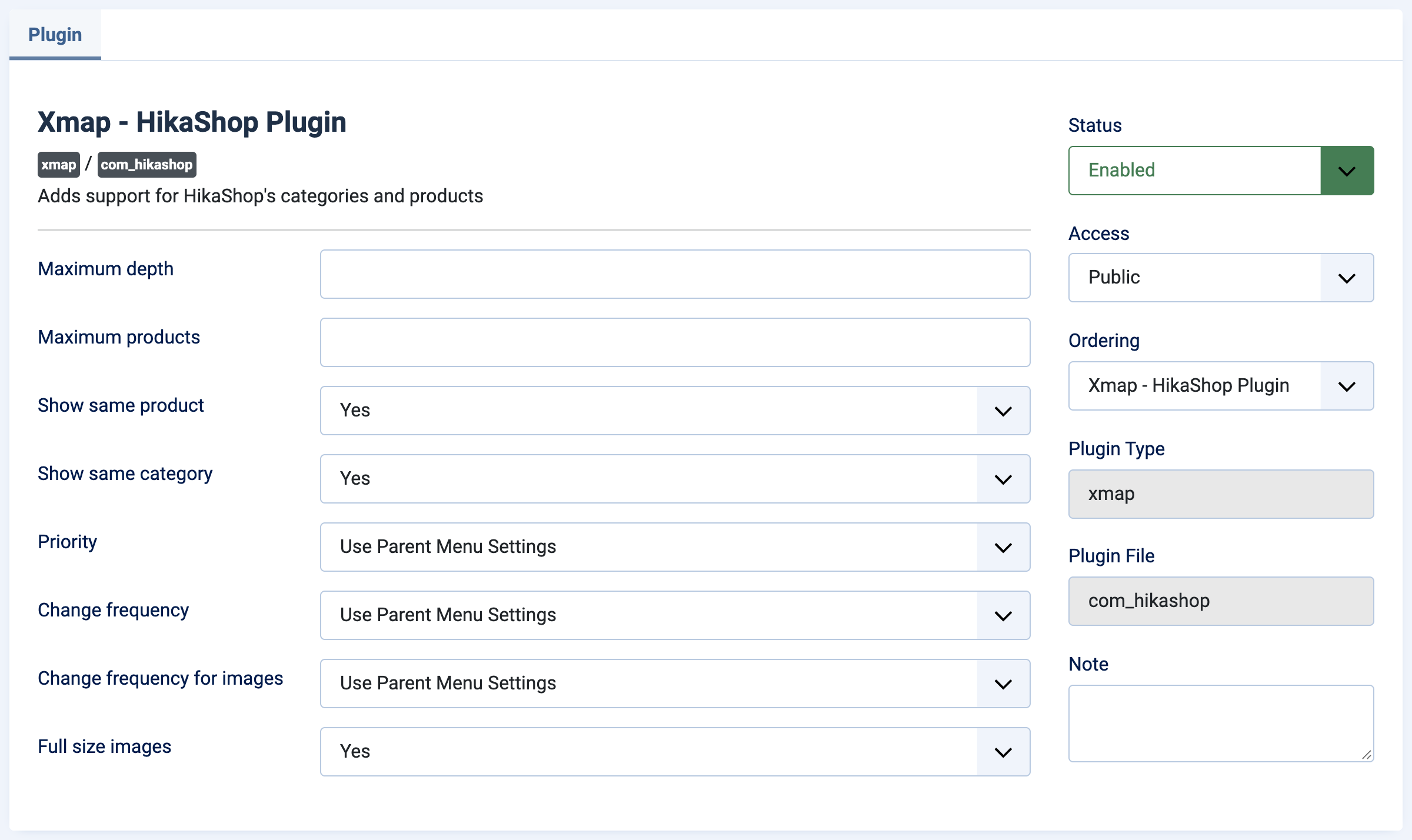
The settings are in the plugin itself, in the Joomla plugins manager, and they apply to every HikaShop menu item of your sitemaps.
Maximum depth: how many levels of child categories are followed under a menu item. Leave it empty to follow the whole category tree.
Maximum products: the maximum number of products listed for each category. Leave it empty to list them all. It is meant for very large catalogs.
Show same product: with Yes, a product placed in several categories is listed once per category. With No, it is listed only the first time it is met.
Show same category: the same for a category which can be reached from several places in the sitemap.
Priority: the priority given to your categories and products, from 0.0 to 1. It tells search engines which pages of your website are the most important. "Use Parent Menu Settings" keeps the priority of the menu item.
Change frequency: how often you tell search engines that these pages change, from Always to Never. "Use Parent Menu Settings" keeps the value of the menu item. Search engines take it as a hint.
Change frequency for images: the same value for the product images sent with the pages. Your sitemap extension has to support images for it to be used.
Full size images: with Yes, the address sent for a product image is the one of the original image. With No, it is the one of the thumbnail generated by HikaShop.
What the sitemap shows
For each HikaShop menu item of your sitemap, OSMap lists the categories and the products found under it, next to the other pages of your website, in the HTML sitemap as well as in the XML sitemap sent to search engines.
Troubleshooting
- Nothing from HikaShop in the sitemap: check that the plugin "Xmap - HikaShop Plugin" is enabled, and that the HikaShop menu items are part of a menu published in your sitemap.
- The sitemap is too heavy: set "Maximum products" and "Maximum depth".
- A product appears several times: set "Show same product" to No.
- Images are missing: your sitemap extension has to support images in the sitemap.