
Installation
- 1) Have a MyParcel account (myparcel.nl) and its API key.
- 2) Install this plugin on your Joomla website with the extension manager.
- 3) In HikaShop, go to System > Shipping methods, click "New" and choose MyParcel Pickup.
- 4) Type your API Key, choose the country and the carrier, set "Published" to Yes and save.
- 5) Go to Display > Custom fields and make the post code field of the address required: the plugin searches the pickup locations with the post code of the shipping address.
The customer then chooses, at checkout, a pickup location near the shipping address, in a list that shows its opening hours. The plugin works with the MyParcel label and track plugin.
Configuration
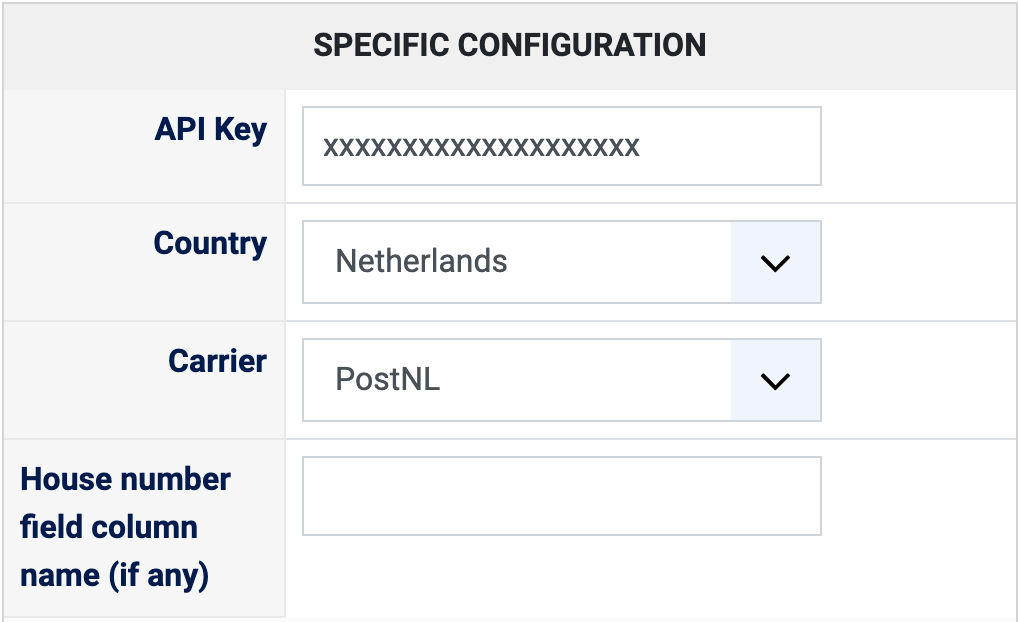
- API Key: your MyParcel API key. Left empty, the method is not offered at checkout.
- Country: Netherlands (default) or Belgium, the country in which the pickup locations are searched.
- Carrier: the carrier whose pickup locations are offered: PostNL (default), Bpost, DPD, UPS, DHL For You, DHL Parcel Connect or DHL Europlus.
- House number field column name (if any): if your shop asks for the house number in its own custom address field instead of in the street field, type the column name of that field here, so that the house number is used in the search. Empty: the street field is used as it is.
- The other settings of the page (name, description, price, zone, restrictions) are the same as for every HikaShop shipping method.
Troubleshooting
- "Please make sure you enter your MyParcel API Key in the settings of the MyParcel Pickup shipping method": type the API Key in the shipping method.
- "The MyParcel pickup shipping plugin requires the user to enter a postal code": in Display, Custom fields, make the post code field of the address required.
- "We couldn't find any pickup location for your address" (or for the post code typed): MyParcel has no location of this carrier near that address. The customer can type another street and post code under the list, or you can offer another carrier.
- "MyParcel Pickup: Invalid data": the pickup location sent with the order is not valid; the customer has to choose a location again.
- An error message from MyParcel in the checkout instead of the list: it is MyParcel's own answer to the search of pickup locations; check the Country and the Carrier of the method.