1) Open an iyzico merchant account at iyzico.com. Live payments need a company or sole trader registered in Turkey and a Turkish bank account. To test first, register a sandbox account at sandbox-merchant.iyzipay.com.
2) In your iyzico merchant panel, Settings, Merchant Settings, copy the API key and the secret key.
3) Install this plugin, then in HikaShop go to System > Payment methods, click New and choose iyzico.
4) Paste the two keys, set Sandbox to Yes for the keys of a sandbox account, choose the statuses and save.
5) Copy the Notification URL shown in the plugin's settings and paste it in your iyzico merchant panel, Settings, Merchant Settings, Merchant Notifications.
6) Your shop must sell in a currency iyzico takes: Turkish lira (TRY), or USD, EUR, GBP, NOK and CHF when iyzico enables them on your account.
Configuration
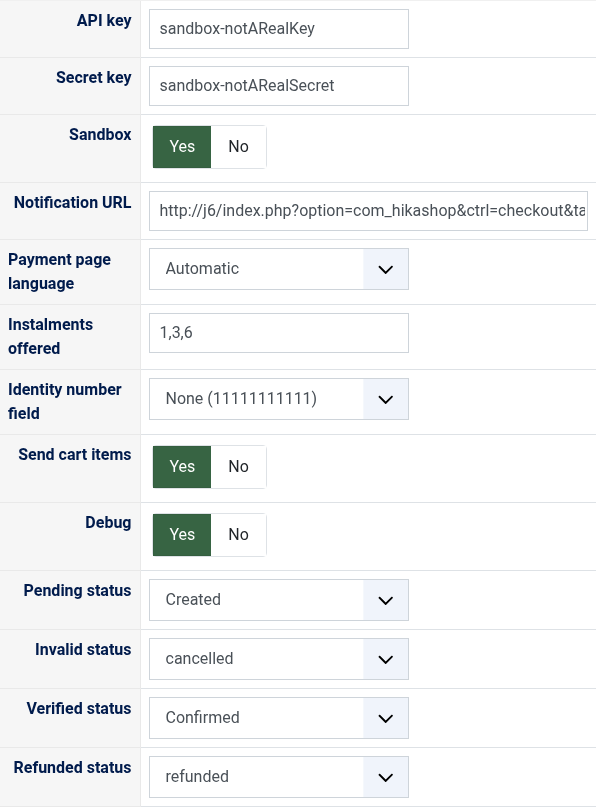
API key: the API key of your iyzico account. Sandbox keys start with sandbox-.
Secret key: the secret key, next to the API key in your iyzico panel.
Sandbox: Yes with the keys of a sandbox account, no real payment is taken; No with the keys of your live account. The plugin warns you when the keys and this setting do not agree.
Notification URL: the address to paste in your iyzico panel, Merchant Notifications.
Payment page language: Automatic shows it in Turkish when your shop is shown in Turkish and in English otherwise; or always Turkish, or always English.
Instalments offered: the numbers of instalments the customer can choose, separated by commas (for example 1,2,3,6,9). Empty offers all those your account allows for the card.
Identity number field: the custom field of the address or of the user where your customers type their Turkish identity number (TCKN). None sends 11111111111, which iyzico accepts.
Send cart items: Yes sends each product, the shipping and the fees to iyzico, refundable one by one; No sends one line with the order number.
Debug: writes every call to iyzico and every notification to the HikaShop payment log file.
Pending status: the status of an order whose payment iyzico has not confirmed yet, created by default.
Invalid status: the status of an order whose payment failed, cancelled by default.
Verified status: the status of a paid order, confirmed by default.
Refunded status: moving an order to this status cancels or refunds its whole payment on iyzico, refunded by default.
The other settings of the page (name, description, images, price, zone, currency, restrictions) are the same as for every HikaShop payment method.
Troubleshooting
"The payment could not be started" at the checkout gives iyzico's reason: "api credentials are not found" means a wrong key, or sandbox keys with Sandbox set to No (or the reverse).
iyzico is not offered at the checkout: the order is not in one of the currencies above, or the method is not published.
An order stays pending: iyzico is reviewing the payment, or a bank transfer has not arrived. The order is confirmed when iyzico notifies the result: check that Merchant Notifications is set in your iyzico panel.
"The refund was not made": the order keeps its status and the message gives iyzico's reason; what was already refunded stays written in the order.
Turn Debug on and look at the HikaShop payment log file (System > Configuration > Files) to see what iyzico answered.